

With the release of macOS Ventura, Apple updated its stock Mail app with several long-awaited features, including the ability to retrieve emails sent in error. This article explains how to use the new Undo Send Email feature.

General iOS Mail Feature
If you use Apple's Mail app for your email correspondence and you have macOS 13.0 or later installed on your Mac, keep in mind the Undo Send feature.

Put simply, if for some reason you regret sending a message immediately after you have pressed Send, you can now unsend the email so that it doesn't arrive at its destination, but only as long as you act quickly.

Next time you send an email, an Undo Send option will briefly appear at the bottom of the sidebar (if you don't have the sidebar showing, select View -> Show Sidebar in the menu bar).
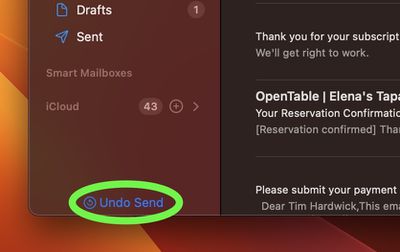
mail
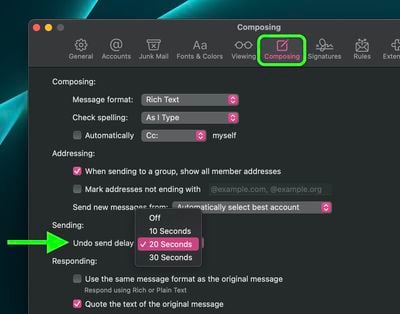
If you sent the email in error, by default you have 10 seconds to click it before the option disappears, after which the message cannot be unsent. However, the interval can also be set to 20 or 30 seconds or turned off entirely for immediate sending. Here's how.

  1. With the Mail app open, select Mail -> Settings... from the menu bar.
  2. Select the Composing tab in the settings window.
  3. Under "Sending:" click the dropdown menu next to "Undo send delay:" and select from the following options: Off, 10 Seconds, 20 Seconds, and 30 Seconds.
  4. Close the Settings window to save your changes.
mail

The Undo send delay option that you selected will come into effect immediately.

Popular Stories

iphone 17 models

No iPhone 18 Launch This Year, Reports Suggest

Thursday January 1, 2026 8:43 am PST by
Apple is not expected to release a standard iPhone 18 model this year, according to a growing number of reports that suggest the company is planning a significant change to its long-standing annual iPhone launch cycle. Despite the immense success of the iPhone 17 in 2025, the iPhone 18 is not expected to arrive until the spring of 2027, leaving the iPhone 17 in the lineup as the latest...
duolingo ad live activity

Duolingo Used iPhone's Dynamic Island to Display Ads, Violating Apple Design Guidelines

Friday January 2, 2026 1:36 pm PST by
Language learning app Duolingo has apparently been using the iPhone's Live Activity feature to display ads on the Lock Screen and the Dynamic Island, which violates Apple's design guidelines. According to multiple reports on Reddit, the Duolingo app has been displaying an ad for a "Super offer," which is Duolingo's paid subscription option. Apple's guidelines for Live Activity state that...
Clicks Communicator Feature

'Clicks Communicator' Unveiled — Will You Carry This With Your iPhone?

Friday January 2, 2026 6:35 am PST by
The company behind the BlackBerry-like Clicks Keyboard accessory for the iPhone today unveiled a new Android 16 smartphone called the Clicks Communicator. The purpose-built device is designed to be used as a second phone alongside your iPhone, with the intended focus being communication over content consumption. It runs a custom Android launcher that offers a curated selection of messaging...
Low Cost MacBook Feature A18 Pro

Low-Price 12.9-Inch MacBook With A18 Pro Chip Reportedly Launching Early This Year

Friday January 2, 2026 9:08 am PST by
Apple plans to introduce a 12.9-inch MacBook in spring 2026, according to TrendForce. In a press release this week, the Taiwanese research firm said this MacBook will be aimed at the entry-level to mid-range market, with "competitive pricing." TrendForce did not share any further details about this MacBook, but the information that it shared lines up with several rumors about a more...
Low Cost A18 Pro MacBook Feature Pink

Apple's 2026 Low-Cost A18 Pro MacBook: What We Know So Far

Friday January 2, 2026 4:33 pm PST by
Apple is planning to release a low-cost MacBook in 2026, which will apparently compete with more affordable Chromebooks and Windows PCs. Apple's most affordable Mac right now is the $999 MacBook Air, and the upcoming low-cost MacBook is expected to be cheaper. Here's what we know about the low-cost MacBook so far. Size Rumors suggest the low-cost MacBook will have a display that's around 13 ...
Apple Fitness Plus hero

Apple Announces New Fitness+ Workout Programs, Strava Challenge, and More

Friday January 2, 2026 6:43 am PST by
Apple today announced a number of updates to Apple Fitness+ and activity with the Apple Watch. The key announcements include: New Year limited-edition award: Users can win the award by closing all three Activity Rings for seven days in a row in January. "Quit Quitting" Strava challenge: Available in Strava throughout January, users who log 12 workouts anytime in the month will win an ...


govee floor lamp

CES 2026: Govee Announces New Matter-Connected Ceiling and Floor Lights

Sunday January 4, 2026 5:00 am PST by
Govee today introduced three new HomeKit-compatible lighting products, including the Govee Floor Lamp 3, the Govee Ceiling Light Ultra, and the Govee Sky Ceiling Light. The Govee Floor Lamp 3 is the successor to the Floor Lamp 2, and it offers Matter integration with the option to connect to HomeKit. The Floor Lamp 3 offers an upgraded LuminBlend+ lighting system that can reproduce 281...
Belkin 25W Battery magnetic

CES 2026: Belkin Announces Magnetic Ring Power Bank, Modular Dock, and More

Sunday January 4, 2026 3:02 pm PST by
Belkin today announced a range of new charging and connectivity accessories at CES 2026, expanding its portfolio of products aimed at Apple device users. UltraCharge Pro Power Bank 10K with Magnetic Ring The lineup includes new Qi2 and Qi2.2 wireless chargers, magnetic power banks, a high-capacity laptop battery, and USB-C productivity accessories, with an emphasis on higher charging...









































