

How to Turn On Noise Cancellation for Just One AirPod - MacRumors
Skip to Content

How to Turn On Noise Cancellation for Just One AirPod

by

AirPods Pro and AirPods Pro 2 feature Active Noise Cancellation (ANC), which is designed to adapt to the shape of your ear and block out the outside world so you can focus on what you're listening to. ANC is typically used when you have both AirPods in, but there is a way to use it when you're wearing just a single AirPod.
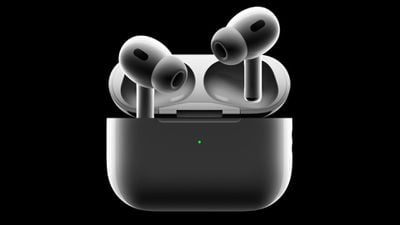
airpods pro 2
The feature fully realizes its design aims when both AirPods are in your ears, but there may be occasions when you only want noise cancellation in one ear and not the other.

Perhaps you sleep on your side and like to wear a single AirPod when you're resting in bed, with your other ear pressed into the pillow. With noise cancellation still active in the one AirPod, you're less likely to be disturbed by external noise while you drift off to sleep.

Or maybe your hearing isn't as good in one ear, and you want the benefit of ANC on only that side of your head for blocking out ambient sounds so that you can better make out what you're listening to. Either way, the following steps show you how to allow AirPods to be put into noise cancellation mode when only one AirPod is in your ear.

  1. With AirPods Pro connected, launch the Settings app on your iPhone.
  2. Tap the AirPods Pro tab just under your Apple ID banner.
  3. Scroll down, then tap Accessibility.
  4. Scroll down again, then under "Noise Control," toggle on the switch next to Noise Cancellation with One AirPod.
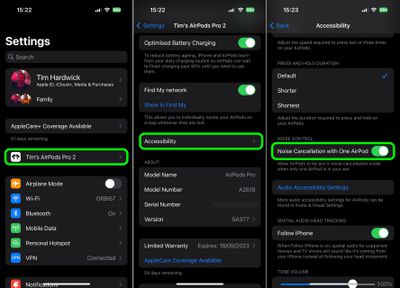
settings

That's all there is to it. You can now press and hold the force sensor on the AirPod to switch between Active Noise Cancellation, Transparency mode, and Off.

Related Roundup: AirPods Pro 3
Buyer's Guide: AirPods Pro (Neutral)
Related Forum: AirPods

Popular Stories

AirPods Pro Beta Firmware 2

Apple Releases New AirPods Firmware With iOS 27 Features

Monday September 14, 2026 11:42 am PDT by
Apple today released new firmware for the AirPods Pro 2, AirPods Pro 3, AirPods 4, and AirPods Max 2. The firmware is available for all of the above devices, and it will enable support for new iOS 27 features. The firmware has a build number of 9A348. In iOS 27, iPadOS 27, and macOS Golden Gate, Apple is adding a new AirPods interface, a slider for Adaptive mode, and support for custom EQ....

airpods pro 3 blue

AirPods With Cameras Were Supposed to Debut Today, Now Delayed

Wednesday September 9, 2026 4:35 am PDT by
Apple planned to introduce high-end in-ear AirPods with built-in cameras for analyzing the surrounding environment at today's event, but the launch has been pushed to next year, Bloomberg's Mark Gurman reports. In early August, Gurman said the earbuds were progressing well enough to potentially ship before the end of the year. By mid-August, though, he reported that Apple had pulled the model...
iphone 18 pro cases

Apple Debuts New Accessories for iPhone 18 Pro and AirPods Pro 3

Wednesday September 9, 2026 12:01 pm PDT by
Apple today announced a new lineup of accessories for the iPhone 18 Pro, iPhone 18 Pro Max, and AirPods Pro 3, including a redesigned clear case with MagSafe and all-new wrist straps. The new colors span much of Apple's accessory range: TechWoven Case with MagSafe: Burgundy, Olive, Taupe, Chambray Blue, Mulberry, and Black Silicone Case with MagSafe: Magenta, Black, Navy Blue, Crisp...











































