How to Turn Off Automatic Ear Detection on AirPods and AirPods Pro - MacRumors
Skip to Content

How to Turn Off Automatic Ear Detection on AirPods and AirPods Pro

by

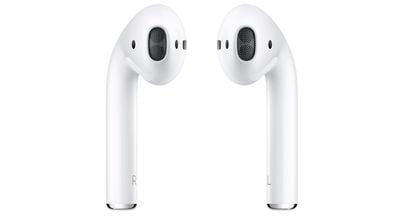
Apple's AirPods and AirPods 2 include a feature called Automatic Ear Detection that allows the audio routed from a connected device to seamlessly switch to the AirPods the moment you put them in your ears.
airpodsnocase
This means the AirPods can automatically pause the audio track when you remove them, and resume playback when you put them back in again, ensuring you won't miss a thing.

The feature is enabled by default, but if you want to you can manually disable it once you've connected the AirPods to an iPhone or iPad. Just note that once you do, you'll have to manually play/pause audio routing to the AirPods.

How to Turn off Automatic Ear Detection

  1. On your iPhone or ‌iPad‌, launch the Setings app.
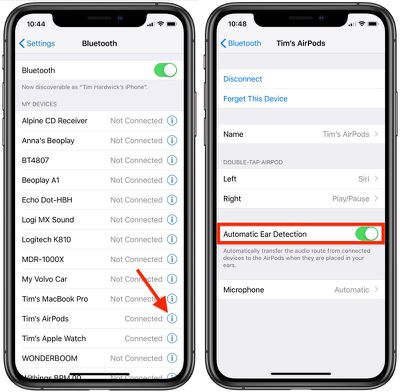
  2. Tap the name of your connected AirPods, just under your Apple ID banner. Alternatively, tap Bluetooth, then tap the circled "i" icon next to your connected AirPods.
    AirPods turn off ear detection

  3. Scroll down and toggle off the switch next to Automatic Ear Detection.
Related Roundup: AirPods 4
Buyer's Guide: AirPods (Caution)
Related Forum: AirPods

Popular Stories

airpods eq

Apple to Bring Custom EQ to AirPods

Monday June 8, 2026 10:29 am PDT by
Apple today announced that AirPods will gain a custom EQ (equalizer) feature, allowing users to further personalize how their AirPods sound. The new capability is part of Apple's next-generation software platform updates, which the company unveiled today. Custom EQ lets listeners adjust audio output to match their personal preferences, going beyond the fixed audio profiles AirPods have...
airpods pro 3 orange

iOS 27 Introduces Overhauled AirPods Settings Menu

Tuesday June 9, 2026 5:45 am PDT by
When AirPods owners connect to their iPhone running iOS 27, they'll see a completely revamped settings menu for their earbuds that does a better job at organizing all of the feature options that Apple has added over the last few years. In the first iOS 27 developer beta, released on Monday, the new settings menu can be accessed in the same way as the old one – i.e. by appearing only when...
AirPods Pro Beta Firmware 2

Apple Releases New AirPods Beta Firmware With iOS 27 Features

Tuesday June 9, 2026 11:31 am PDT by
Apple today released new beta firmware for the AirPods 4, AirPods Pro 2, and AirPods Pro 3. The firmware is limited to developers at the current time, and it has a build number of 9A5292e. In iOS 27, iPadOS 27, and macOS Golden Gate, Apple is adding a new AirPods interface and support for custom EQ. AirPods are also compatible with the new Siri AI. With iOS 26, iPadOS 26, and macOS Tahoe, ...