

Flight tracker apps are a popular way to keep tabs on planes in the sky, because when you're preparing to fly or when someone you know is on board a flight, you can use them to check that things are still on schedule. But if you have an iPhone, you don't need to download and install a third-party app to track a flight – it's a handy built-in feature of the operating system.

The ability to track flights in iOS is thanks to the data detectors that Apple has integrated into the system for quite a few years now. Data detectors recognize things like times, dates and addresses, and in the right context, turns these into tappable links. Here's how it works.
Track Flights in Messages
If someone sends you a flight number (U2502, say) in Messages, you can press and hold the underlined number to get a real-time view of the flight's progress plotted on a map.
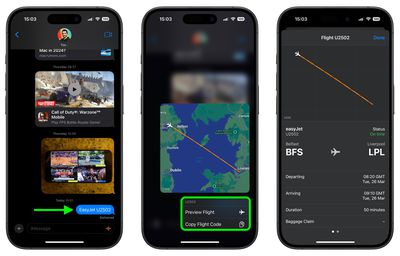
You also get the option to learn more by tapping Preview Flight, which will give you information like departure and arrival times, delays, and for some airports, baggage claim details. You'll find links to the airline website and Apple Maps at the bottom of the information card.
To increase the chances that iOS detects the flight number, it's best to include the full airline name along with the number (EasyJet U2502, for example).
Track Flights in Spotlight Search
On iPhone and iPad, you can also track flights in Search.
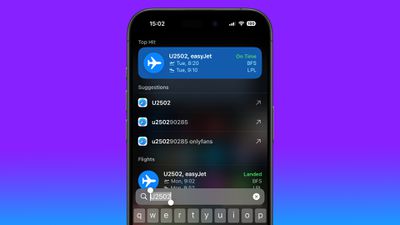
Swipe down from the middle of the Home screen and simply input the flight number into the search field to get departure and arrival information. Tap the information card to get the additional details mentioned above.
Tracking Flights on a Mac

Apple has included the same data detectors into macOS, meaning you can track flights on your Mac, too. Simply invoke Spotlight with the Command-Spacebar key combination and type the flight number into the input field.
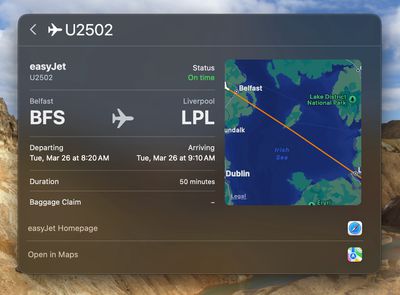
Select the flight data in the results, and you'll see the same information card that appears in iOS, complete with the flight's live trajectory shown on a map and other details.





















Top Rated Comments
2. Chuckling at the OnlyFans suggestion in the iOS screenshot.
You could ask Siri "what planes are overhead" and it brought up flight information about the aircraft that you might be looking at and perhaps another out of sight. That disappeared (homeland security, per chance)? Back in those old days Siri also had a sense of humor that Apple bled out of the assistant. For example, you could also ask "Hey Siri, beam me up" and it would have a cheeky response from that Star Trek command. It was also aware of 2001 A Space Oddysey. Just try opening those pod bay doors.
While new technology is welcome, it is now fairly generic. Of course, you can also get and AI system to give you some inaccurate information, just for fun!
https://bsky.app/profile/did:plc:62cuohm6c6nefpnw4uujepty