In iOS 16, Apple has added multiple options to customize the iPhone Lock Screen, including the ability to apply different styles or "looks" to your chosen wallpaper picture. This article explains how it's done.
ios 16 lock screen customization
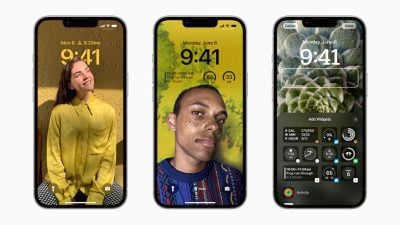
With the Lock Screen in iOS 16, Apple set out to give ‌iPhone‌ users the ability to create something that looks slick like a magazine cover, but in a way that's simple and fun to make.

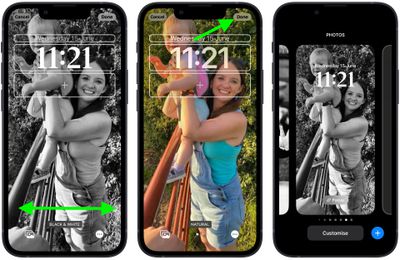
To achieve this, iOS 16 uses machine learning to analyze Lock Screen pictures, and provides you with a selection of "looks" to choose from. However, the end result is more compelling than just laying a filter over a photo, as looks are intelligently generated specifically to style the chosen picture.

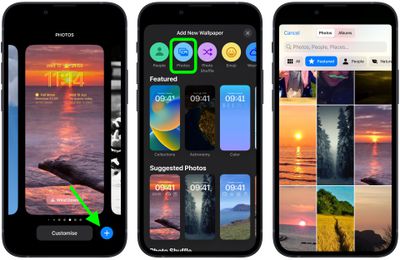
The following steps guide you through the process of choosing and applying a look to a new photo-based Lock Screen in iOS 16.

  1. Unlock your ‌iPhone‌ with Face ID or Touch ID, then press and hold the Lock Screen.
  2. Tap the blue + button, or swipe leftwards all the way to the end and then tap Add New.
  3. Tap the Photos button in the top row of options.
  4. Choose a picture from your Photos library to use.
    Lock Screen

  5. Swipe left and right in the Lock Screen editor to preview the auto-generated looks that are available for this picture.
  6. When you've settled on the look you want, tap Done.
  7. Tap the Lock Screen you just created to activate it.
    Lock Screen

Note that you can customize the current Lock Screen at any time by invoking the gallery view from the Lock Screen with a long press, or by going into Settings -> Wallpaper & Lock Screens.


Related Forum: iOS 16

Popular Stories

Apple Announces Special Event in New York Feature 1

Apple Reportedly Plans to Unveil at Least Five New Products Next Week

Sunday February 22, 2026 9:48 am PST by
In his Power On newsletter today, Bloomberg's Mark Gurman said Apple will have a three-day stretch of product announcements from Monday, March 2 through Wednesday, March 4. In total, he expects Apple to introduce "at least five products." Subscribe to the MacRumors YouTube channel for more videos. A week ago, Apple invited selected journalists and content creators to an "Apple Experience" in...
iOS 26

iOS 26.3.1 Update for iPhones Coming Soon as 'Apple Experience' Nears

Sunday February 22, 2026 5:29 pm PST by
Apple's software engineers are testing iOS 26.3.1, according to the MacRumors visitor logs, which have been a reliable indicator of upcoming iOS versions. iOS 26.3.1 should be a minor update that fixes bugs and/or security vulnerabilities, and it will likely be released within the next two weeks. Last month, Apple released iOS 26.2.1 with bug fixes and support for the second-generation...


iPhone 18 Pro Deep Red Feature

Apple is Testing These iPhone 18 Pro and Foldable iPhone Colors

Sunday February 22, 2026 8:41 am PST by
The special new color that Apple is considering for the iPhone 18 Pro and iPhone 18 Pro Max this year is red, according to Bloomberg's Mark Gurman. Specifically, he said that Apple is testing a "deep red" finish for the two devices. If this rumor materializes, it would be the first time that the Pro and Pro Max models ever come in red, and the iPhone 18 Pro models would be the first...