iOS 16: How to Set a Dynamic Astronomy Lock Screen Wallpaper - MacRumors
Skip to Content

iOS 16: How to Set a Dynamic Astronomy Lock Screen Wallpaper

by

In iOS 16, Apple has added multiple options to customize the iPhone Lock Screen, including the ability to change the font and color, apply filters, and even add information-rich widgets to your wallpaper.
Lock Screen
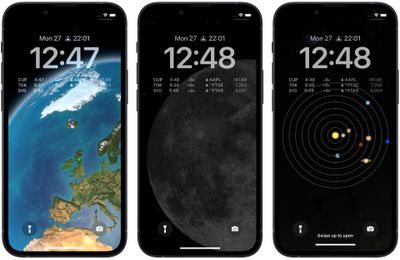
Apple has also included a handful of dynamic Lock Screen wallpapers that adapt to specific real-world variables, including an astronomy wallpaper that shows the current alignment of the Moon, Earth, and Solar System.

The astronomy wallpaper comes in several variations that let you view Earth from afar or close in on your current location, view the Moon from afar or in detail, or view the entire Solar System on your screen.

The following steps show you how to set up a dynamic astronomy wallpaper on an iPhone running iOS 16.

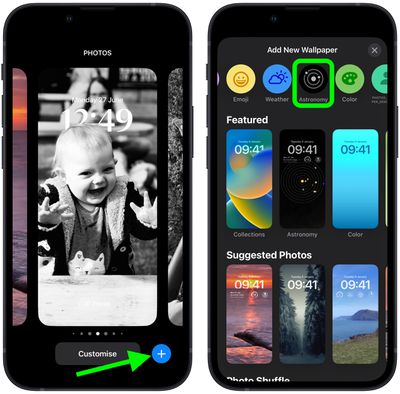
  1. Unlock your ‌‌iPhone‌‌ with Face ID or Touch ID, then press and hold the Lock Screen.
  2. Tap the blue + button, or swipe leftwards all the way to the end and then tap Add New.
  3. Tap the Astronomy button in the top row of options.
    Lock Screen

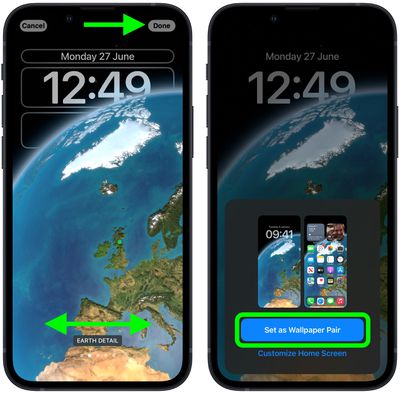
  4. Swipe left and right on the wallpaper to preview the different astronomical view options, including Earth, Earth Detail, Moon, Moon Detail, and Solar System.
  5. When you're happy with the look and have added any widgets, tap Done in the top-right corner of the screen.
  6. To make the dynamic wallpaper appear on both your Lock Screen and Home Screen, tap Set as Wallpaper Pair in the pop-up. Otherwise, tap Customize Home Screen to do so separately.
  7. Tap the Lock Screen you just created in the wallpaper gallery to activate it.
    Lock Screen

You can customize the current Lock Screen at any time by invoking the gallery view from the Lock Screen with a long press, or by going into Settings -> Wallpapers.


Popular Stories

Apple Watch Ultra 2 Black Titanium

watchOS 27 Will Add These New Features to Your Apple Watch

Sunday May 24, 2026 11:53 am PDT by
Apple will unveil watchOS 27 during its WWDC 2026 keynote on Monday, June 8, and a handful of new features have been rumored already. The first developer beta of watchOS 27 should be available immediately following the keynote, and a public beta typically follows in July. The update should be released to all users with a compatible Apple Watch model in September. Below, we recap watchOS...
iPhone 15 General Feature Green

Apple Preparing 'Most Significant Overhaul in the iPhone's History'

Friday May 22, 2026 1:36 pm PDT by
Apple reportedly plans to unveil its first foldable iPhone in September this year — it may be named "iPhone Ultra" — and expectations are high. In his Power On newsletter, Bloomberg's Mark Gurman said the foldable iPhone will be "the most significant overhaul in the iPhone's history." "iPhone 4, iPhone 6 and iPhone X were clearly a big deal, but this is a whole new design," he said....
imac video apple feature

Apple Released Two New Accessories This Month

Friday May 22, 2026 12:24 pm PDT by
May has been a quiet stretch in terms of new Apple products, but the company did release two accessories on its online store this month. First up was a new Pride Edition Sport Loop for the Apple Watch. The band features a rainbow design with 11 colors of woven nylon yarns. U.S. pricing is set at $49. The band is part of Apple's 2026 Pride Collection, which also includes a new Pride...