iPhone 15 Pro: How to Set a Default Camera Focal Length - MacRumors
Skip to Content

iPhone 15 Pro: How to Set a Default Camera Focal Length

by

On iPhone 15 Pro models, Apple has introduced three focal length options for shooting with the main camera. This article explains what the options are, and how to set a preferred default focal length for taking photos.
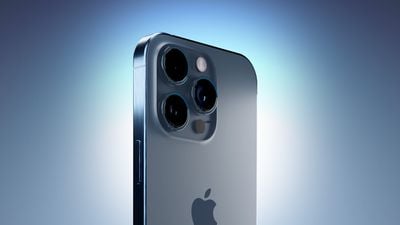
iPhone 15 Blue Three Quarters Perspective Camera Closeup Feature
To take advantage of the enhanced camera system on the iPhone 15 Pro and iPhone 15 Pro Max, Apple has added three different focal length options for the main camera's optical zoom. To the standard default 1x (24mm) mode, Apple has added 1.2x (28mm), and 1.5x (35mm) settings.

iPhone 15 Pro users can choose from these focal lengths when taking photos, simply by tapping the 1x button in the Camera app. However, for technical reasons, these focal length options aren't available when shooting video, and the Camera offers a zoom ring instead.
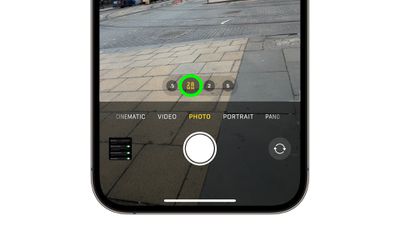
iphone 15 focal length presets
Apple has made these particular focal lengths available to photography enthusiasts by using computational processing to crop the 48-megapixel image that the new larger sensor can capture, so it always delivers a high-resolution 24MP image. In addition, Apple has added an option to change the default optical zoom setting, which is handy if you're working with a specific focal length. The following steps show you how it's done.

  1. Open the Settings app.
  2. Scroll down and tap Camera.
  3. Tap Main Camera.
  4. Under "Default Lens," select from Default to 24mm - 1x, Default to 28mm - 1.2, and Default to 35mm - 1.5x.
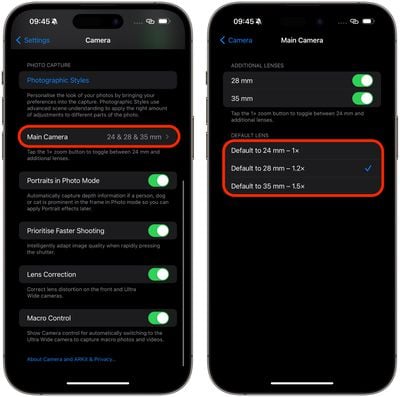
settings

That's all you have to do. The next time you shoot, you won't have to set the focal length before you start shooting – your preferred option will already be selected.

Popular Stories

Apple Acquires Award Winning App Play Feature

Apple Acquires Award-Winning App 'Play'

Monday June 29, 2026 7:39 am PDT by
In February, Apple notified the European Commission that it would be acquiring certain assets from and have the right to hire certain employees from Rabbit 3 Times, the company behind the award-winning app design tool Play. The notification was published on the European Commission's website this week, following a four-month waiting period. Play was a Mac and iPhone app that allowed designers ...
iPhone 18 Pro Deep Red Feature

Apple 'Concerned' Over iPhone 18 Pro Data Leak From Supplier Tata

Monday June 29, 2026 11:46 am PDT by
Apple is "concerned" about a recent data leak from Tata Electronics, one of its manufacturing partners in India, reports Reuters. Tata Electronics was the target of a cyberattack, with confidential Apple documents stolen and shared on the dark web. Hackers were able to steal information about the iPhone 18 Pro and iPhone 18 Pro Max, including a list of suppliers, parts, and images of the...
American Express Gold Apple Pay Feature

American Express Announces New Apple Pay Feature

Tuesday June 30, 2026 10:27 am PDT by
American Express today announced that you can now redeem Membership Rewards points when checking out with Apple Pay on the web and in apps on the iPhone and iPad. When checking out with Apple Pay on iOS 18 or iPadOS 18 or later, tap on your eligible American Express card (Platinum, Gold, Green, and others) and select the Membership Rewards points option. You can use points to cover all or...