How to Review and Delete WhatsApp Media - MacRumors
Skip to Content

How to Review and Delete WhatsApp Media

by

If you're a heavy WhatsApp user and your iPhone is running low on storage, it may be that all the videos, voice messages and photos stored in the app are taking up a hefty amount of space on your device.

Whatsapp Feature
Fortunately, WhatsApp features a built-in media management tool that can help you identify, select, and bulk delete GIFs, photos, and videos that may be filling up your phone.

The tool groups together large files and media that has been forwarded many times, sorting files by size in descending order, and provides a way to preview files before deleting them. You can also see a preview of media before selecting one or multiple files to delete.

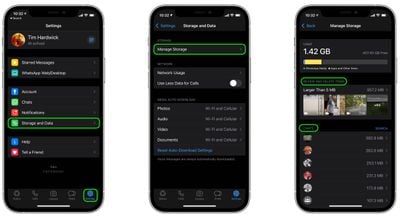
To access the storage management tool, launch the app and go to Settings -> Storage and Data -> Manage Storage.
whatsapp
The Review and Delete Items section shows you media that is larger than 5MB, while the Chats section below lists all the media shared in a particular chat thread. Tapping into either section allows you to view media and delete items individually in the viewing window.

You can also bulk-delete media by tapping Select in the top-right corner of the screen, choosing multiple items, then tapping the Trash icon in the bottom-right corner. There's also a nuke option in the form of the Select All button, which lets you delete all WhatsApp media over 5MB.


Popular Stories

whatsapp carplay

WhatsApp Gets New CarPlay App

Tuesday April 7, 2026 4:32 pm PDT by
Facebook-owned messaging app WhatsApp was today updated with expanded support for CarPlay. CarPlay users are able to more easily call and message their friends and family members in WhatsApp directly from the car interface. WhatsApp had CarPlay integration before, but with limited Siri-based functionality. The new app has a full native CarPlay interface with a list of recent chats and call...
Whatsapp Feature

WhatsApp Testing Paid 'Plus' Subscription Tier – Here's What's Included

Tuesday April 21, 2026 6:22 am PDT by
WhatsApp has started testing a paid subscription tier called WhatsApp Plus, which adds a set of personalization options on top of the standard messaging experience, according to WABetaInfo. The paid plan Meta is testing appears to be geared towards hardcore users who spend a lot of time in the app: subscribers get access to premium sticker packs with fullscreen overlay animations (visible to ...
macOS 27 on MacBook Pro

macOS 27 Will Mark the End of an Era

Saturday April 18, 2026 6:45 am PDT by
During its Platforms State of the Union segment at WWDC 2025, Apple revealed that macOS 26 Tahoe is the final major macOS version for Intel-based Macs. The upcoming macOS 27 release will be compatible with Apple silicon Macs only, meaning that you will need a Mac with an M-series chip or a MacBook Neo with an A18 Pro chip in order to install the software update. macOS 27 should be available...