How to Reset an iPhone 7 or Enter DFU Mode for Last-Ditch Recovery - MacRumors
Skip to Content

How to Reset an iPhone 7 or Enter DFU Mode for Last-Ditch Recovery

by

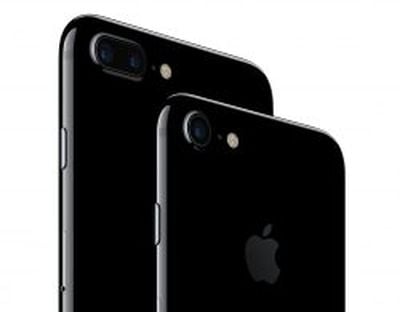
apple-iphone7This tutorial explains how to reset an iPhone 7 and iPhone 7 Plus, and how to activate Device Firmware Upgrade (DFU) mode to troubleshoot your device if needed. Apple has changed the reset process with the iPhone 7 series, and with the devices now making their way into users' hands, it's a good time to let everyone know what to do when things go wrong.

A hard reset basically force-reboots your iPhone, which is useful if the device is freezing, throwing up errors, or has stopped responding completely. DFU mode, on the other hand, restores an iPhone if a reset or standard Recovery Mode doesn't solve the problem you're experiencing.

DFU mode lets the device interface with iTunes, update the firmware and restore the OS without automatically installing the last downloaded version. It's useful for installing older versions of iOS if a beta persistently hangs your phone, or if a jailbreak goes bad.

Note for iPhone 6s and earlier owners: Apple has had to alter the hard reset process and DFU mode activation on the iPhone 7 because the physical-click home button has been replaced with a Force Touch-based Taptic Engine, which is rendered unresponsive if the OS isn't functioning properly. Owners of iPhone 6s/6s Plus or earlier devices should therefore consider all mentions of the "lower volume button" in the below steps to indicate when the home button should be held down instead.

How to Reset an iPhone 7

  1. Press and hold down the iPhone's power button on the right side of the handset.
  2. With the power button still held down, press and hold the lower volume button on the other side of the handset.
  3. Continue to hold both buttons while the display remains blank, until it comes back on with the Apple logo showing.

How to Activate DFU Mode on an iPhone 7

  1. Turn off your iPhone and connect it to a computer using a Lightning to USB cable, and ensure iTunes is running.
  2. Press and hold down the power button on the handset for three seconds.
  3. With the power button still held down, press and hold the lower volume button, and keep holding both for 10 seconds. The screen should remain blank throughout, so if you see the Apple logo displayed, you've held the buttons for too long and will need to restart the process.
  4. Release the power button, but keep holding the lower volume button for about 5 seconds. Again, if your phone displays the "Plug into iTunes" screen, you've held down too long and need to restart.
  5. If you performed the previous steps correctly and your phone's screen remained blank, a dialog prompt should appear on your computer saying "iTunes has detected an iPhone in recovery mode. You must restore this iPhone before it can be used with iTunes."
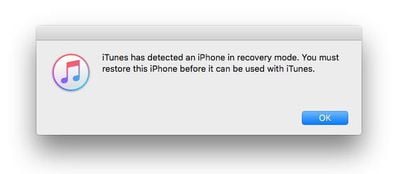
itunes-recovery-mode
iTunes' iPhone device screen should show the phone as being in iPhone Recovery Mode, with the message: "If you are experiencing problems with your iPhone, you can restore its original settings by clicking Restore iPhone."
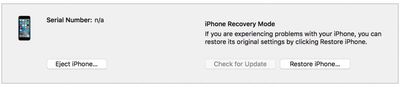
iTunes recovery mode
To exit DFU mode, simply hold both the lower volume button and the power button until the Apple logo is displayed on your iPhone's screen.


Tag: DFU
Related Forum: iPhone

Top Rated Comments

132 months ago
This post is rambling too much. Get to the point within a sentence or two.
You must be joking. I found the article well written - in fact it was just right. Novices and Experts alike can get the point quickly - because it provides proper context.
Score: 11 Votes (Like | Disagree)
Kaibelf Avatar
132 months ago
This post is rambling too much. Get to the point within a sentence or two.
Behold, the Twitter generation.

Score: 5 Votes (Like | Disagree)
132 months ago
I had no idea that the reset had changed to use the lower volume button. Thank you MR, this will save me some frustration in the near future. :D

Score: 5 Votes (Like | Disagree)
132 months ago
This post is rambling too much. Get to the point within a sentence or two.
Are you serious? The article is fine. The things you people complain about just astound me. Can you please rewrite the article for us and prove your point by showing us how your abridged version will work better than the one presented. Thanks so much.
[doublepost=1474050351][/doublepost]
You must be joking. I found the article well written - in fact it was just right. Novices and Experts alike can get the point quickly - because it provides proper context.
You need to understand that some people have an attention span of only one sentence. We must accommodate them.
Score: 4 Votes (Like | Disagree)
Telos101 Avatar
132 months ago
Does this indicate that the lock and volume buttons will remain physical?
This is a really good point. Something has to remain physical on the iPhone 8, right? Otherwise every OS freeze would essentially brick your phone!
Score: 4 Votes (Like | Disagree)
132 months ago
This post is rambling too much. Get to the point within a sentence or two.
Score: 4 Votes (Like | Disagree)

Popular Stories

Apple MacBook Pro with PROLED XDR Display family lineup feature

Apple Announces OLED MacBook Pro With Touch Display

Wednesday October 28, 2026 10:11 am PDT by
Apple today announced a new high-end MacBook Pro, which is available in 14-inch and 16-inch sizes. The new device has a PROLED XDR display that supports touch gestures, and a glowing rear Apple logo. Pricing on the MacBook Pro starts at $2,899 for the 14-inch model and $3,399 for the 16-inch model. Apple says the MacBook Pro has the "world's best display in a pro laptop." The PROLED...
Apple MacBook Pro 14 in with M6 hero

Apple Announces New 14-Inch MacBook Pro With M6 Chip

Tuesday October 27, 2026 6:01 am PDT by
Apple today announced a refreshed 14-inch MacBook Pro featuring the M6 chip, upgraded connectivity specifications, and more. The M6 chip in the MacBook Pro features a 12-core CPU with 2 super cores, 4 performance cores, and 6 efficiency cores, paired with a 12-core GPU. This is up from the M5 chip with a 10-core CPU with 4 super cores and 6 efficiency cores, paired with a 10-core GPU. M6...
apple pro tell logo

Apple Opened Pre-Orders for Five New Products This Week

Wednesday October 28, 2026 2:49 am PDT by
Apple opened pre-orders for five new products on Wednesday, October 28, including its first touchscreen MacBook Pro models. Pre-orders opened for the following new products: iPad mini with OLED display and A20 Pro chip iMac with M6 chip 14-inch MacBook Pro with M6 chip 14-inch MacBook Pro with OLED touchscreen 16-inch MacBook Pro with OLED touchscreen Pre-orders for the iPad mini,...
Latest Stories
Apple Executive Comments on New iPad Mini Lacking 120Hz Display
4 hours ago
Here's a Hands-On Look at HomePod Mini 2's New Two-Tone Colors
5 hours ago
Apple Lowers App Store Fees in Taiwan Starting October 31
6 hours ago
HomeView Pre-Order Returns to $289.99 on Amazon
6 hours ago
Apple Avoids Showing Pinched Fingers on iPad Mini Page in South Korea
6 hours ago
Old 'Popcorn Time' App Left Hundreds of Thousands of Macs at Risk
7 hours ago
You Can Turn Off the New MacBook Pro's Touchscreen Functionality
8 hours ago
MacBook Pro Mini-LED vs. OLED Buyer's Guide: Every Difference
9 hours ago
Where to Pre-Order Apple's New MacBooks, iPad Mini, and iMac
10 hours ago
Apple Releasing HomePod Mini 2 Tomorrow With These New Features
12 hours ago
How macOS Adapts Its Controls for Touch on the New MacBook Pro
12 hours ago
Just Got an iPhone Duo? Try These Features First
14 hours ago
Apple Announced Scott Forstall's Departure 14 Years Ago Today
14 hours ago
Best Buy Opens Pre-Orders for PROLED XDR MacBook Pro With $100 Bonus Gift Cards
1 day ago
Here's Everything Apple Announced This Week
1 day ago
Here's a Real-World Look at the New MacBook Pro's Glowing Apple Logo
1 day ago
How Accurate Were Rumors About Apple's OLED Touchscreen MacBook Pro?
1 day ago
Apple Has 8 New Products Available for Pre-Order
1 day ago
iPhone Duo: Turn the Hinge Into an App Launcher
1 day ago
OLED MacBook Pro vs. Mini-LED MacBook Pro: Size and Weight Compared
1 day ago
Best Buy Offering Up to $100 Gift Cards With iPad Mini 8 and M6 MacBook Pro Pre-Orders
1 day ago
Adding Touch Didn't Cost the MacBook Pro Any Battery Life
1 day ago
Apple Releases Redesigned Mac Chargers and 'World Travel Adapter Kit'
1 day ago
Apple Executives Explain Why the MacBook Pro Finally Has a Touch Screen
1 day ago
New MacBook Pro Features Deeper Bass and Improved Closed-Lid Audio
1 day ago
New MacBook Pro Offers Up to 16TB of Storage, Double Previous Limit
1 day ago
Apple's New Touchscreen MacBook Pro Costs Up to $14,549
1 day ago
Apple Brings Dynamic Island to Mac for the First Time
1 day ago
Mac Studio With M5 Ultra Now Available With 512GB RAM for $22,299
1 day ago
Illuminated Apple Logo Returns to MacBook Pro After 10 Years
1 day ago