How to Remove Memoji Stickers From the Emoji Keyboard in iOS - MacRumors
Skip to Content

How to Remove Memoji Stickers From the Emoji Keyboard in iOS

by

In iOS 11, Apple introduced animated emoji characters called Animoji, which are designed to mimic your facial expressions. Animoji have since grown to encompass Memoji, which are customizable humanoid Animoji characters that you can design to look just like you.
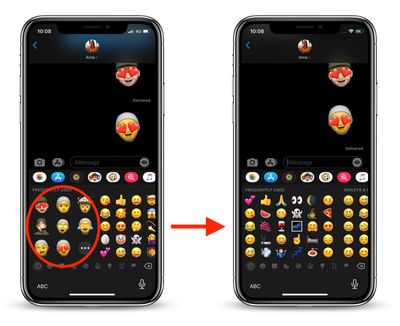
remove memoji keyboard ios
These characters are also available as Memoji Stickers in iOS 13, which show up in the frequently used section of the emoji picker on the default virtual keyboard. If you don't use them enough to find their appearance useful in the emoji keyboard, there's now a way that you can get rid of them.

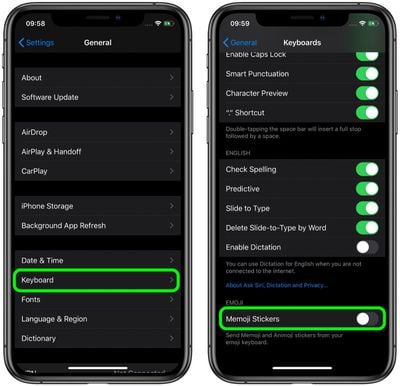
As of iOS 13.3, Apple has added an option to prevent Memoji Stickers from showing up in your Frequently Used emojis on iPhone and iPad. Make sure you're running iOS 13.3, then follow the steps below to turn them off.

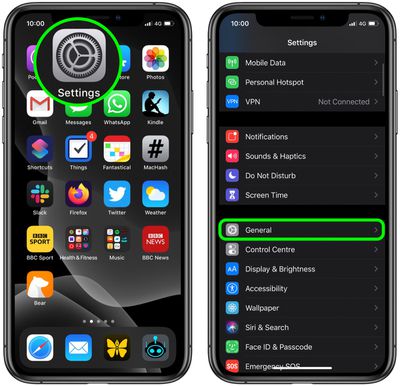
  1. Launch the Settings app on your iOS device.
  2. Tap General.
    settings

  3. Tap Keyboard.
  4. Swipe down to the bottom of the screen.
    settings

  5. Toggle off the switch next to Memoji Stickers.
Next time you send a message, your favorite emojis will fully populate the Frequently Used section of the emoji keyboard, which will be free of Memoji Stickers.


Tag: Memoji
Related Forum: iOS 13

Popular Stories

iOS 26

iOS 26.4 Adds Two New Features to CarPlay

Tuesday March 24, 2026 1:55 pm PDT by
iOS 26.4 was released today, and it includes a couple of new features for CarPlay: an Ambient Music widget and support for voice-based chatbot apps. To update your iPhone 11 or newer to iOS 26.4, open the Settings app and tap on General → Software Update. CarPlay will automatically offer the new features so long as the iPhone connected to your vehicle is running iOS 26.4 or later....


AirPods Pro Firmware Feature

Apple Releases New Firmware for AirPods Pro 3, AirPods Pro 2 and AirPods 4

Tuesday March 24, 2026 12:31 pm PDT by
Apple today released new firmware for the AirPods Pro 2, AirPods Pro 3, and the AirPods 4. The firmware has a version number of 8B39, up from 8B34 on the AirPods Pro 3, 8B28 on the AirPods Pro 2, and 8B21 on the AirPods 4. There is no word on what's included in the firmware, but Apple has a support document with limited notes. Most updates are limited to bug fixes and performance...
apple tv 4k new orange

tvOS 26.4 Adds These New Features to Your Apple TV

Wednesday March 25, 2026 3:33 pm PDT by
Apple this week released tvOS 26.4, and the software update includes a handful of new features and changes for the Apple TV. tvOS 26.4 is compatible with all Apple TV 4K and Apple TV HD models released since 2015. To update your Apple TV, open the Settings app on the device, navigate to System → Software Updates, and select Update Software. Below, we have recapped what is new in tvOS...