

iOS 27's New Compact Clock Gives Your Wallpaper Room to Breathe - MacRumors
Skip to Content

iOS 27's New Compact Clock Gives Your Wallpaper Room to Breathe

by

In iOS 26, Apple let you stretch the Lock Screen clock down your iPhone's display until it dwarfed everything else. In iOS 27, Apple has a new clock option that does the opposite, with the introduction of a compact mode that shrinks the time to roughly the size of the date and tucks it into the row at the top of the screen.
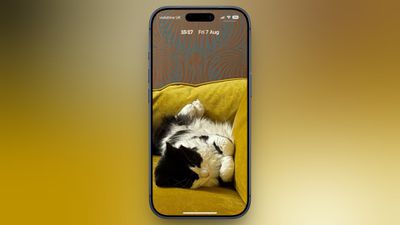
betsy-cat-lock-screen
The result is a Lock Screen that genuinely shows off your wallpaper, while still displaying the time and date. If you picked a photo that looks better in its complete framing, this is the first time iOS gives you the opportunity to see more of it unobstructed.

How to Switch to the Compact Clock

The following steps show you how it's done.

  1. Touch and hold the Lock Screen, then tap Customize.
  2. Tap inside the currently set clock frame to open the Font & Color panel.
  3. Tap the new icon made of two horizontal bars in the top-right corner of the panel to set the clock to compact mode.
  4. If you're happy with the new look, tap anywhere else on the wallpaper, then tap Done in the top-right corner of the screen.
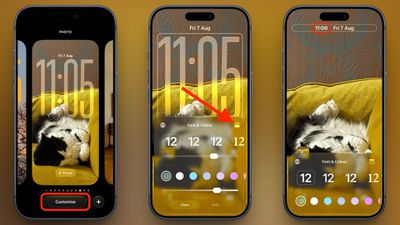
compact clock steps

You'll see that the clock shrinks immediately and moves up beside the date, so you can judge the effect against your wallpaper before saving. To go back, simply tap the same icon in the Font & Color panel again. The clock will return to its previous position and size.

Customizations

The new compact clock keeps your existing clock customizations like font, weight, and color, and these can still be adjusted, but you do lose access to the Liquid Glass slider in compact mode.

Bear in mind that the option applies to individual Lock Screens rather than being a global setting, so you can have a compact clock on one wallpaper and a full-size one on another – for a Focus mode, for example. iOS 27 is currently in public beta with general availability expected in September.

Related Roundups: iOS 27, iPadOS 27

Top Rated Comments

PBG4 Dude Avatar
5 weeks ago
This is the internet. Everything moves to make space for cat pics.


Attachment Image
Score: 17 Votes (Like | Disagree)
5 weeks ago
I’m getting older so last thing I want is for the time and date on the screen to be smaller. I will leave it clearly visible, thank you, so I can easily see it at a glance when I pull my phone out.
Score: 17 Votes (Like | Disagree)
5 weeks ago
choice is good. i personally like the oversized clock so its easier to see when the screen is dimmed on lock.
Score: 14 Votes (Like | Disagree)
Slo Pesci Avatar
5 weeks ago
nice clean look, I like it.
Score: 10 Votes (Like | Disagree)
5 weeks ago
Good to see this. Always good to have maximum customization options possible so that everyone can set it to their preferred style.
Score: 9 Votes (Like | Disagree)
BlankStar Avatar
5 weeks ago
They made this change for the smaller screen of the closed iPhone Fold/Ultra
Score: 8 Votes (Like | Disagree)

Popular Stories

iPhone Handoff Feature

iOS 27 Introduces New 'iPhone Handoff' Feature

Wednesday September 2, 2026 12:35 pm PDT by
Apple has added a new "iPhone Handoff" feature to iOS 27 that will allow you to switch between two iPhones while using the same phone number on each device. This functionality was briefly mentioned during the WWDC 2026 keynote in June, on a slide that listed hundreds of new features coming in iOS 27 and corresponding software updates, but Apple never shared any further details at the time. ...
iOS 27 Feature Cool

Apple Releases New iOS 27, iPadOS 27, macOS 27, and tvOS 27 Public Betas

Monday August 31, 2026 2:13 pm PDT by
Apple today released the sixth public betas of iOS 27, iPadOS 27, tvOS 27, and macOS Golden Gate, allowing anyone with a compatible device to download and test the new software. The sixth betas come a week after Apple seeded the fifth betas and a few hours after the eighth developer betas. You can get started by signing up on Apple's beta website and then opting in to the public beta by...
iphone 17 pro dark blue 1

Five iPhone 18 Pro Camera Features Seemingly Leak in Code

Monday September 7, 2026 9:07 am PDT by
Apple is working on a broader set of Camera app improvements in iOS 27 it has announced, according to a new deep dive from MacRumors forum member "pdfu." iOS 27 beta code apparently points to five features that could arrive alongside new iPhone models this week or in a future software update: Exposure scopes: The Camera app can display a waveform or histogram to help judge exposure...








































