How to Remap Modifier Keys on iPad When Using a Keyboard - MacRumors
Skip to Content

How to Remap Modifier Keys on iPad When Using a Keyboard

by

With the release of iPadOS 13.4, Apple expanded its support for keyboards by allowing users to remap certain modifier keys so that they serve different functions.

Magic Keyboard Side Anlge Red
This ability is especially useful if you're using a third-party Bluetooth keyboard, because its keyboard layout may be different from Apple's own Smart Keyboard. But even if you own an Apple external keyboard or the Magic Keyboard for iPad Pro, these settings can still be useful.

For example, the Magic Keyboard for ‌iPad Pro‌ lacks an Escape key, but you can remap this function to the modifier key of your choice. Likewise, Apple's standalone Magic Keyboard lacks a Globe key for accessing alternative keyboard layouts and emoji, but you can remap this function to a modifier key, too.

Before you follow the steps below for remapping keys, make sure your keyboard is connected to your iPad.

  1. Launch the Settings app on your ‌iPad‌.
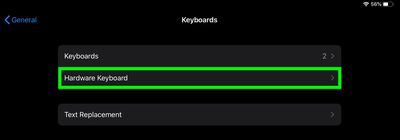
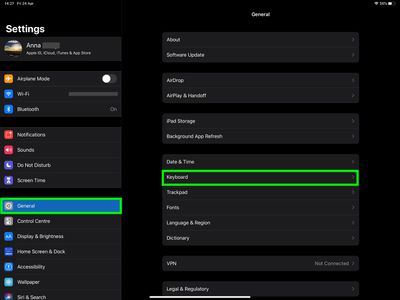
  2. Select General -> Keyboard.
    settings

  3. Select Hardware Keyboard.
    settings

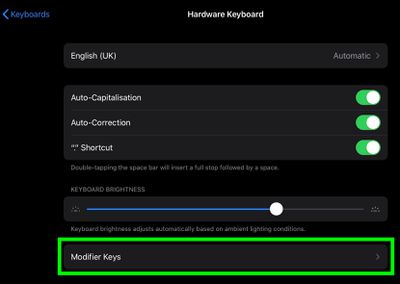
  4. Select Modifier Keys.
    settings

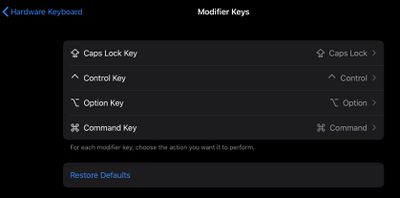
  5. Select the key that you'd like to modify. The options are Caps Lock, Control, Option, and Command.
    settings

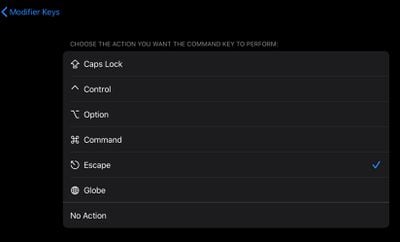
  6. Select the action that you'd like to perform when tapping the chosen key. The options are Caps Lock, Control, Option, Command, Escape, Globe, and No Action.
    settings

Tip: If you need to use the onscreen virtual keyboard to do things like type accented characters or use dictation, tap the down arrow key on your Magic Keyboard, then touch and hold the downward-facing chevron in the bottom-right corner of the screen. To hide the keyboard again, tap the key in the bottom-right corner of the screen.


Popular Stories

Apple Wallet

iOS 27 Will Add Two New Apple Wallet Features to Your iPhone

Monday June 1, 2026 12:15 pm PDT by
Apple is set to unveil iOS 27 during its WWDC 2026 keynote on Monday, June 8, and the update will reportedly include two new Apple Wallet features. First, iOS 27 will reportedly let users create their own digital passes by scanning items like movie tickets, concert passes, and gym membership cards. Many apps already offer Apple Wallet passes, but now users will be able to create a custom...
HomePod mini and Apple TV Sage

New Apple TV and HomePod Mini Are 'Nearly Ready' to Launch, New Siri Remote Also Rumored

Sunday May 31, 2026 8:47 am PDT by
New models of the Apple TV 4K and HomePod mini are "nearly ready to go," according to the latest word from Bloomberg's Mark Gurman. Subscribe to the MacRumors YouTube channel for more videos. Both devices have been ready "for months," but Apple is holding off on launching them until the more personalized version of Siri is available, he said. "I am told the hardware for the next Apple TV...


Dynamic Island iPhone 18 Pro Feature

iPhone 18 Pro Battery Capacities Allegedly Leaked

Tuesday June 2, 2026 1:54 am PDT by
Battery capacities for Apple's upcoming iPhone 18 Pro have allegedly surfaced, and the numbers suggest only a modest increase over the iPhone 17 Pro. According to prolific Weibo-based leaker Digital Chat Station, Apple is testing the iPhone 18 Pro with different battery capacities for the China and U.S. versions of the device, similar to last year's iPhone 17 Pro models. The Chinese model is ...