How to Play a Sound on an AirTag - MacRumors
Skip to Content

How to Play a Sound on an AirTag

by

Apple's AirTags are small, button-shaped devices that are designed to be attached to items like keys and wallets to allow these accessories to be tracked using Bluetooth right alongside Apple devices in the Find My app.

Screen Shot e1619178146247
If you've set up a AirTag and attached it to an item, you can track said item in the ‌Find My‌ app, should you misplace it. ‌Find My‌ uses Bluetooth signals from a lost ‌AirTag‌ to relay its location back to its owner, and on devices that also have U1 chips, there's a Precision Finding feature that enables you to more accurately determine where an ‌AirTag‌ when it's in range.

But what if the AirTagged item isn't in sight, even when it's nearby? If you know you've lost your keys down the back of a couch, for example, it can still be pretty hard to find them. Fortunately, Apple has thought of this, which is why you can make an ‌AirTag‌ play a sound to help you find it.

How to Make an AirTag Play a Sound

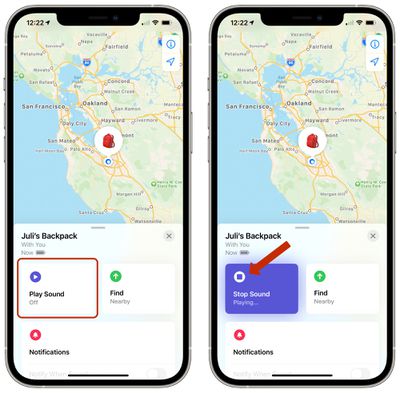
If an ‌AirTag‌ is nearby, you can get it to play a sound so that you can locate it easier.

  1. In the Find My app, tap Items.
  2. Tap the ‌AirTag‌ that you want to play a sound.airtags play sound
  3. Tap Play Sound.

To stop playing the sound before it automatically ends, tap Stop Sound. You can also pick up the ‌AirTag‌ and give it a squeeze to make it stop.

Use Siri to Play a Sound

If you ask Siri to find my [item] or play a sound on my [item], ‌Siri‌ will ping the ‌AirTag‌ and cause it to make a noise so that you can locate it.

You can also get map directions to an item's current or last known location, and if you have a supported iPhone and are near your ‌AirTag‌, you can find its precise location.

Related Roundup: AirTag
Buyer's Guide: AirTag (Buy Now)

Popular Stories

iphone duo

Apple Announces Foldable 'iPhone Duo'

Wednesday September 9, 2026 10:56 am PDT by
Apple today announced the "iPhone Duo," a new kind of iPhone featuring two screens and a foldable inner display. The two halves of the iPhone Duo connect into a single continuous frame with the same aspect ratio across both displays, and Apple said the transition between open and closed is designed to feel fluid. When fully open, Apple says it is the thinnest iPhone ever made, with an...
Surprise and Shine Live Coverage Article

Apple Event Live Blog: iPhone Duo, iPhone 18 Pro, and More

Wednesday September 9, 2026 9:10 am PDT by
Apple's "Surprise and Shine" event kicks off today at 10:00 a.m. Pacific Time, where we're expecting to see the foldable iPhone Duo, the iPhone 18 Pro and Pro Max, Apple Watch Series 12 and Ultra 4 models, new AirPods 5 earphones, and perhaps some other announcements. Apple is providing a live video stream on its website, on YouTube, and in the company's TV app across various platforms. We...
iOS 27 Feature Dark

Apple Announces iOS 27 Release Date

Wednesday September 9, 2026 10:46 am PDT by
At its event today unveiling the iPhone 18 Pro, AirPods 5, Apple Watch Series 12, and more, Apple announced that iOS 27 will be released later this month. iOS 27 has already been available as a developer beta since June and as a public beta since July, and Apple today said that the update will be released for all users with a compatible iPhone model on Monday, September 14. iOS 27 is...