If you misplace your iPhone and you have an Apple Watch paired with it, you can use your watch to help you locate it. Keep reading to learn how.

Finding your iPhone with your Apple Watch can be achieved thanks to a "Ping My iPhone" button in Control Center. Tapping the button makes your iPhone emit an audible tone so that you can more easily locate it.
The feature only works if your iPhone and Apple Watch are in Bluetooth range and/or connected to the same Wi-Fi network. If you think your iPhone may be further away, try the Find My app instead.
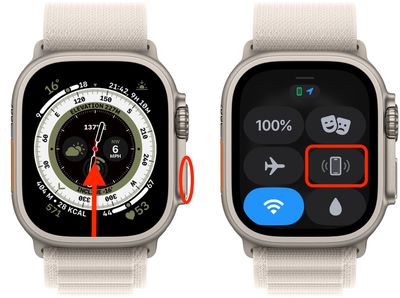
- On your Apple Watch, swipe up from the watch face (or press the Side button if you're running watchOS 10 or later).
- Tap the the phone icon in the Control Center to ping your iPhone.
- If you're in a poorly lit environment, press and hold the phone icon to both ping the iPhone and flash its flashlight.
If your iPhone is running iOS 17 or later, you can do the opposite and ping a misplaced Apple Watch with your iPhone.