How to Use the On Screen Keyboard on an iPad Pro With Keyboard Connected - MacRumors
Skip to Content

How to Use the On Screen Keyboard on an iPad Pro With Keyboard Connected

by

Anyone who has used an iPad Pro with a Magic Keyboard will know just how much better the typing experience is compared to tapping away on the virtual keyboard. Once you've tried it, you'll never want to go back to using the onscreen keyboard for any extensive document work.
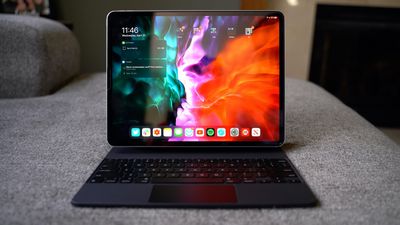
magickeyboard
However, occasionally there might be times when you need to use the onscreen virtual keyboard to do things like type accented characters or use dictation. Fortunately, Apple has recognized this and included a simple way to activate the virtual keyboard on an ‌iPad Pro‌ even when you're using a Magic Keyboard.

  1. When you're in an editing window, tap the Down Arrow key on your Magic Keyboard.
  2. Next, touch and hold the downward-facing chevron in the bottom-right corner of the screen until the onscreen keyboard appears.
    virtual keyboard magic keyboard

  3. To hide the virtual keyboard again, tap the key in the bottom-right corner of the screen.

For more tips on using a Magic Keyboard with your ‌iPad Pro‌, click here.

Popular Stories

Apple Event Logo

Apple to Release These 15 New Products Later This Year

Friday June 12, 2026 7:45 am PDT by
Apple's annual WWDC developers conference is drawing to a close, but there is still a lot to look forward to in the second half of the year. Apple is expected to release at least 15 more products later this year. Now that the more intelligent and personal version of Siri has finally arrived in beta, a full two years after Apple first previewed it at WWDC 2024, we should begin to see some new ...


Apple Lists 250 Changes Across iOS 27 and More Feature

Apple Shares List of 250 Changes Across iOS 27, macOS Golden Gate, and More

Wednesday June 10, 2026 1:34 pm PDT by
During its WWDC 2026 keynote on Monday, Apple briefly showed a slide with hundreds of new features and enhancements coming across iOS 27, macOS 27 Golden Gate, watchOS 27, tvOS 27, and visionOS 27. All of the software updates are currently available as developer betas, and they are expected to be released to all users in September. We already highlighted some of the key new features from the ...
liquid glass app icon

Apple Maps to Get These 10 New Features in iOS 27

Thursday June 11, 2026 5:45 am PDT by
Apple Maps is getting a range of new features in iOS 27, headlined by an upgraded Flyover experience that uses AI to improve the realism and detail of its aerial imagery. Flyover is a longstanding feature of Apple Maps and lets users explore more than 350 cities in 3D with detailed landmarks, roads, parks, and buildings. Apple described the enhanced Flyover in iOS 27 as combining aerial...