In iOS 26, Apple has added a new feature to its Home screen customization options that can match the color of your app icons with the actual color of your iPhone. The image below demonstrates the effect on the new iPhone 17 Pro in Cosmic Orange.
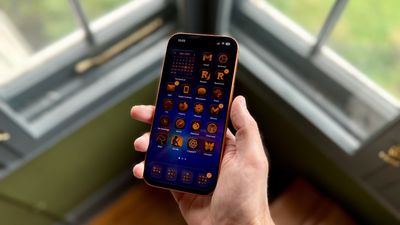
tinted app icons match iphone 17 cosmic orange
In iOS 18, Apple introduced Tinted app icons. The option applies a color filter over app icons, widgets, and even system UI elements, and with iOS 26, Apple has built on the theme with a new option that matches the color of your iPhone model.

iOS 26 knows the exact finish and color variant of your iPhone – Deep Blue, Sage, or Lavender, for example – because Apple has the device's SKU mapped at the firmware level (SKUs are a unique identifier that companies use to track and manage inventory). This allows iOS to identify your model and match a precise color profile.

This filter uses a base color taken from your iPhone's chassis color, then automatically adjusts brightness, saturation, and contrast so icons remain legible while still reflecting the hardware's tone. The following steps show you how it's done.

  1. On your iPhone's Home screen, long press a space between app icons.
  2. Tap Edit in the top-left corner, then select Customize from the popup menu.
  3. Choose Tinted from the options panel that appears, then tap the far-left iPhone button under the two horizontal color sliders.
  4. Select Light, Dark, or Auto, based on your preferences.
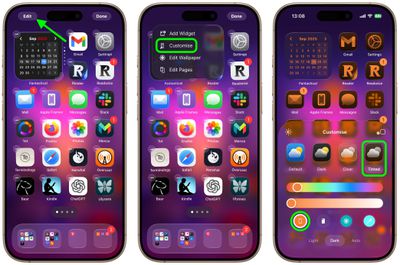
home screen

That's all there is to it. We've heard of the iPhone color matching option not working for some users who have updated older iPhone models to iOS 26. This is likely a bug that Apple will hopefully fix in a forthcoming update.

Match App Icons With Your iPhone's Case Color

If you press the button immediately right of the new iPhone color tint option, iOS 26 will even match app icon colors to your iPhone's case color. However, this only works with official Apple MagSafe cases that include a small NFC chip with color variant information.

Note that Tinted mode looks different in iOS 26 than it did in iOS 18. Rather than icons featuring a black background with colored graphics, icons adopt the full color that you select with white graphics in Light Mode. In ‌Dark Mode‌, backgrounds are a much darker shade of the color you choose, but aren't entirely black.

Top Rated Comments

turbineseaplane Avatar
13 weeks ago
This feature still has never appealed to me.

I guess I’m older or something, but I really like the color and personality of different icons.

It also makes it very easy to differentiate them and quickly find them visually.
Score: 38 Votes (Like | Disagree)
macjaffa Avatar
13 weeks ago
While you’re at it, take the opportunity to change your default iphone system language to Russian*. Now as well as finding it difficult to see and differentiate your icons, you will now also not be able to read or understand anything on your screen. Brilliant!

*Apologies to Russian readers.
Score: 14 Votes (Like | Disagree)
FSMBP Avatar
13 weeks ago

This feature still has never appealed to me.

I guess I’m older or something, but I really like the color and personality of different icons.

It also makes it very easy to differentiate them and quickly find them visually.
Exactly...this seems fun in theory but awful in practice. Basically, a basic human way of visual scanning for icons gets more difficult.
Score: 13 Votes (Like | Disagree)
bradman83 Avatar
13 weeks ago
I'm old enough to remember the days of Classic Mac OS when you could use extensions/control panels like Kaleidoscope to create a highly personalized, if not barely usable user interface experience for yourself. I'm glad to see Apple is inching back in that direction.


Attachment Image
Score: 12 Votes (Like | Disagree)
ericesque Avatar
13 weeks ago
Thanks, I hate it.
Score: 10 Votes (Like | Disagree)
S.B.G Avatar
13 weeks ago
I think it looks cool to tint the icons to match the color of the device, but only for a minute or so. After that it gets difficult for me to tell apps apart. So I just leave the icons in normal color, with dark mode on.
Score: 9 Votes (Like | Disagree)

Popular Stories

Apple Logo Top Half

Early iOS 26 Software Leak Uncovers Dozens of Upcoming Apple Features

Monday December 15, 2025 3:05 pm PST by
Software from an iPhone prototype running an early build of iOS 26 leaked last week, giving us a glimpse at future Apple devices and iOS features. We recapped device codenames in our prior article, and now we have a list of some of the most notable feature flags that were found in the software code. In some cases, it's obvious what the feature flags are referring to, while some are more...
iPhone Top Left Hole Punch Face ID Feature Purple

iPhone 18 Pro Features Leaked in New Report, Including Under-Screen Face ID

Tuesday December 16, 2025 8:44 am PST by
Next year's iPhone 18 Pro and iPhone 18 Pro Max will be equipped with under-screen Face ID, and the front camera will be moved to the top-left corner of the screen, according to a new report from The Information's Wayne Ma and Qianer Liu. As a result of these changes, the report said the iPhone 18 Pro models will not have a pill-shaped Dynamic Island cutout at the top of the screen....
apple beta 26 lineup

Apple Leak Confirms Work on Foldable iPhone, AirTag 2, and Dozens More Devices

Monday December 15, 2025 2:05 pm PST by
Last week, details about unreleased Apple devices and future iOS features were shared by Macworld. This week, we learned where the information came from, plus we have more findings from the leak. As it turns out, an Apple prototype device running an early build of iOS 26 was sold, and the person who bought it shared the software. The OS has a version number of 23A5234w, and the first...
iOS 26

iOS 26.3 Beta 1 Features: What's New So Far

Monday December 15, 2025 4:23 pm PST by
Apple is testing iOS 26.3, the next version of iOS 26 that will launch around January. Since iOS 26.3's testing is happening over the holidays, it is a smaller update with fewer features than we've seen in prior betas. We've rounded up what's new so far, and we'll add to our list with subsequent betas if we come across any other features. Transfer to Android Apple is making it simpler...
Apple Foldable Thumb

Leak Reveals Foldable iPhone Details

Monday December 15, 2025 9:09 am PST by
The first foldable iPhone will feature a series of design and hardware firsts for Apple, according to details shared by the Weibo leaker known as Digital Chat Station. According to a new post, via machine translation, Apple is developing what the leaker describes as a "wide foldable" device, a term used to refer to a horizontally oriented, book-style foldable with a large internal display....
iOS 26

iOS 26.4 and iOS 27 Features Revealed in New Leak

Friday December 12, 2025 10:56 am PST by
Macworld's Filipe Espósito today revealed a handful of features that Apple is allegedly planning for iOS 26.4, iOS 27, and even iOS 28. The report said the features are referenced within the code for a leaked internal build of iOS 26 that is not meant to be seen by the public. However, it appears that Espósito and/or his sources managed to gain access to it, providing us with a sneak peek...
apple iphone air battery pack

Apple Aims to Boost Popularity of iPhone Air 2 in Two Ways

Tuesday December 16, 2025 11:06 am PST by
We have been covering iPhone 18 Pro, iPhone 17e, and iPhone Fold details from The Information's report about future iPhone models, and next up is the iPhone Air 2. The report says that Apple aims to make the iPhone Air 2 more attractive in two ways. First, Apple is apparently considering adding a second rear camera to the device, which would resolve a key limitation. The current iPhone...
apple music chatgpt

ChatGPT's Apple Music Integration Is Now Live

Wednesday December 17, 2025 3:50 pm PST by
There's now a dedicated Apple Music app for ChatGPT, which allows ChatGPT to make music recommendations and build playlists. Apple Music can be added to ChatGPT through the Settings section in the Mac app, website, or iOS app. Apple Music is listed under the apps option, and connecting to it requires signing in with your Apple Account for authorization purposes. ChatGPT can be used to...
maxresdefault

Apple Developing iMac Pro With M5 Max Chip

Tuesday December 16, 2025 7:30 am PST by
Apple is developing a high-end iMac featuring the M5 Max chip, according to information from leaked internal software. Subscribe to the MacRumors YouTube channel for more videos. The finding comes from leaked kernel debug kit files used by Apple engineers. These kernel debug kit files enumerate unreleased Apple hardware by internal identifiers, such as codenames and platform names, and they...