iOS 27: Customize Controls in the Camera App - MacRumors
Skip to Content

iOS 27: Customize Controls in the Camera App

by

In the iOS 27, available now, Apple has added the long-rumored ability to customize the Camera app's controls. Far from the rigid interface of previous iOS versions, you can now pick which controls appear in the Camera app, right down to the flash, exposure, timer, depth of field, photo styles, and resolution.
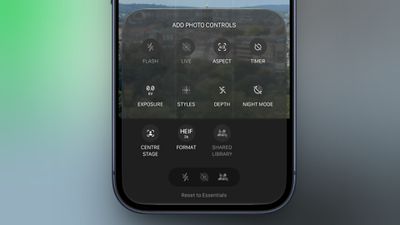
add photo controls camera app
It's a notable development for a stock app that Apple has historically kept locked down. It also feels like a subtle admission that the iPhone's camera has outgrown the existing interface. Third-party apps like Halide and Kino have spent years filling the gap for users who want more manual control. Finally, iOS 27 brings some of that flexibility in-house, without forcing it on everyone.

To customize the Camera app's controls, tap the button with six circles inside in the bottom-right of the Camera's UI and look for a new Edit button in the top-left corner.

From the new "Add Photo Controls" tray that appears, you can add or remove the widget-like controls to the top of the Camera app's UI, then press Done in the top right when you're happy with your selection. Depending on your iPhone model, you should be able to choose from the following controls:

  • Flash
  • Live Photo
  • Aspect Ratio
  • Timer
  • Exposure
  • Styles
  • Filters
  • Depth Control
  • Night Mode
  • Center Stage
  • File Format
  • Shared Library

A "Rest to Essentials" option at the bottom of the widget tray lets you revert to the default set of controls.
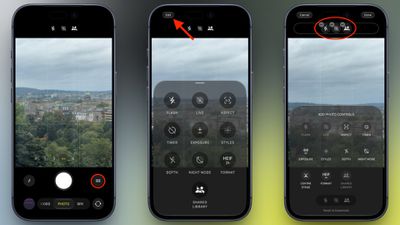
ios 27 camera app control customize
When the customization feature didn't appear in Apple's iOS 27 preview at WWDC in June, it was believed that Apple was holding it back specifically for the release of new iPhone 18 Pro models, which bring some of the most significant camera hardware upgrades in several years.

As it turns out, Apple has made the customization feature available to all iPhone models capable of running iOS 27. If you haven't updated to iOS 27 yet, you can download and install it from the Settings app, via General -> Software Update.

Related Roundups: iOS 27, iPadOS 27
Related Forum: iOS 27

Popular Stories

iOS 27

iOS 27.2 Features: Everything New in iOS 27.2

Monday October 26, 2026 3:56 pm PDT by
Apple released iOS 27.2, uniting the iPhone Duo and other iPhone models on the same version of iOS. iOS 27.2 is the first major iOS 27 update, and it adds several useful new features. Siri AI Improvements Siri AI can recall past conversations you had with it, so you can ask Siri about something it told you before, like a restaurant it previously recommended. It's also able to draw on more...

iOS 27

Apple Releases iOS 27.2 Release Candidate

Monday October 19, 2026 10:26 am PDT by
Apple today seeded the release candidate of an upcoming iOS 27.2 update to developers for testing purposes, with the update coming a week after Apple released the fourth iOS 27.2 beta. Apple also seeded the iPadOS 27.2 RC. Registered developers can download the beta updates by opting in under Settings > General > Software Update and selecting the iOS 27 developer beta. The beta was used...
bug security vulnerability issue fix larry

Here's What Apple Fixed in iOS 27.2.1 and macOS 27.2.1

Monday November 9, 2026 3:07 pm PST by
The iOS 27.2.1, iPadOS 27.2.1, and macOS 27.2.1 updates Apple released today fix a handful of security vulnerabilities. With the security fixes implemented, it's a good idea to update as soon as you can. A bug with iMessage could let a remote attacker join a group chat to receive its messages, and another could let users see messages sent before they joined a group chat. Most of the...
Latest Stories
Apple Invites App Updated With Two New Features
17 minutes ago
Google Says Gemini App Rolling Out on Apple CarPlay Starting Today
1 hour ago
Is It Worth Buying a Ceramic Apple Watch?
4 hours ago
Samsung Early Black Friday Event Brings Major Sales to Frame TVs and More
6 hours ago
iPhone 18 Pro Max Wins Battery Test Involving 32 Smartphones
6 hours ago
AirTag 2 4-Pack Hits Record Low $69.99 Price Ahead of Black Friday
7 hours ago
Rumored Apple Smart Glasses Mentioned in Supplier's Earnings Briefing
7 hours ago
Make Apple Watch Listen for Sounds Like the Doorbell
11 hours ago
Apple Chip Supplier TSMC Approves $1 Billion AI Investment
11 hours ago
'Apple Support Community' Permanently Closing on November 20
17 hours ago
Apple's Holiday Gift Guide Highlights iPhone Duo and More
20 hours ago
Three Workers Die at Tata iPhone Parts Plant in India
21 hours ago
iCloud Mail, Calendar, Contacts and More Experiencing Outage [Updated]
21 hours ago
Apple's Claris Testing 'Harbor' App for Local AI on Macs
22 hours ago
iFixit's PROLED MacBook Pro Teardown Reveals Logo LEDs
23 hours ago
10 Free iPhone Duo Apps Worth Downloading
1 day ago
Apple Releases New AirPods Firmware
1 day ago
Amazon Begins Early Black Friday Sale, Featuring Sitewide Discounts on Tech and Decor
1 day ago
Apple Announces Swift Student Challenge Ahead of WWDC 2027
1 day ago
Next iPad Air Likely to Have These 10 New Features
1 day ago
iPad Mini 2021 vs. 2026 Buyer's Guide: Is It Worth Upgrading?
1 day ago
New Apple TV Sign Language Feature Announced
1 day ago
Disable Touch on MacBook Pro PROLED XDR and When Using Sidecar
1 day ago
Anker's Early Black Friday Sale Surprises With Mystery Boxes and Big Discounts
1 day ago
Apple Arcade Adding These Four Games in December
1 day ago
OLED iPad Air Rumored to Launch in Two Sizes in Early 2027
1 day ago
The Original iPod Went on Sale 25 Years Ago Today
1 day ago
Apple Maps Could Factor Parking Into Your Arrival Time
1 day ago
Waze Now Alerts Drivers to Nearby Cyclists Using Garmin LiveTrack
1 day ago
iPhone 20 Pro: Ten Big Changes That Could Redefine Apple's Flagship
1 day ago