Apple in August released the macOS Big Sur beta for its public beta testing group, allowing them to test out the new software for Macs ahead of its release this fall.
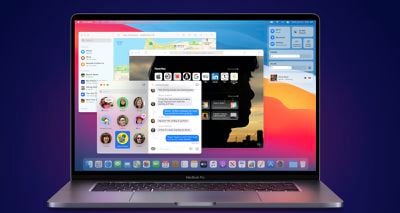
macos big sur desktop
The macOS Big Sur Public Beta is available to anyone with a compatible Mac and it does not require a developer account. This guide walks you through the steps on installing the beta software. Note that you will need about 20GB of free space on your hard drive before attempting an installation.


Before you jump in and download the update, it's worth noting that Apple does not recommend installing the macOS Big Sur Public Beta on your main Mac, so if you have a secondary machine, use that. This is beta software, and there are often bugs and issues that pop up that can prevent software from working properly or cause other problems.

Will macOS Big Sur Run on My Mac?

macOS Big Sur is compatible with most 2013 and later machines, outlined below:

The operating system update does not support the following Macs that were capable of running macOS Catalina:

  • 2012 and Early 2013 ‌MacBook Pro‌
  • 2012 ‌MacBook Air‌
  • 2012 and 2013 ‌iMac‌
  • 2012 ‌Mac mini‌

Make a Time Machine Backup

Before upgrading to the new beta, make sure to make a backup using Apple's Time Machine feature with an external drive.

If you want to revert back to your previous setup after testing macOS Big Sur or if it doesn't work out, you'll need to re-install macOS Catalina and a backup can be helpful to get things up and running as before.

Enroll in Apple's Beta Software Program

Installing macOS Big Sur requires enrolling your Mac in Apple's free Apple Beta Software Program. Follow these steps to do so.
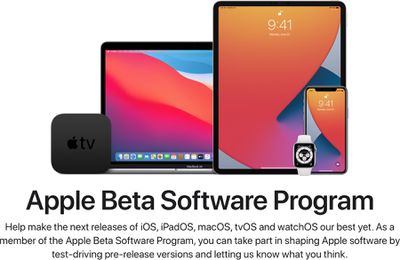
applebetasoftwareprogram

  1. Visit the Apple Beta Software Program website in a browser on your Mac.
  2. Click on the blue Sign up button or, if you're already a member, click sign in.
  3. Enter your Apple ID and password and then a two-factor authentication code if verification is required.
  4. Agree to the Apple Beta Software Program terms and conditions.
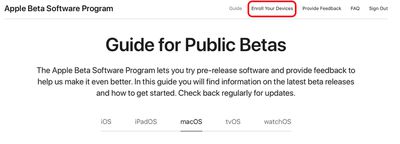
  5. Once signed in and at the Guide for Public Betas page, scroll up to the top and click on "Enroll Your Devices" then click on "macOS." publicbetaenrolldevices

Downloading and Installing the macOS Big Sur Beta

Once you're enrolled in Apple's public beta testing program, you can download macOS Big Sur.

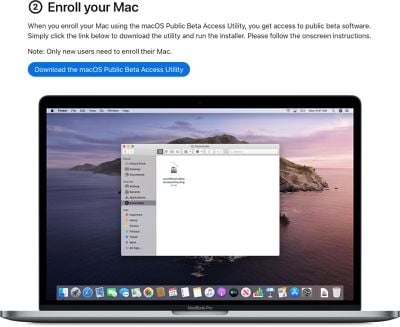
  1. Make sure you've made your backup as outlined above, and then scroll down to "Enroll your Mac" option. enrollyourmacdownloadbet
  2. Click on "Download the macOS Public Beta Access Utility."
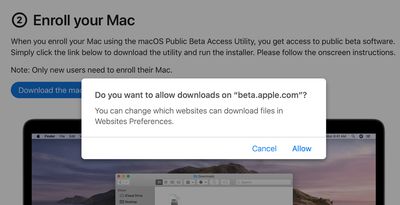
  3. When asked if you want to allow downloads on "beta.apple.com" click on "Allow." appleallowdownloadsbeta
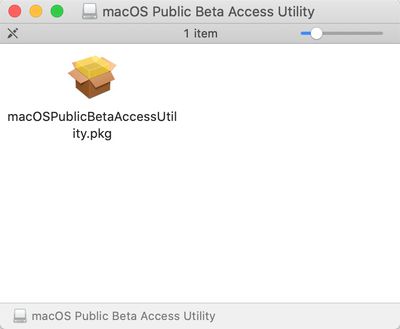
  4. Unless you've changed where files download, the beta installer (macOSPublicBetaAccessUtility.dmg) will show up in your downloads folder. Locate it and double click on it to open it up. macospublicbetapkg
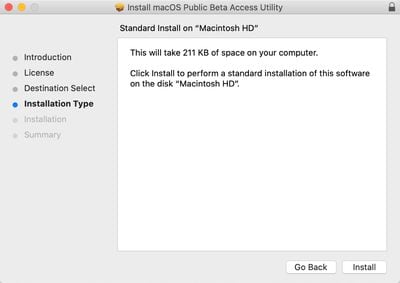
  5. Double click on the .pkg file inside to run the installer. installbetautility
  6. You may see a warning advising you to back up your Mac with Time Machine. Either stop here and back up, or, if you've already done so, Click OK and then click Continue.
  7. Click Continue again and then click on Agree to accept Apple's software license agreement.
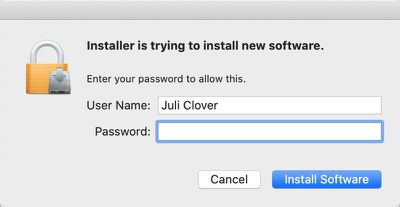
  8. Click on Install. Enter your admin password if prompted. bigsuradminpassword
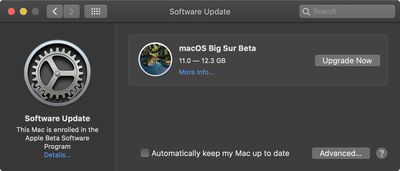
  9. Once the installer has completed the download, the System Preferences Software Update panel will open automatically and display the macOS Big Sur Beta download as available. Click on Upgrade Now to download the public beta software when prompted. It will take some time to download the file, which is around 12GB. When the download is complete, your Mac should restart. macosbigsurinstallwindow
Install the macOS Big Sur Public Beta

After you restart, you will see the macOS Big Sur installer launch automatically. If it doesn't, find it in the Applications folder using Finder and click on it.
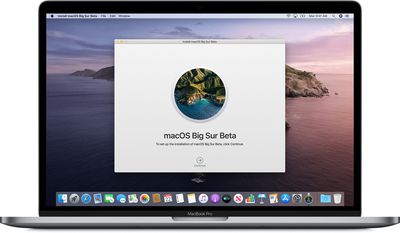
macosbigsurbetainstaller

  1. Click Continue at the bottom of the installer.
  2. Click Continue at the bottom once you've finished backing up, or if you already performed a backup.
  3. Click Agree to accept the terms and conditions and then click Agree again to confirm.
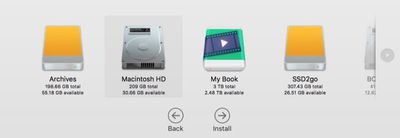
  4. Select the drive that you want to install the public beta on. You can choose your main drive or a partition that you've created. install macos beta
  5. Click Install, enter your administrator password, and click OK.
  6. Click Restart, or wait for your Mac to reboot automatically.

After clicking on restart, the macOS Big Sur installation process will begin. It will take some time, but when the Mac boots up again, it will be running the macOS Big Sur Public Beta. For a list of everything that's new in macOS Big Sur, make sure to check out our macOS Big Sur roundup.


Related Forum: macOS Big Sur

Top Rated Comments

Nugget Avatar
70 months ago
Any user who requires a detailed walk-through in order to figure out how to install the Big Sur public beta should not be installing the Big Sur public beta.
Score: 26 Votes (Like | Disagree)
imnotthewalrus Avatar
70 months ago
I like this feature :oops:

Attachment Image
Score: 11 Votes (Like | Disagree)
itsmilo Avatar
70 months ago
Hope there will be a Good 3rd party solution to get this on my 2012 MacBook Pro Retina. It’s still working great!

Even the battery is still at 91% health according to coconut battery.

See no point in upgrading it yet as it still has all the slots like SD reader, HDMI
Score: 7 Votes (Like | Disagree)
ivan86 Avatar
70 months ago
Somebody please check the column view in Finder. Has Apple finally fixed “Right Size All Columns Individually” option, so that columns automatically resize depending on the width of the folder/file name when browsing through various folders?
Right now all this right click feature does is adjusting the width of only one column ones and than that width remain the same for all other columns even if nested folder has very short file names in it.

Browsing files in column view in Finder has been a disaster for years now. ForkLift mostly does the job but at some things it is not good enough to be a full Finder replacement. It is simply time for Apple to fix this completely broken feature.

I have been reporting this throughout the whole beta test period of Mojave and I think once or twice during Catalina. The only hope for this to be addressed is to make some of the big youtubers / tech sites mentioning it and hopefully the right person from Apple sees this.

This issue has been since day one when I started using Macs in 2013 and basically covers:
OS X 10.9 - Mavericks

OS X 10.10 - Yosemite

OS X 10.11 - El Capitan

macOS 10.12 - Sierra

macOS 10.13 - High Sierra

macOS 10.14 - Mojave

macOS 10.15 - Catalina

Sometimes I wonder if anyone at Apple actually does the job on their Macs, you know - like working with tons of files. ?‍♂️
Score: 5 Votes (Like | Disagree)
skitidetdu Avatar
70 months ago
Now is the time to start thinking about installing Catalina.
Score: 5 Votes (Like | Disagree)
Jarrod Halbert Avatar
70 months ago
Is anyone else's download SUPER slow.. like 12-24 hours to finish...
Score: 3 Votes (Like | Disagree)

Popular Stories

iOS 26

15 New Things Your iPhone Can Do in iOS 26.2

Friday December 5, 2025 9:40 am PST by
Apple is about to release iOS 26.2, the second major point update for iPhones since iOS 26 was rolled out in September, and there are at least 15 notable changes and improvements worth checking out. We've rounded them up below. Apple is expected to roll out iOS 26.2 to compatible devices sometime between December 8 and December 16. When the update drops, you can check Apple's servers for the ...
Intel Inside iPhone Feature

Apple's Return to Intel Rumored to Extend to iPhone

Friday December 5, 2025 10:08 am PST by
Intel is expected to begin supplying some Mac and iPad chips in a few years, and the latest rumor claims the partnership might extend to the iPhone. In a research note with investment firm GF Securities this week, obtained by MacRumors, analyst Jeff Pu said he and his colleagues "now expect" Intel to reach a supply deal with Apple for at least some non-pro iPhone chips starting in 2028....
Photos App Icon Liquid Glass

John Gruber Shares Scathing Commentary About Apple's Departing Software Design Chief

Thursday December 4, 2025 9:30 am PST by
In a statement shared with Bloomberg on Wednesday, Apple confirmed that its software design chief Alan Dye will be leaving. Apple said Dye will be succeeded by Stephen Lemay, who has been a software designer at the company since 1999. Meta CEO Mark Zuckerberg announced that Dye will lead a new creative studio within the company's AR/VR division Reality Labs. On his blog Daring Fireball,...
ive and altman

Jony Ive's OpenAI Device Barred From Using 'io' Name

Friday December 5, 2025 6:22 am PST by
A U.S. appeals court has upheld a temporary restraining order that prevents OpenAI and Jony Ive's new hardware venture from using the name "io" for products similar to those planned by AI audio startup iyO, Bloomberg Law reports. iyO sued OpenAI earlier this year after the latter announced its partnership with Ive's new firm, arguing that OpenAI's planned "io" branding was too close to its...
iOS 26

Apple Seeds iOS 26.2 and iPadOS 26.2 Release Candidates to Developers and Public Beta Testers

Wednesday December 3, 2025 10:33 am PST by
Apple today seeded the release candidate versions of upcoming iOS 26.2 and iPadOS 26.2 updates to developers and public beta testers, with the software coming two weeks after Apple seeded the third betas. The release candidates represent the final versions of iOS 26.2 and iPadOS 26.2 that will be provided to the public if no further bugs are found during this final week of testing....
iphone air camera

iPhone Air's Resale Value Has Dropped Dramatically, Data Shows

Thursday December 4, 2025 5:27 am PST by
The iPhone Air has recorded the steepest early resale value drop of any iPhone model in years, with new data showing that several configurations have lost almost 50% of their value within ten weeks of launch. According to a ten-week analysis published by SellCell, Apple's latest lineup is showing a pronounced split in resale performance between the iPhone 17 models and the iPhone Air....
iPhone 17 Pro Cosmic Orange

iPhone 17 Pro Lost a Camera Feature Pro Models Have Had Since 2020

Thursday December 4, 2025 5:18 am PST by
iPhone 17 Pro models, it turns out, can't take photos in Night mode when Portrait mode is selected in the Camera app – a capability that's been available on Apple's Pro devices since the iPhone 12 Pro in 2020. If you're an iPhone 17 Pro or iPhone 17 Pro Max owner, try it for yourself: Open the Camera app with Photo selected in the carousel, then cover the rear lenses with your hand to...
ios 18 to ios 26 upgrade

Apple Pushes iPhone Users Still on iOS 18 to Upgrade to iOS 26

Tuesday December 2, 2025 11:09 am PST by
Apple is encouraging iPhone users who are still running iOS 18 to upgrade to iOS 26 by making the iOS 26 software upgrade option more prominent. Since iOS 26 launched in September, it has been displayed as an optional upgrade at the bottom of the Software Update interface in the Settings app. iOS 18 has been the default operating system option, and users running iOS 18 have seen iOS 18...
maxresdefault

iPhone Fold: Launch, Pricing, and What to Expect From Apple's Foldable

Monday December 1, 2025 3:00 am PST by
Apple is expected to launch a new foldable iPhone next year, based on multiple rumors and credible sources. The long-awaited device has been rumored for years now, but signs increasingly suggest that 2026 could indeed be the year that Apple releases its first foldable device. Subscribe to the MacRumors YouTube channel for more videos. Below, we've collated an updated set of key details that ...
iPhone 17 Pro Cosmic Orange

10 Reasons to Wait for Next Year's iPhone 18 Pro

Monday December 1, 2025 2:40 am PST by
Apple's iPhone development roadmap runs several years into the future and the company is continually working with suppliers on several successive iPhone models at the same time, which is why we often get rumored features months ahead of launch. The iPhone 18 series is no different, and we already have a good idea of what to expect for the iPhone 18 Pro and iPhone 18 Pro Max. One thing worth...