Creating a photo slideshow on your iPhone is a fantastic way to showcase your memories in a dynamic and visually engaging way. Whether it's reliving a recent holiday, celebrating a family event, or sharing your artistic endeavors, a slideshow can bring your stories to life.
icloud photos
Available through the Photos app, the slideshow feature allows you to easily curate your images and present them in a polished, professional manner without needing any additional software.

Using the slideshow function also enhances your ability to share and enjoy memories, by offering a seamless way to compile and view your photos. It enables you to create a cinematic experience right on your ‌iPhone‌, complete with transitions and music. It's perfect for gatherings, where you can AirPlay a slideshow on a larger screen. Or you can use it for personal reflection and enjoy your favorite moments in a refreshing format.

Let's walk through the easy steps to create your own photo slideshow on ‌iPhone‌.

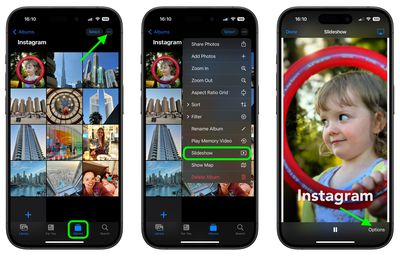
  1. Open the ‌Photos‌ app.
  2. Go to the Albums view and tap the desired album that you want to turn into a slideshow. Alternatively, in the Library view, choose Select and tap the pictures that you want to include in your slideshow.
  3. Tap the More icon (three dots) and select Slideshow from the dropdown menu.
    slideshow

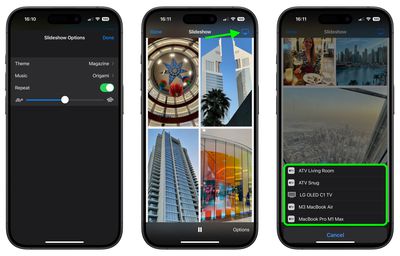
  4. As the slideshow plays, tap the screen and choose Options to adjust the speed, theme and music. (If you don't want to be limited to the default music options, you can choose a song from your Music library.)
  5. To stream your slideshow to a nearby Apple device or smart TV, tap the AirPlay icon in the top-right corner, then select the preferred device.
  6. To end the slideshow, tap the screen and select Done.
    slideshow

That's all there is to it. If you're looking for a more dynamic presentation of your photos that you can preserve for repeat vewing, consider creating a Memory Video (More ➝ Play Memory Video). In addition to music options, Memory Videos include filters (or "Looks"), title options, and the ability to save your memory.


Popular Stories

iPhone Top Left Hole Punch Face ID Feature Purple

iPhone 18 Pro Launching Later This Year With These 12 New Features

Thursday January 15, 2026 10:56 am PST by
While the iPhone 18 Pro and iPhone 18 Pro Max are not expected to launch for another eight months, there are already plenty of rumors about the devices. Below, we have recapped 12 features rumored for the iPhone 18 Pro models, as of January 2026: The same overall design is expected, with 6.3-inch and 6.9-inch display sizes, and a "plateau" housing three rear cameras Under-screen Face ID...

iPhone Top Left Hole Punch Face ID Feature Purple

New Leak Reveals iPhone 18 Pro Display Sizes, Under-Screen Face ID, and More

Wednesday January 14, 2026 7:09 am PST by
While the iPhone 18 Pro models are still around eight months away, a leaker has shared some alleged details about the devices. In a post on Chinese social media platform Weibo this week, the account Digital Chat Station said the iPhone 18 Pro and iPhone 18 Pro Max will have the same 6.3-inch and 6.9-inch display sizes as the iPhone 17 Pro and iPhone 17 Pro Max. Consistent with previous...
2024 iPhone Boxes Feature

Apple Adjusts Trade-In Values for iPhones, Macs, and More

Thursday January 15, 2026 11:19 am PST by
Apple today updated its trade-in values for select iPhone, iPad, Mac, and Apple Watch models. Trade-ins can be completed on Apple's website, or at an Apple Store. The charts below provide an overview of Apple's current and previous trade-in values in the United States, according to the company's website. Most of the values declined slightly, but some of the Mac values increased. iPhone ...
Apple MacBook Pro M4 hero

These 5 Apple Products Will Reportedly Be Upgraded With OLED Displays

Friday January 16, 2026 7:07 pm PST by
Apple plans to upgrade the iPad mini, MacBook Pro, iPad Air, iMac, and MacBook Air with OLED displays between 2026 and 2028, according to DigiTimes. Bloomberg's Mark Gurman previously reported that the iPad mini and MacBook Pro will receive an OLED display as early as this year, but he does not expect the MacBook Air to adopt the technology until 2028 at the earliest. A new iPad Air is...
Verizon New

Verizon Offering $20 Credit After Major Outage, Here's How to Get It

Thursday January 15, 2026 7:37 am PST by
Verizon today announced it will be offering customers a $20 account credit after a major outage on Wednesday, and action is required to receive it. The carrier said affected customers can accept the credit by logging into the My Verizon app, but it might take some time before this option shows up in the app. Affected customers will receive a text message when the credit is available. On...