

 Spotify lets you make your own playlists, but it also allows you to enjoy millions of others created by Spotify, artists and other listeners worldwide.
Not only that, it makes bespoke playlists just for you, such as Discover Weekly and Release Radar, which are based on your listening habits (what you like, share, save, skip) and the listening habits of others with similar taste.
Of course, there's always a chance that you won't like a song in a playlist which you otherwise enjoy. Happily, Spotify has acknowledged this possibility and added a Premium feature that allows paying subscribers to hide individual songs in curated playlists.
When listening through a playlist again, any hidden songs are automatically skipped. The following steps explain how it works.
How to Hide Songs Within Spotify Playlists
- Launch Spotify and select a curated playlist.
- Find a song you want to hide and tap the three dots next to it.

- Tap Hide song.
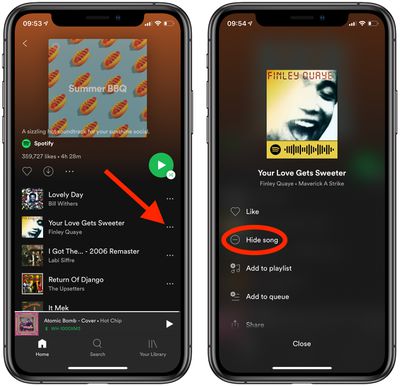
If you change your mind, you can unhide songs in a playlist as well. Here's how.
How to Unhide Songs Within Spotify Playlists
- Launch Spotify and select a curated playlist.
- Tap the three dots next to the hidden song that you want to unhide (hidden songs are greyed out and indicated by a red circled minus icon).
- Tap Hidden.
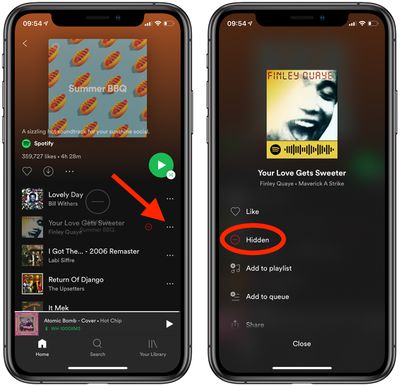
Did you know Spotify has an official app for Apple Watch that allows Spotify subscribers to access and control their favorite Spotify music and podcasts from their wrist? Check out our guide to Spotify on Apple Watch to learn more.


















