How to Get Unique Alerts for VIP Emails Received on Your Mac - MacRumors
Skip to Content

How to Get Unique Alerts for VIP Emails Received on Your Mac

by

Mac OS X 10In the last installment of our regular how-to series, we showed how you can set up an iOS device to get unique alerts when emails are received from your VIP contacts. In this article, we're going to show you how to do the same thing on your Mac.

In the native Mail application in macOS, the standard way of ensuring you receive new message notifications from VIPs is to go into Mail's Preferences and select VIPs in the New message notifications dropdown list.

Setting up VIP alerts this way is all well and good, but it prevents you from receiving notifications for all other messages coming into your inbox.
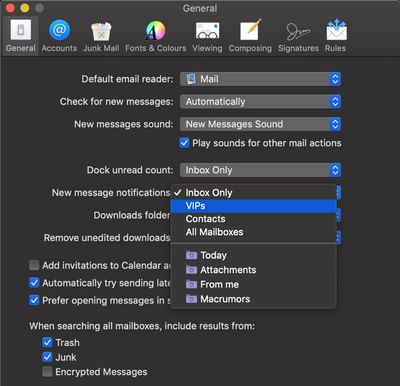
unique alerts VIP emails on Mac
A better solution would be to set up a rule in Mail that plays a specific sound or bounces the Dock icon when a message is received and the sender is in your VIP list. Here's how to do it.

How to Get a Unique Alert for VIP Emails

  1. Launch the Mail app on your Mac.
  2. Select Preferences... from the Mail menu bar.
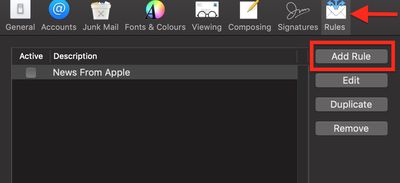
  3. Select the Rules tab.
    Mac VIP email rule 1

  4. Click Add Rule.
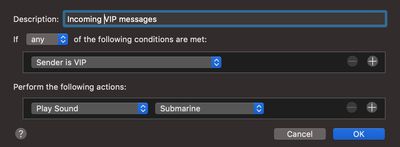
  5. Give your rule a name in the Description field.
  6. For If, select Any.
  7. For the first condition, select Sender is VIP from the first dropdown list.
    Mac VIP email rule 2

  8. Under Perform the following actions: select Play Sound from the first dropdown list. (Another option available here is Bounce Icon in Dock.)
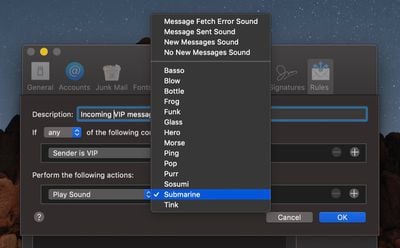
  9. Under Perform the following actions: choose a sound to play from the second dropdown list.
    unique alerts VIP emails on your Mac

  10. Click OK.
  11. Click Apply.

With the rule set up, you'll now get a unique alert for every VIP mail you receive that you'll be able to distinguish from regular new message notifications as they come through.
Top Rated Comments

cerote Avatar
96 months ago
Wish I could use Mail again on my work phone because it had better alerts. I still am having issue finding how to give VIP alerts style in Outlook for iOS.
Score: 1 Votes (Like | Disagree)
harriska2 Avatar
96 months ago
Thanks for this tip. I’m a newbie coming from windows and wondered if there were rules in mail just yesterday.
Score: 1 Votes (Like | Disagree)

Popular Stories

iOS 26

iOS 26.4 Adds Two New Features to CarPlay

Tuesday March 24, 2026 1:55 pm PDT by
iOS 26.4 was released today, and it includes a couple of new features for CarPlay: an Ambient Music widget and support for voice-based chatbot apps. To update your iPhone 11 or newer to iOS 26.4, open the Settings app and tap on General → Software Update. CarPlay will automatically offer the new features so long as the iPhone connected to your vehicle is running iOS 26.4 or later....
Apple Business hero

Apple Unveils 'Apple Business' All-in-One Platform

Tuesday March 24, 2026 8:53 am PDT by
Apple today announced Apple Business, a new all-in-one platform that unifies device management, productivity tools, and customer outreach features. The service is designed to be a consolidated replacement for several of Apple's existing business-focused offerings, including Apple Business Essentials, Apple Business Manager, and Apple Business Connect. It provides organizations with a single...
AirPods Pro Firmware Feature

Apple Releases New Firmware for AirPods Pro 3, AirPods Pro 2 and AirPods 4

Tuesday March 24, 2026 12:31 pm PDT by
Apple today released new firmware for the AirPods Pro 2, AirPods Pro 3, and the AirPods 4. The firmware has a version number of 8B39, up from 8B34 on the AirPods Pro 3, 8B28 on the AirPods Pro 2, and 8B21 on the AirPods 4. There is no word on what's included in the firmware, but Apple has a support document with limited notes. Most updates are limited to bug fixes and performance...