Skip to Content

How to Forget Wireless Networks on Mac

by

wifi iconIf you take your Mac everywhere with you, there's a good chance that it has connected to a number of private and public Wi-Fi networks over that time.

These networks are remembered by macOS so that in the event that your Mac encounters one of them again, it can connect to it automatically and you won't have to manually select it or enter the password.

If you want, you can edit this list of "preferred networks" that your Mac keeps and change individual network connection settings. Whether you want to remove redundant networks or just forget a specific one, the following steps guide you through the process.

How to Forget a Wireless Network on Mac

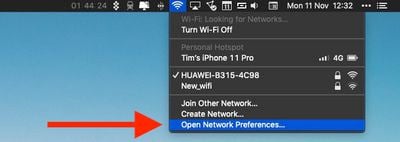
  1. Click the Wi-Fi icon in the top-right corner of the Mac menu bar.
  2. Select Open Network Preferences....
    wi-fi Mac

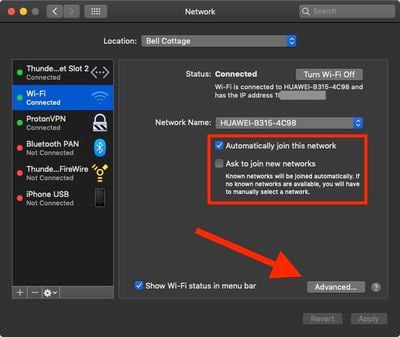
  3. Click Advanced.
    mac wifi network preferences

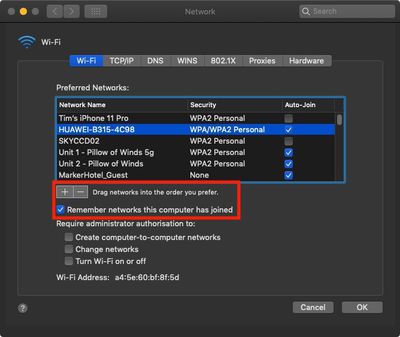
  4. Click a network in the list to select it. (To select multiple networks, hold the Command key while clicking them.) You can also drag networks higher up the list to prioritize them over other local networks.

  5. Click the minus ("") icon below the list to forget the selected network.
    3how to forget wireless networks on mac

Note that in the main Network pane of System Preferences there are two checkboxes. The first allows you to specify whether your Mac is allowed to automatically join the currently connected network, while the second allows you to force your Mac to ask you before it joins new networks.


Popular Stories

MacBook Neo Feature Pastel 1

First MacBook Neo Benchmarks Are In: Here's How It Compares to the M1 MacBook Air

Thursday March 5, 2026 4:07 pm PST by
Benchmarks for the new MacBook Neo surfaced today, and unsurprisingly, CPU performance is almost identical to the iPhone 16 Pro. The MacBook Neo uses the same 6-core A18 Pro chip that was first introduced in the iPhone 16 Pro, but it has one fewer GPU core. The MacBook Neo earned a single-core score of 3461 and a multi-core score of 8668, along with a Metal score of 31286. Here's how the...
MacBook Neo Feature Pastel 1

Apple Announces $599 'MacBook Neo' With A18 Pro Chip

Wednesday March 4, 2026 6:15 am PST by
Apple today announced the "MacBook Neo," an all-new kind of low-cost Mac featuring the A18 Pro chip for $599. The MacBook Neo is the first Mac to be powered by an iPhone chip; the A18 Pro debuted in 2024's iPhone 16 Pro models. Apple says it is up to 50% faster for everyday tasks than the bestselling PC with the latest shipping Intel Core Ultra 5, up to 3x faster for on-device AI workloads,...


Multicolored Low Cost A18 Pro MacBook Feature

Apple Accidentally Leaks 'MacBook Neo'

Tuesday March 3, 2026 7:00 am PST by
Apple appears to have prematurely revealed the name of its rumored lower-cost MacBook model, which is expected to be announced this Wednesday. A regulatory document for a "MacBook Neo" (Model A3404) has appeared on Apple's website. Unfortunately, there are no further details or images available yet. While the PDF file does not contain the "MacBook Neo" name, it briefly appeared in a link...