Is Your macOS Catalina Install Stuck? Here's How to Fix It - MacRumors
Skip to Content

Is Your macOS Catalina Install Stuck? Here's How to Fix It

by

Apple on Monday released macOS Catalina to the public, allowing everyone to install the newest version of the operating system for the Mac.

Based on reports on the MacRumors forums, Twitter, and other social networks, some people are running into a specific problem - an installation that hangs.
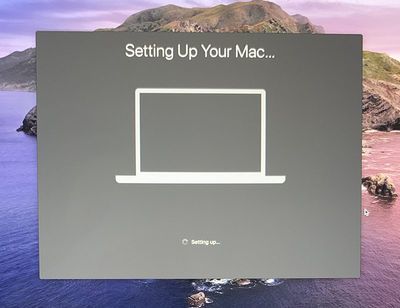
settingupyourmacstuck

Image via MacRumors reader xodbox

After downloading macOS Catalina and installing from the Mac App Store, some people have seen the installation process stop right at the "Setting Up Your Mac..." screen, and even after waiting for hours, it doesn't resolve.

Luckily, there appears to be a super simple fix for this issue: Just restart. Hold down the power button on your Mac until it turns off, and then power it back on.

Based on reports from MacRumors readers, this fix will send you to the login screen or to your desktop.

After the Mac gets to the "Setting Up Your Mac..." screen, the macOS Catalina installation is largely complete. We don't recommend restarting right away, but if sits at that screen for a half hour or more, shut it down because it's not going to resolve on its own.

The macOS Catalina installation takes some time so don't restart ahead of when the setup screen pops up, but based on a multitude of reports, resetting in this way if it gets stuck appears to be a safe way of getting your Mac up and running again.

Related Forum: macOS Catalina

Top Rated Comments

machpost Avatar
84 months ago
Nope. This is all I needed to see to decide that it's going to be a long time before I upgrade to Catalina.
Score: 15 Votes (Like | Disagree)
84 months ago

Really? Thats a shame because its a rather minor issue, and the OS itself is really cool.
If the install process is that buggy it doesn’t exactly inspire confidence does it?
Score: 11 Votes (Like | Disagree)
Morgenland Avatar
84 months ago
Adobe took its latest stand-alone version Photoshop CS6 off the market in January. The 64-bit application worked under Mojave in 64-bit limited mode, I had tested it too.
But it doesn't work under Catalina anymore.

Since I don't think Adobe's current software rental is cool, I've basically separated from the company. I'm glad that there are professional others with same or better features, e.g. Affinity.


Attachment Image
Score: 5 Votes (Like | Disagree)
Expos of 1969 Avatar
84 months ago
Great work Apple :confused:
Score: 4 Votes (Like | Disagree)
sugargliderdude Avatar
84 months ago
Going to wait until next year to install Catalina....
Score: 3 Votes (Like | Disagree)
84 months ago
The fact that all the 32bit apps are not supported is a big NO for me to update.
Score: 3 Votes (Like | Disagree)

Popular Stories

iOS 26

iOS 26.4 Adds Two New Features to CarPlay

Tuesday March 24, 2026 1:55 pm PDT by
iOS 26.4 was released today, and it includes a couple of new features for CarPlay: an Ambient Music widget and support for voice-based chatbot apps. To update your iPhone 11 or newer to iOS 26.4, open the Settings app and tap on General → Software Update. CarPlay will automatically offer the new features so long as the iPhone connected to your vehicle is running iOS 26.4 or later....
Apple Business hero

Apple Unveils 'Apple Business' All-in-One Platform

Tuesday March 24, 2026 8:53 am PDT by
Apple today announced Apple Business, a new all-in-one platform that unifies device management, productivity tools, and customer outreach features. The service is designed to be a consolidated replacement for several of Apple's existing business-focused offerings, including Apple Business Essentials, Apple Business Manager, and Apple Business Connect. It provides organizations with a single...
AirPods Pro Firmware Feature

Apple Releases New Firmware for AirPods Pro 3, AirPods Pro 2 and AirPods 4

Tuesday March 24, 2026 12:31 pm PDT by
Apple today released new firmware for the AirPods Pro 2, AirPods Pro 3, and the AirPods 4. The firmware has a version number of 8B39, up from 8B34 on the AirPods Pro 3, 8B28 on the AirPods Pro 2, and 8B21 on the AirPods 4. There is no word on what's included in the firmware, but Apple has a support document with limited notes. Most updates are limited to bug fixes and performance...