Skip to Content

How To Eject Water From Your Apple Watch Using the Water Lock Feature

by

Apple Watch Series 2 and newer models are water resistant and can be worn for shallow water activities like swimming in a pool or ocean, but that doesn't mean water can't get inside.
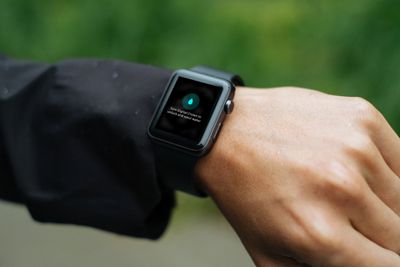
water lock apple watch
If your Apple Watch gets wet in the rain or after a swim or a heavy workout, its speaker may sound muffled. There's no need to insert anything into the openings though, and you don't need to shake your watch to remove any water that may have got inside.

‌Apple Watch Series 2‌, Series 3, Series 4 and Series 5 include a Water Lock feature, which locks the screen so you can swim without activating it. You can also use this feature at any time to eject water out of the speaker holes and prevent moisture from causing long-term issues.

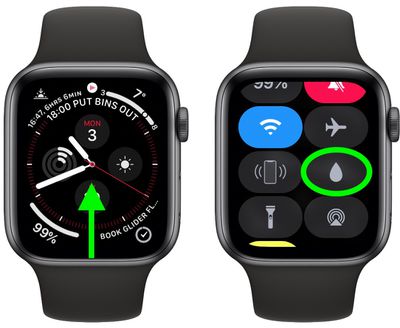
To manually clear water from Apple Watch, follow these quick steps.

  1. Bring up the Control Center on your ‌Apple Watch‌: Swipe up on a watch face, or when in an app, press the bottom edge of the screen then drag up the Control Center.
  2. Tap the Water Lock icon (it looks like a water droplet).
    Apple Watch

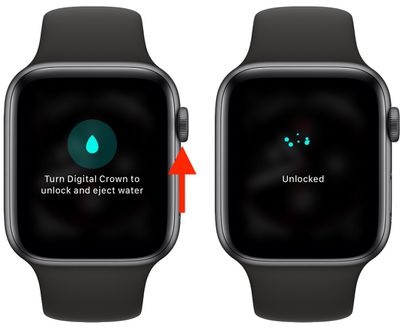
  3. When you're back in a dry environment, press and hold the Digital Crown to unlock the screen and clear water from the speaker.
    Apple Watch

As you turn the Digital Crown, you'll hear noises and see an animation on the screen that will indicate when the speaker is clear of water and when the process is complete.


Related Roundup: Apple Watch 11
Buyer's Guide: Apple Watch (Neutral)

Popular Stories

Apple Event Logo

Apple Released Seven New Products Today

Wednesday March 11, 2026 7:05 am PDT by
Starting today, the seven new Apple products that were announced last week are available at Apple Stores and beginning to arrive to customers. The colorful MacBook Neo and all of the other new products are on display at most Apple Store locations around the world starting today. Apple Stores have inventory of the new products for both walk-in customers and Apple Store pickup, but...

ios 26 4 yellow

Everything New in iOS 26.4 Beta 4

Monday March 9, 2026 3:50 pm PDT by
Apple is continuing to test the iOS 26.4 beta, and the latest update is now available for developers and public beta testers. As testing goes on, there are fewer new features in each beta, but today’s release adds new emoji characters and a few other changes. New Emoji Apple added new emoji characters, including trombone, treasure chest, distorted face, hairy creature, fight cloud, orca,...
Apple MacBook Pro M4 hero

Apple Planning 'MacBook Ultra' With Touchscreen and Higher Price

Sunday March 8, 2026 8:05 am PDT by
Apple is planning to launch an all-new "MacBook Ultra" model this year, featuring an OLED display, touchscreen, and a higher price point, Bloomberg's Mark Gurman reports. Gurman revealed the information in his latest "Power On" newsletter. While Apple has been widely expected to launch new M6-series MacBook Pro models with OLED displays, touchscreen functionality, and a new, thinner design...