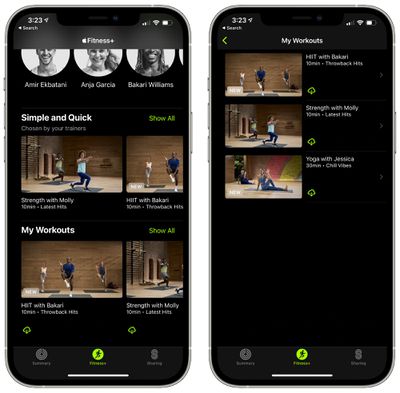
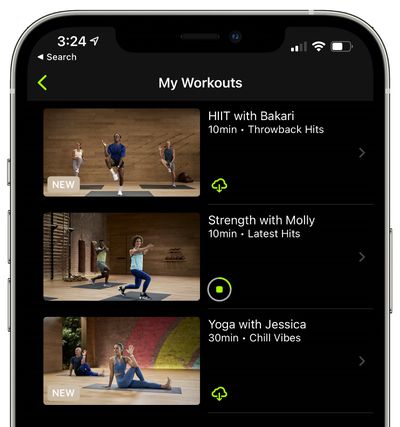
One of the perks of Fitness+ is the option to download Fitness+ videos to your library for offline viewing, a handy option if you're planning to travel somewhere that doesn't have an internet connection but you don't want to miss a workout.

First, you need to save the video that you want to download to your favorites by following the instructions in our how to on saving videos to a list. After that, downloading a video is simple.

  1. Open up the Fitness app on iPhone or iPad. On ‌iPhone‌, tap on the Fitness+ tab.
  2. From the main interface, scroll all the way down to "My Workouts" to access your saved workouts.
  3. Tap on "Show All." fitness plus download offline
  4. Tap on the iCloud button next to the video that you want to download. fitness plus downloaded

After that, the video that you downloaded will be available to watch even when there's no cellular or WiFi connection available. Videos that you've downloaded for offline viewing will have "Downloaded" listed next to them.

To delete a video, tap on the three dots in the top right corner of a video that you've downloaded and then choose the "Remove Download" option.
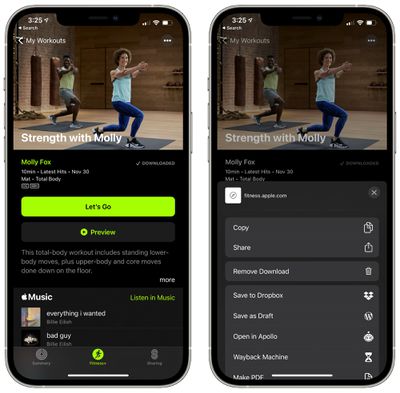
fitness plus remove downloaded video
For more on Fitness+, make sure to check out our full Fitness+ guide.

Popular Stories

iphone 16 apple intelligence

Apple Aiming to Release 'Breakthrough' New iPhone Accessory

Wednesday February 18, 2026 12:43 pm PST by
Apple is looking for a "breakthrough" with its push into wearable AI devices, including an "AirTag-sized pendant," according to Bloomberg's Mark Gurman. In a report this week, he said the pendant is reminiscent of the failed Humane AI Pin, but it would be an iPhone accessory rather than a standalone product. The pendant would feature an "always-on" camera and a microphone for Siri voice...
Multicolored Low Cost A18 Pro MacBook Feature

Low-Cost MacBook Expected on March 4 in These Colors

Wednesday February 18, 2026 5:42 am PST by
Apple will announce its rumored low-cost MacBook at its event on March 4, with the device coming in a selection of bold color options, according to a known leaker. Earlier this week, Apple announced a "special Apple Experience" for the media in New York, London, and Shanghai, taking place on March 4, 2026 at 9:00am ET. Posting on Weibo, the leaker known as "Instant Digital" said that the...
iphone 17 pro green

iPhone 17 Pro Max Curiously Becomes Most Traded-In Smartphone

Wednesday February 18, 2026 9:13 am PST by
New trade-in data indicates that Apple's iPhone 17 Pro Max has rapidly become the single most traded-in smartphone. According to a new report from SellCell, Apple's latest flagship iPhone has quickly risen to the top of the independent trade-in market, accounting for 11.5% of all devices appearing in the top-20 trade-in rankings just months after release. The analysis is based on SellCell...
CarPlay Liquid Glass Dark

iOS 26.4's New CarPlay Video Feature Shown in Action

Wednesday February 18, 2026 9:29 am PST by
Back at WWDC 2025, Apple revealed that it was planning to allow CarPlay users to watch video via AirPlay in their vehicles while they are not driving, and the first beta of iOS 26.4 suggests the feature may be nearing availability. There are several new references to CarPlay video streaming functionality within the iOS 26.4 beta's source code. The feature is not yet visible to users, but...
Dynamic Island iPhone 18 Pro Feature

10 Reasons to Wait for Apple's iPhone 18 Pro

Wednesday February 18, 2026 5:12 am PST by
Apple's iPhone development roadmap runs several years into the future and the company is continually working with suppliers on several successive iPhone models at the same time, which is why we often get rumored features months ahead of launch. The iPhone 18 series is no different, and we already have a good idea of what to expect for the iPhone 18 Pro and iPhone 18 Pro Max. One thing worth...