With iOS 16, Apple introduced a complete overhaul of the iOS Lock Screen, making it more customizable than ever and bringing widgets to the Lock Screen for the first time.
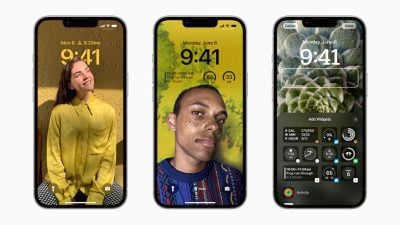
ios 16 lock screen customization
One of the new features is a new depth effect that works well with images of people in your Photo library. When you're creating a new Lock Screen, a "People" category suggests images of people that you've photographed that will work with the new depth effect.

On select images, the time will go under the person or object in the photo to create a layered look, similar to how Portrait mode photos look on the Apple Watch, and the results are often quite impressive.

Often, but not always. Sometimes the photo you use will have the depth effect automatically applied, but it may conceal too much of the time on your Lock Screen, or it may just look wrong. In that case, you can easily disable the depth effect. The following steps show you how it's done.

  1. Unlock your ‌‌iPhone‌‌ with Face ID or Touch ID.
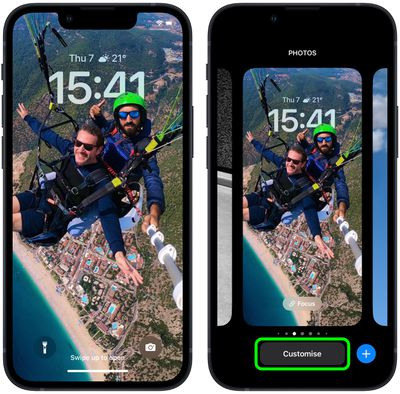
  2. Press and hold on the Lock Screen to enter the wallpaper gallery.
  3. Swipe if necessary to the Lock Screen wallpaper with the depth effect, then tap Customize.
    Lock Screen

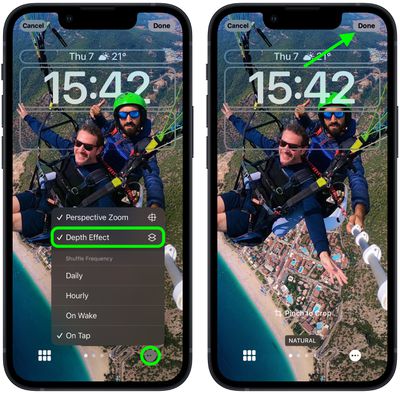
  4. Tap the ellipsis icon (three encircled dots) in the bottom-right corner.
  5. Tap Depth Effect to uncheck the option.
  6. Tap Done in the top-right corner when you've finished making changes.
  7. Tap the wallpaper again in the gallery to activate it.
    Lock Screen

That's all there is to it. Your chosen Lock Screen should now look as it should without the depth effect applied.


Popular Stories

m5 macbook pro deal

Why You Shouldn't Buy the Next MacBook Pro

Tuesday February 10, 2026 4:27 pm PST by
Apple is planning to launch new MacBook Pro models as soon as early March, but if you can, this is one generation you should skip because there's something much better in the works. We're waiting on 14-inch and 16-inch MacBook Pro models with M5 Pro and M5 Max chips, with few changes other than the processor upgrade. There won't be any tweaks to the design or the display, but later this...
iOS 26

Apple Releases iOS 26.3 and iPadOS 26.3

Wednesday February 11, 2026 10:07 am PST by
Apple today released iOS 26.3 and iPadOS 26.3, the latest updates to the iOS 26 and iPadOS 26 operating systems that came out in September. The new software comes almost two months after Apple released iOS 26.2 and iPadOS 26.2. The new software can be downloaded on eligible iPhones and iPads over-the-air by going to Settings > General > Software Update. According to Apple's release notes, ...
Apple Logo Zoomed

Apple Expected to Launch These 10+ Products Over the Coming Months

Tuesday February 10, 2026 6:33 am PST by
It has been a slow start to 2026 for Apple product launches, with only a new AirTag and a special Apple Watch band released so far. We are still waiting for MacBook Pro models with M5 Pro and M5 Max chips, the iPhone 17e, a lower-cost MacBook with an iPhone chip, long-rumored updates to the Apple TV and HomePod mini, and much more. Apple is expected to release/update the following products...
iPhone 16e Bottom Crop

Apple Reportedly Unveiling a New iPhone Next Week

Tuesday February 10, 2026 1:51 pm PST by
Apple plans to announce the iPhone 17e on Thursday, February 19, according to Macwelt, the German equivalent of Macworld. The report said the iPhone 17e will be announced in a press release on the Apple Newsroom website, so do not expect an event for this device specifically. The iPhone 17e will be a spec-bumped successor to the iPhone 16e. Rumors claim the device will have four key...
Apple Logo Black

Apple Acquires New Database App

Wednesday February 11, 2026 6:44 am PST by
Apple acquired Canadian graph database company Kuzu last year, it has emerged. The acquisition, spotted by AppleInsider, was completed in October 2025 for an undisclosed sum. The company's website was subsequently taken down and its Github repository was archived, as is commonplace for Apple acquisitions. Kuzu was "an embedded graph database built for query speed, scalability, and easy of ...