 Web browsing on your iPhone and iPad is designed to be a smooth and enjoyable experience, and not one cluttered by annoying ads, which can take up valuable screen space, slow down webpage loading times, and eat up valuable bandwidth. That's why Apple's Safari mobile browser includes native support for third-party content blockers.
Content blockers prevent ads like popups and banners from loading on websites you visit, and may also disable cookies, beacons, and the like to prevent online tracking and protect your privacy. Occasionally, however, they may insistently block a legitimate page element that you need access to on a particular webpage you regularly visit.
If you suspect that a content blocker you installed is disabling a useful webpage element, or you just want to disable all blocking for that specific website, here's how to turn it off.
- Launch Safari on your iOS device and navigate to the site in question.
- Tap the "aA" icon in the top-left corner of the screen to reveal the Website View menu.

- Tap Website Settings.
- Toggle the switch beside Use Content Blockers to the grey OFF position.
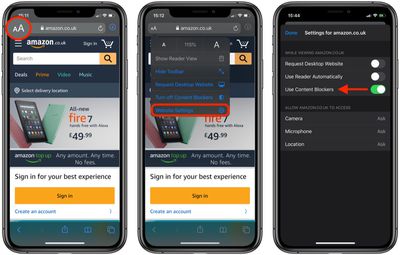
Alternatively, if you want to temporarily disable content blockers for all websites, simply tap Turn Off Content Blockers in the Website View menu.