How to Answer and Decline Calls With Powerbeats Pro - MacRumors
Skip to Content

How to Answer and Decline Calls With Powerbeats Pro

by

Apple's Beats-branded Powerbeats Pro earbuds feature integrated buttons and include beamforming microphones that allow you to answer incoming calls when you're wearing them and carry on a handsfree conversation. You can also hang up the call by using the physical buttons when the conversation is over, or even decline a call altogether. Here's how it works.
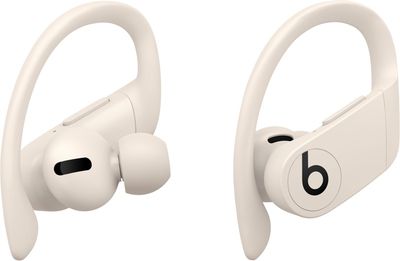
powerbeatsproivory
When you hear a ringing tone indicating an incoming call, simply press the multi-function "b" button on the outside of either earbud to answer. When you're finished, the action is the same -– just press the same button again to hang up the call.

If you want to decline an incoming call – if you're in the middle of an intense workout, say – simply press and hold the "b" button for a moment and then carry on as you were.

That's all there is to it, though you may also want to enable a setting to have your ‌Powerbeats Pro‌ announce who is calling. Instructions are available here.
Popular Stories

WWDC26 MR Live Coverage Article

WWDC 2026 Apple Event Live Keynote Coverage: iOS 27, Revamped Siri, and More

Monday June 8, 2026 9:15 am PDT by
Apple's Worldwide Developers Conference (WWDC) starts today with the traditional keynote kicking things off at 10:00 a.m. Pacific Time. MacRumors is on hand for the event and we'll be sharing details and our thoughts throughout the day. We're expecting to see a number of software-related announcements today, headlined by a reset on Apple's push into AI that should see a significant overhaul...
Aston Martin CarPlay Ultra Screen

Apple Says CarPlay Ultra is Coming to These Vehicle Brands

Thursday May 21, 2026 11:53 am PDT by
Last year, Apple launched CarPlay Ultra, the long-awaited next-generation version of its CarPlay software system for vehicles. Nearly a year later, CarPlay Ultra is still limited to Aston Martin's latest luxury vehicles, but that should change fairly soon. In May 2025, Apple said many other vehicle brands planned to offer CarPlay Ultra, including Hyundai, Kia, and Genesis. CarPlay Ultra...
ios 26 iphone 16 pro lock screen notifications feature 1

iOS 27 Notifications Will Slide in From Left Side of Your iPhone's Screen

Friday June 5, 2026 7:24 am PDT by
Bloomberg's Mark Gurman today revealed another iOS 27 change: notifications will slide in from the left side of the screen instead of from the top. In addition, accessing Notification Center on iOS 27 will require swiping down on the top-left corner of the screen. If you swipe down on the Dynamic Island area, a new "Search or Ask" interface tied to the revamped Siri will appear, instead of...