Stop Your iPhone Suppressing Background Audio in Videos - MacRumors
Skip to Content

Stop Your iPhone Suppressing Background Audio in Videos

by

In iOS, Apple's Audio Zoom feature automatically focuses your iPhone's microphones on whatever you've zoomed in on while recording video. It's great for isolating a subject in a noisy environment, but it can also strip away the ambient sound that can give your footage a broader context. Fortunately, iOS 26.4 adds a dedicated toggle for Audio Zoom so you can decide for yourself when it's truly required.
iphone 16 pro rear cameras

What Is Audio Zoom?

Audio Zoom is likely to be most useful if you're recording at a concert, sporting event, or any scenario where you want to isolate a specific sound source from a noisy environment. But what if you want to capture the full acoustic experience rather than just the subject you've zoomed in on? In those situations, the audio narrowing effect could risk making your video sound flat and unnatural.

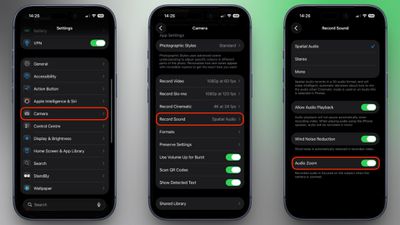
In iOS 26.4, Audio Zoom is on by default, but now you can also turn it off. If you haven't updated yet, head to Settings ➝ General ➝ Software Update on your iPhone to download the latest version. Once you're up and running, here's how to find the setting:

  1. Open Settings on your iPhone.
  2. Scroll down and tap Camera.
  3. Tap Record Sound.
  4. Toggle Audio Zoom on or off.

settings

Note that Audio Zoom only works when Spatial Audio or Stereo is selected as your recording format. If you've switched to Mono, the option will be grayed out.

If you shoot a lot of zoomed-in video and want the clearest possible audio of your subject, it's best to leave Audio Zoom enabled. But if you prefer capturing the full ambient soundscape of a scene regardless of zoom level, be sure to switch it off.


Top Rated Comments

hybrid_x Avatar
16 weeks ago
Why isn't this a toggle right in the camera interface?
Score: 4 Votes (Like | Disagree)
16 weeks ago

I keep wondering whether people who constantly film at concerts actually watch their footage afterwards. It's ALWAYS going to sound crap.
Maybe with a smartphone from 15 years ago. I've recorded many times at concerts and gotten great video and audio, and often rewatch those recordings to experience it again.
Score: 3 Votes (Like | Disagree)
DanteHicks79 Avatar
16 weeks ago

I keep wondering whether people who constantly film at concerts actually watch their footage afterwards. It's ALWAYS going to sound crap.
Speak for yourself. I am constantly amazed at how clear and great sounding the audio I've captured on my 15PM at concerts has been. Apple worked real magic when they coded the algorithms that process incoming sound. I would never have expected a consumer device, let alone a phone, be able to produce such spectacular sound.


Score: 2 Votes (Like | Disagree)
16 weeks ago

I keep wondering whether people who constantly film at concerts actually watch their footage afterwards. It's ALWAYS going to sound crap.
You don't have to immediately justify every memory saved. That's no different than the photo albums people saved before digital existed and was this convenient. Saved away, and then brought out decades later as a reminder or to show the next generation. It doesn't have to be perfect to have value.
Score: 2 Votes (Like | Disagree)
16 weeks ago
Good to give more control to the users. I like the audio zoom feature but will definitely update my phone and change the setting and see.
Score: 1 Votes (Like | Disagree)
DDustiNN Avatar
16 weeks ago

This is great! I had no idea this was a function, but I had noticed on my videos that sometimes the audio started to sound off / muffled / different than usual. I had chalked it up to thinking I started covering the mic up with my hand at certain points in the video, but this totally makes more sense! I frequently tap 2x quickly to zoom in on things, and then back to 1x as needed. I just went in and turned it off - better for my needs!
I turned off Spatial Audio a while back and that muffled sound stopped happening. But I did notice the focus happening, such as the music drowning out when I did a spinning shot of everyone’s flashlights on in an arena. So now I have turned that off as well.
Score: 1 Votes (Like | Disagree)

Popular Stories

iPhone 18 Pro Deep Red Feature

iPhone 18 Pro Launching in Two Months With These 12 New Features

Friday July 17, 2026 10:39 am PDT by
It is now mid-July, and that means the iPhone 18 Pro and iPhone 18 Pro Max are now just two months away. The devices are expected to look similar to the iPhone 17 Pro and iPhone 17 Pro Max, but there will still be many year-over-year changes, with rumored features including a smaller Dynamic Island, 5G via satellite, and more. Apple is expected to unveil the iPhone 18 Pro, iPhone 18 Pro Max, ...
iCloud General Feature Redux

Apple Raises iCloud+ Prices in 8 Countries

Friday July 17, 2026 11:56 am PDT by
Apple has increased the price of iCloud+ in Nigeria, Türkiye, Vietnam, Japan, Egypt, New Zealand, the Philippines, and Indonesia, according to an updated version of its iCloud support document. Price increases range from 11 percent to 55 percent depending on the plan and the country. Nigeria saw the biggest hike, and a 50GB plan is now ₦1,300, up from ₦900. Türkiye saw the next largest...
Apple AppleCare One Feature

'AppleCare One' is Now Even More Valuable

Saturday July 18, 2026 6:25 am PDT by
While the monthly and annual prices of AppleCare+ plans for Macs and iPads received a slight increase this week, AppleCare One continues to start at $19.99 per month in the U.S., making the multi-device plan even more valuable. Launched in July 2025, AppleCare One allows you to cover up to three devices as part of a single subscription for $19.99 per month, and additional devices can be...