


How to Choose an Image Size When Uploading a Photo in Safari for iOS - MacRumors
Skip to Content

How to Choose an Image Size When Uploading a Photo in Safari for iOS

by

ios7 safari iconWhen it comes to uploading an image to a website using your mobile device, you may be concerned about your data cap or the time the upload is going to take, especially if the original image is in a very high resolution.

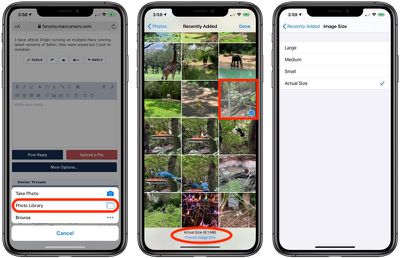
Happily, in the latest version of Safari for iOS 13, Apple has added an feature that lets you choose what size image to upload. The options include Actual Size, Large, Medium, and Small, and Safari provides the file size at the bottom of the display once you've selected one. Here's how it works.

  1. Select the option to upload an image on the website of your choosing.
  2. Tap Photo Library.
  3. Select the image in your library, then tap Choose Image Size at the bottom of the screen.
    how to safarifilesize

  4. Select Large, Medium, Small, or Actual Size, then tap to go back to your photo library.
  5. Tap Done in the top-right corner of the screen to upload the image.
Safari in iOS 13 offers a whole range of useful updates, from an updated start page to a new download manager. Check out our dedicated Safari guide to learn more.

Tag: Safari
Related Forum: iOS 13

Popular Stories

Apple Event Logo

Apple to Launch These 15+ New Products Later This Year

Friday March 27, 2026 2:03 pm PDT by
March has been an incredibly busy month for Apple, with the company unveiling more than 10 new products and accessories. We said hello to the MacBook Neo at the start of the month, and we bid farewell to the Mac Pro at the end of it. Nevertheless, there is still a lot more to come this year. Beyond the usual annual updates to iPhones and Apple Watches, Apple's all-new smart home hub is...
iOS 26

iOS 26.4 Adds Two New Features to CarPlay

Tuesday March 24, 2026 1:55 pm PDT by
iOS 26.4 was released today, and it includes a couple of new features for CarPlay: an Ambient Music widget and support for voice-based chatbot apps. To update your iPhone 11 or newer to iOS 26.4, open the Settings app and tap on General → Software Update. CarPlay will automatically offer the new features so long as the iPhone connected to your vehicle is running iOS 26.4 or later....
Mac Pro Feature Teal

Apple Confirms Mac Pro Is Dead, No Future Models Planned

Thursday March 26, 2026 2:04 pm PDT by
Apple has discontinued the Mac Pro and has removed the machine from its website, reports 9to5Mac. Apple said it does not plan to design a new version of the Mac Pro, and no new model will be coming in the future. The Mac Pro was last updated in 2023, which was when Apple added an M2 Ultra Apple silicon chip, but the chassis has not been refreshed since 2019. Apple redesigned the Mac Pro to...
















