Check Who's Using Your iPhone Hotspot Data - MacRumors
Skip to Content

Check Who's Using Your iPhone Hotspot Data

by

If you regularly share your iPhone's data connection with your laptop or iPad, or let family members piggyback on your device's data, you'll be glad to learn that Apple recently made it a lot easier to keep tabs on who's burning through your monthly allowance.
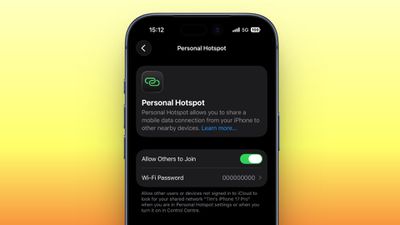
personal hotspot
In a welcome change with the release of iOS 26.4, Apple has moved Personal Hotspot data usage info out of its previous hiding spot and put it in a much more convenient location.

Before the latest update, Personal Hotspot's per-device breakdown was secreted away inside cellular settings, where it was easy to miss. Now it sits right inside the Personal Hotspot menu, making it way more practical for anyone on a capped data plan who's keen to keep an eye on usage.

Here's how to check it in iOS 26.4 (you can make sure your device is up-to-date via Settings ➝ General ➝ Software Update).

How to Check iPhone Hotspot Data Usage

  1. Open Settings on your iPhone.
  2. Tap Personal Hotspot.
  3. Below the "Maximize Compatibility" toggle, tap Data Usage.
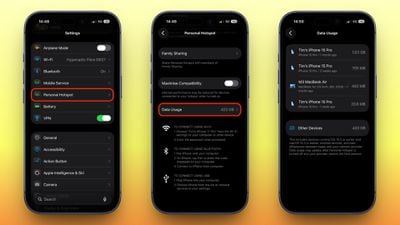
ios hotspot data usage

Here you'll see a list of connected devices along with how much data each one has consumed, as well as a total figure across all devices. Note that Apple devices running iOS 26.4 or macOS 26.4 appear individually by name, whereas Android phones, Windows PCs, and anything running older Apple software are grouped together under "Other Devices."

Bear in mind that the Data Usage option only appears if you've used Personal Hotspot recently. If you want, you can clear the figures and start tracking anew by heading to Settings ➝ Cellular/Mobile Service and resetting your overall cellular usage statistics (the option at the bottom). This wipes your hotspot numbers at the same time.


Top Rated Comments

17 weeks ago
Is it going to stop turning itself off arbitrarily?

Is it still going to sometimes just not show up arbitrarily?

Who's using the data isn't going to helpful if the connected devices aren't able to connect or stay connected.
Score: 9 Votes (Like | Disagree)
Will Co Avatar
17 weeks ago

You hit the nail directly on the head 3 times!! This Hotspot feature SUCKS and I and family members have tried it on iPhones 13-16 with various iOSes along with Apple and non-Apple devices trying to (stay) connect(ed) to it.

Complete garbage if you ask me.

Maybe the variability in usability is linked to the data provider. I have absolutely no problems with the feature here in the UK and I'm with EE. It's extremely reliable: I can connect my laptop and remain reliably connected throughout an entire 2 hour train journey or 3 hour car journey across the country.

There is a niggle, sometimes, with the Hotspot not showing up when you search for it. Used to do this all the time but over the years that's got better. Occasionally I need to wake up my iPhone and unlock it. That might just be me being impatient because I suspect what happens is that the iPhone periodically broadcasts the fact that the Hotspot is available to other Apple devices using some sort of low power BLE advertising packet, and unless my macBook has seen one recently, it doesn't show up. Presumably the macBook has to ping back a request for the phone to bring up the Hotspot, again to save battery. Perhaps this handshake is a little slow, and that's why I suspect it's just impatience. But it's very rare this affects me, and once connected, it's solid.


YMMV, I guess.
Score: 7 Votes (Like | Disagree)
17 weeks ago
I still don’t understand why Apple can’t give you more control over viewing the mobile data usage like letting you choose the dates
Score: 6 Votes (Like | Disagree)
eclipse01 Avatar
17 weeks ago
This is cool, definitely didn't know about the old location.
Score: 5 Votes (Like | Disagree)
17 weeks ago
How about a calendar feature to reset the monthly data counter on our cellular renewal day?

How about curbing some of the " system services " & miscellaneous " metrics " data that now approach like 1 GB a month? And I'm not even using my phone that much. > 800 MB in services ... of 3GB total used??
Score: 4 Votes (Like | Disagree)
17 weeks ago

OK, how do your think your phone could know what those devices are? It will be able to see their MAC addresses, but how would it be able to display more information than that if it did not have access to that information?
My wifi router is able to tell me a bit more than the MAC Address, such as the model of each of my smart devices. Surely Apple can glean some info like that, or AT LEAST split it out by MAC address.
Score: 4 Votes (Like | Disagree)

Popular Stories

iPhone 18 Pro Deep Red Feature

iPhone 18 Pro Launching Next Month With These 12 New Features

Thursday August 6, 2026 7:03 am PDT by
It is now August, and that means the iPhone 18 Pro and iPhone 18 Pro Max are just a month away. The devices are expected to look similar to the iPhone 17 Pro and iPhone 17 Pro Max, but there will still be many year-over-year changes, with rumored features including a smaller Dynamic Island, 5G via satellite, and more. Apple is expected to unveil the iPhone 18 Pro, iPhone 18 Pro Max, and a...
AirPods Ultra Mock

'AirPods Ultra' to Launch as Soon as Next Month

Friday August 7, 2026 10:58 am PDT by
Apple has been planning to release AirPods with cameras as early as this year, according to Bloomberg's Mark Gurman. If so, they could be unveiled as soon as September alongside the iPhone 18 Pro models and the long-rumored foldable iPhone. The earbuds are expected to have a design similar to the AirPods Pro 3, but with tiny cameras. Given the AirPods with cameras will likely be more...
dopamine

iOS 26 Gets First Jailbreak Thanks to Dopamine

Friday August 7, 2026 1:56 pm PDT by
After 326 days, iOS 26 has received its first jailbreak, thanks to the developers behind the popular Dopamine jailbreak. Lars Fröder, better known as opa334, today released Dopamine 3.0, which adds support for a number of newer firmware versions, including iOS 26.0 and iOS 26.0.1 on devices with A12 or A13 chips. Another major addition in today's release is support for all devices running...