Skip to Content

Apple Vision Pro: How to Screenshot or Record Your View

by

If you want to share what you see when you're wearing Apple Vision Pro, you can capture the entire view as an image, or alternatively, make a video recording. Keep reading to learn how.

Apple Vision Pro Digital Crown
On Vision Pro headsets, Apple has built in a function that lets you capture a still picture of your entire field of view that gets saved as an image file, making it convenient for sharing.

It works similarly to the way you take screenshots on iPhone and Apple Watch. Except with Vision Pro, everything you see is included, including your physical room, active Environments, and any apps you are using.

How to Capture Your View

Here are two different methods you can use to capture a still image of your view on ‌Apple Vision Pro‌.

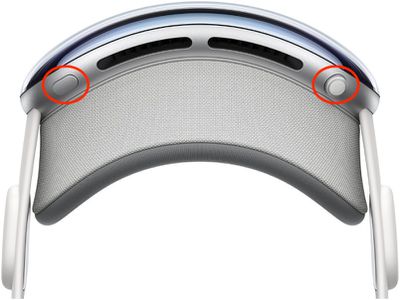
  • Simultaneously press the Digital Crown and the top button.
    apple vision pro screenshot

  • Say, "Siri, take a screenshot."

When you take a capture, it's automatically saved to Photos. Note that your view is obscured when entering a password or passcode.

How to Record Your View

You can also record a video clip of your view when wearing ‌Apple Vision Pro‌.

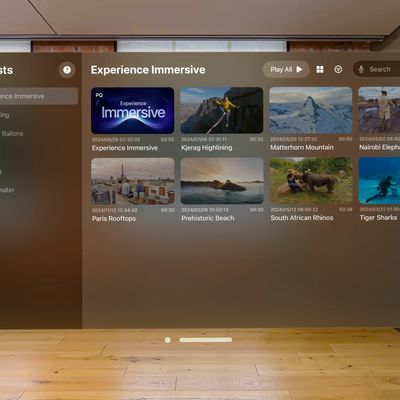
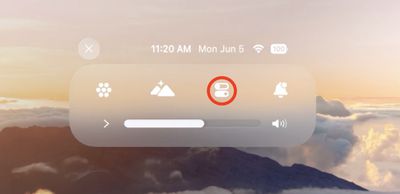
  1. Look up and tap the downward pointing chevron near the top of your view.
  2. Tap the Control Center button (the icon made up of two horizontal switches).
    control center

  3. Tap the Record button, and your recording will begin when the countdown ends.
    control center

  4. To stop recording, tap the Record button again or the red status bar at the top of your view, then tap Stop.
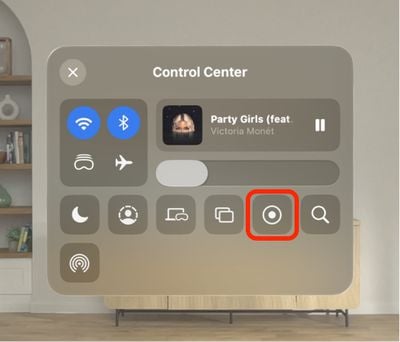
If you don't see the Screen Recording button in Control Center, go to Settings ➝ Control Center, then add the control in question and follow the above steps again.

Related Roundup: Apple Vision Pro
Buyer's Guide: Vision Pro (Buy Now)
Related Forum: Apple Vision Pro

Popular Stories

Multicolored Low Cost A18 Pro MacBook Feature

Apple Accidentally Leaks 'MacBook Neo'

Tuesday March 3, 2026 7:00 am PST by
Apple appears to have prematurely revealed the name of its rumored lower-cost MacBook model, which is expected to be announced this Wednesday. A regulatory document for a "MacBook Neo" (Model A3404) has appeared on Apple's website. Unfortunately, there are no further details or images available yet. While the PDF file does not contain the "MacBook Neo" name, it briefly appeared in a link...
imac video apple feature

Apple Unveils Two New Products

Monday March 2, 2026 7:49 am PST by
Apple today introduced two new devices, including the iPhone 17e and an updated iPad Air. iPhone 17e features the same overall design as the iPhone 16e, but it gains Apple's A19 chip, MagSafe for magnetic wireless charging and magnetic accessories, Apple's second-generation C1X modem for faster 5G, and a doubled 256GB of base storage. In the U.S., the iPhone 17e starts at $599, just like the ...
MacBook Neo Feature Pastel 1

Apple Announces $599 'MacBook Neo' With A18 Pro Chip

Wednesday March 4, 2026 6:15 am PST by
Apple today announced the "MacBook Neo," an all-new kind of low-cost Mac featuring the A18 Pro chip for $599. The MacBook Neo is the first Mac to be powered by an iPhone chip; the A18 Pro debuted in 2024's iPhone 16 Pro models. Apple says it is up to 50% faster for everyday tasks than the bestselling PC with the latest shipping Intel Core Ultra 5, up to 3x faster for on-device AI workloads,...