Some websites don't have a dedicated mobile app for accessing their content, but that doesn't mean you can't add bookmarks to favorite websites on your Home screen.
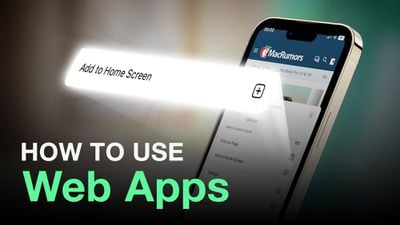
Creating a bookmark on your Home screen lets you use it as a one-tap portal to access specific online content, instead of having to open a browser and then select a bookmark or type in a website's URL address.
When you tap a website bookmark on your Home screen, it opens in Safari on the specific page you selected. If the site you're linking to has a dynamic mobile-friendly layout, accessing it from your Home screen can even become an app-like experience.
What's more, you can create as many website links as you like and arrange them on your iPhone or iPad Home screen, just like you would with regular apps. Here's how it works.
How to Create a Website Link on Your Home Screen
- Launch Safari on your iPhone or iPad.
- Navigate to the site that you want to create a Home screen shortcut to.
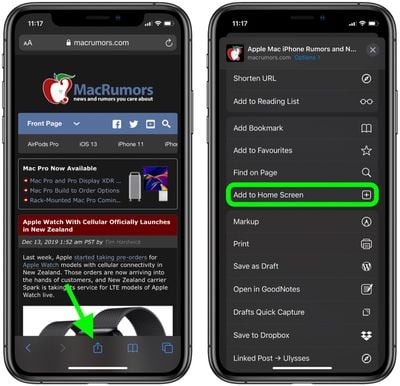
- Tap the Share icon (the square with an arrow pointing out of it) at the bottom of the screen.
- Scroll down to the list of actions and tap Add to Home Screen. (If you don't see the action, scroll to the bottom and tap Edit Actions, then tap Add next to the Add to Home Screen action. After that, you'll be able to select it from the Share Sheet.)

- Type a name for your site link. This will be the title that appears beneath its icon on your Home screen.
- Tap Add in the top-right corner of the screen.
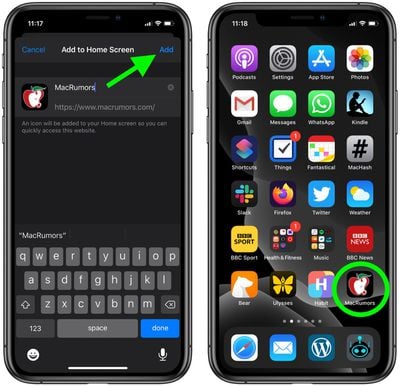
Your new "web app" will appear in the next available space on your device's Home screen. To move it like you would any other app, tap and hold its icon, then tap Edit Home Screen, and you'll be able to drag it to your desired location. When you've placed it where you want it, tap Done.