Apple is making more of an effort to turn the iPhone into a physical wallet replacement in iOS 27, and there are several upgrades to the Wallet app.
Pass Upgrades
Apple upgraded airline boarding passes in the Wallet app with iOS 26, and in iOS 27, upgrades are available for more types of passes. Memberships, gift cards, loyalty cards, and rewards cards can use a bolder "Poster Generic" card style with full background images, primary logo, header fields, footer field, primary fields, and an optional barcode.
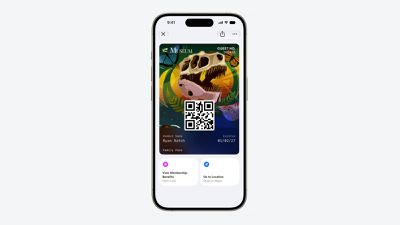
Each pass is able to include up to two actions that can be tapped from the bottom of the pass, such as getting directions to a venue or checking a rewards point balance.
Apple is also allowing users to check the pass issuer certificate to ensure that a digital pass is legitimate (not applicable to Create a Pass), and there are four new barcode types supported, including EAN–13, Code 39, Codabar, and ITF.
There is a new Pass Designer Mac app for developers that makes it easier to create a pass using a WYSIWYG editor.
Create a Pass
There's a "Create a Pass" feature in the Wallet app for adding tickets, memberships, and more using Visual Intelligence. If you have a ticket for an event and there's not a digital version available for the Wallet app already, you can create one using the physical pass.
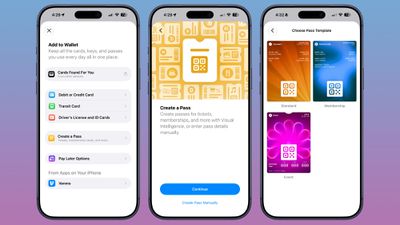
You can scan a pass and add it with Visual Intelligence if there's a barcode or QR code, or a pass can be added manually. Pass templates include Standard, Membership, and Event.
Each type includes relevant information like name, location, or admission type, along with a scannable code drawn from an included barcode or QR code that you take a photo of. There are 12 background colors to choose from with different texture options, or seven custom backgrounds for categories like theater, music, sports, and movies.
Fields can be added or removed as needed when creating a custom pass, with options like label, date, membership, contact, coupon code, VIN, insurance, and more, so most physical cards are able to be stored digitally.
Hotel Keys
When you add a digital hotel key from a participating hotel to the Wallet app, you can now view more details about the trip. Hotels can provide updates on booked activities and allow access to different services.
AI Bill Splitting
Using the new Siri Mode in the Camera app, or a feature in the Messages and Wallet apps, you can take a photo of a bill and use Apple Intelligence to figure out what each person owes. Visual Intelligence scans the receipt and makes a digital copy of everything on the list, and each person can select what they consumed. Tax and tip portions are also calculated automatically.
Payments can be made using Apple Cash, which is a U.S.-only feature.
Insights
iOS 27 includes an "Insights" feature where you can add financial accounts to the Wallet app to monitor spending.
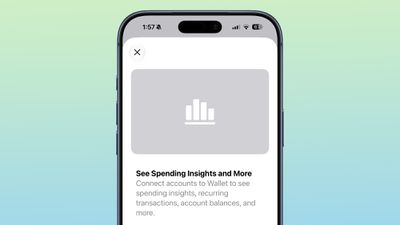
Insights is an expansion of the Connected Accounts feature in earlier versions of iOS, and it includes spending, recurring transactions, account balances, and more. It works for financial institutions that have implemented Connected Cards support, including several UK banks.
Order Tracking
Order tracking in the Wallet app expanded to Australia and Canada in iOS 27. In iOS 26, it was limited to the United States and UK.
Tap to Share
Tap to Share is an iOS 27 feature that lets customers connect to a participating merchant's iPhone for quicker digital checkout.
Device Requirements
Visual Intelligence is an Apple Intelligence feature requiring an iPhone 15 Pro or newer. Many of the other features should work on all iPhones.
Launch Date
iOS 27 is available to developers and public beta testers right now, and it is set to launch in September.