iOS 26: What's New With Notes and Reminders

Apple is updating almost all of its built-in apps with new features and design changes in iOS 26, including Notes and Reminders. Many of the changes to the apps are visual, but there is some useful new functionality available that you won't want to miss.
iOS 26 Notes and Reminders

Liquid Glass

The Notes and Reminders apps adopt the Liquid Glass design that's been introduced in ‌iOS 26‌. Signs of Liquid Glass are more subtle in these apps than apps like Camera, but everything looks a little different.
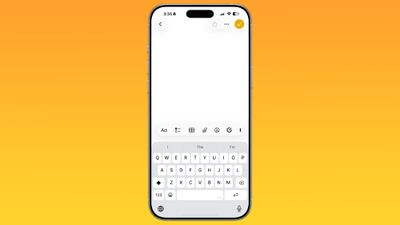
ios 26 notes app
The Notes app's toolbar has rounded corners and is more compact with a frosted glass look, and the keyboard also has rounded edges. Buttons at the top are circles or pills, with the Liquid Glass effect.

In Reminders, the different inbox sections are full color instead of white, and all of the various buttons are rounder than before with a translucent aesthetic. Interfaces for entering and editing reminders also have the rounded edges that are part of the new design.
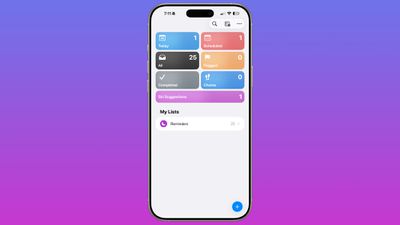
ios 26 reminders app

Reminders

The changes in the Reminders app go beyond simple design updates, with Apple introducing some useful new AI features. The new Reminders features require a device that supports Apple Intelligence.

Siri Suggestions

Apple added a Siri Suggestions section to the Reminders app, which will bring up items that you might want to add to your to-do lists that are found in conversations in Mail and Messages. Reminders is able to suggest tasks automatically, taking in information from notes, grocery items in a list, and more.
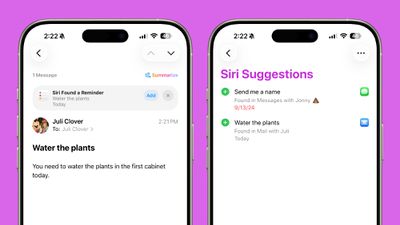
ios 26 reminders suggestions
You'll also see Reminder suggestions in apps like Mail, and you can tap these to add a reminder without opening the Reminders app.

Suggestions for reminders are contextual and personalized to each user, and are designed to make it easier to create reminders with fewer interactions. Apple says users will see suggestions for tasks, grocery items, and follow-ups based on emails and other text on the iPhone.

Automatic Categorization

The Reminders app is able to categorize related tasks into sections that are grouped together. If you need to pick up several items at the grocery store, for example, the Reminders app can aggregate these in one area.
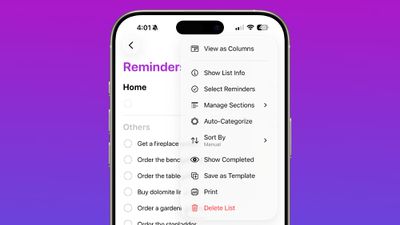
ios 26 reminders app categorize
If you have several work tasks and errands to run, the Reminders app is able to separate them out, so you don't need to spend time manually sorting your lists.

Control Center

There's now a Control Center option for creating a new reminder. You can use it from the Control Center, assign it to the Action Button, or access it from the Lock Screen by assigning it to one of the Lock Screen buttons.
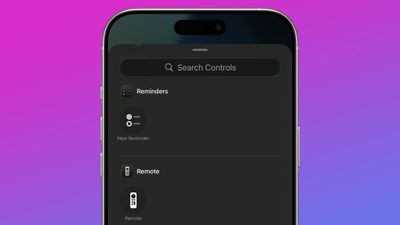
ios 26 reminders app control center

Notes

There are fewer updates in the Notes app in ‌iOS 26‌, but Apple made a couple of changes that will be useful to users.

Math Notes

Math Notes now supports creating 3D graphs using three-variable equations. An equation like z=sin(x2 + y2), for example, will create a ripple graph.
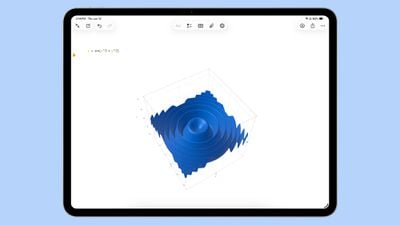
ios 26 math notes
Using this feature can be done by typing in an equation and then tapping on one of the variables. From there, choose the Insert 3D graph option. 3D graphs can be enlarged, resized, and moved using tap and drag gestures.

3D graphs are also supported in iPadOS 26, including with handwritten equations.

Scrolling Toolbar

You can now swipe along the toolbar in Notes to see all of the available tool options. Before, you had to tap into a tool section to get to all of the features. Even though swiping is an option to get to more tools, you can still tap to open different submenus for formatting, image generation, lists, tables, and more.
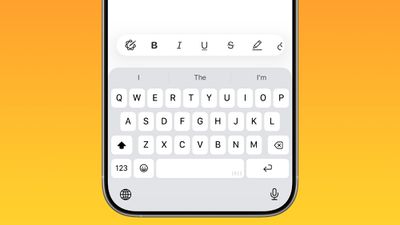
ios 26 notes app nav bar

Markdown

The Notes app supports exporting content in Markdown in ‌iOS 26‌, so you can save notes as Markdown (.md) files that can be imported into third-party apps that support Markdown. Writing in Markdown is not supported in the Notes app.
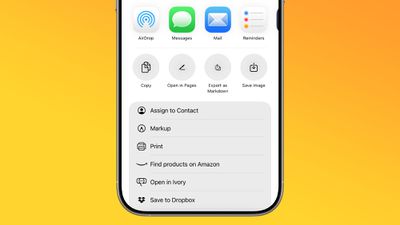
ios 26 notes app markdown

The Folders view of the Notes app now has an always-visible search bar at the bottom rather than a hidden bar that's accessible with a swipe from the top of the app.
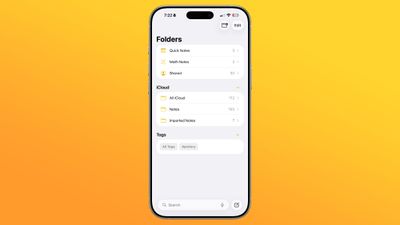
ios 26 notes app main view

Call Recordings

Conversations from the new Phone app on the iPad and the Mac can be saved as audio recordings with transcriptions in the Notes app. This was previously available on the ‌iPhone‌ in iOS 18, but with the Phone app expanding to new devices, the call recording functionality has expanded as well. Transcriptions require ‌Apple Intelligence‌.

Read More

We have an iOS 26 roundup that has more information on all of the new features that are available in ‌iOS 26‌.

Related Roundups: iOS 26, iPadOS 26
Related Forum: iOS 26

Popular Stories

iOS 26

iOS 26.4 and iOS 27 Features Revealed in New Leak

Friday December 12, 2025 10:56 am PST by
Macworld's Filipe Espósito today revealed a handful of features that Apple is allegedly planning for iOS 26.4, iOS 27, and even iOS 28. The report said the features are referenced within the code for a leaked internal build of iOS 26 that is not meant to be seen by the public. However, it appears that Espósito and/or his sources managed to gain access to it, providing us with a sneak peek...
Apple Logo Top Half

Early iOS 26 Software Leak Uncovers Dozens of Upcoming Apple Features

Monday December 15, 2025 3:05 pm PST by
Software from an iPhone prototype running an early build of iOS 26 leaked last week, giving us a glimpse at future Apple devices and iOS features. We recapped device codenames in our prior article, and now we have a list of some of the most notable feature flags that were found in the software code. In some cases, it's obvious what the feature flags are referring to, while some are more...
apple beta 26 lineup

Apple Leak Confirms Work on Foldable iPhone, AirTag 2, and Dozens More Devices

Monday December 15, 2025 2:05 pm PST by
Last week, details about unreleased Apple devices and future iOS features were shared by Macworld. This week, we learned where the information came from, plus we have more findings from the leak. As it turns out, an Apple prototype device running an early build of iOS 26 was sold, and the person who bought it shared the software. The OS has a version number of 23A5234w, and the first...
Apple Foldable Thumb

Leak Reveals Foldable iPhone Details

Monday December 15, 2025 9:09 am PST by
The first foldable iPhone will feature a series of design and hardware firsts for Apple, according to details shared by the Weibo leaker known as Digital Chat Station. According to a new post, via machine translation, Apple is developing what the leaker describes as a "wide foldable" device, a term used to refer to a horizontally oriented, book-style foldable with a large internal display....
iOS 26

iOS 26.3 Beta 1 Features: What's New So Far

Monday December 15, 2025 4:23 pm PST by
Apple is testing iOS 26.3, the next version of iOS 26 that will launch around January. Since iOS 26.3's testing is happening over the holidays, it is a smaller update with fewer features than we've seen in prior betas. We've rounded up what's new so far, and we'll add to our list with subsequent betas if we come across any other features. Transfer to Android Apple is making it simpler...
iOS 26

Apple Releases iOS 26.2 With Alarms for Reminders, Lock Screen Changes, Enhanced Safety Alerts and More

Friday December 12, 2025 10:10 am PST by
Apple today released iOS 26.2, the second major update to the iOS 26 operating system that came out in September, iOS 26.2 comes a little over a month after iOS 26.1 launched. ‌iOS 26‌.2 is compatible with the ‌iPhone‌ 11 series and later, as well as the second-generation ‌iPhone‌ SE. The new software can be downloaded on eligible iPhones over-the-air by going to Settings >...
iOS 26

iOS 26.2 Coming Soon With These 8 New Features on Your iPhone

Thursday December 11, 2025 8:49 am PST by
Apple seeded the second iOS 26.2 Release Candidate to developers earlier this week, meaning the update will be released to the general public very soon. Apple confirmed iOS 26.2 would be released in December, but it did not provide a specific date. We expect the update to be released by early next week. iOS 26.2 includes a handful of new features and changes on the iPhone, such as a new...
airpods max 2024 colors

AirPods Max 2 Likely to Offer These 10 New Features

Monday December 15, 2025 7:41 am PST by
Apple released the AirPods Max on December 15, 2020, meaning the over-ear headphones launched five years ago today. While the AirPods Max were updated with a USB-C port and new color options last year, followed by support for lossless audio and ultra-low latency audio this year, the headphones lack some of the features that have been introduced for newer generations of the regular AirPods and the ...

Top Rated Comments

TomaxXamot Avatar
22 weeks ago
I use the Notes app a lot and there are some bugs that have persisted for me for years that I wish they’d fix. Sometimes the toolbar is missing until I force quit. Find In Note is often unusable in my longer notes, like my gym log. I’ll search for a keyword and I’ll have to scroll and scroll to find the highlighted word. That ones drives me crazy. Sometimes the cursor is flashing between lines and then when I type it jumps up or down the page to some random place. Tapping on a longer note often has a delay before anything happens. I’m on an iPhone 15 Pro and it should be able to handle a text based app with ease.
Score: 8 Votes (Like | Disagree)
chriscl Avatar
22 weeks ago
Come on, you've missed maybe the biggest new thing in Notes - synchronisation with the Apple Watch, finally, after nearly ten years.

You can now sync and view your Notes on Apple Watch directly, which was never supported before, For me, this is a real game changer for Notes, and will ensure that I use it more in the future, because my needed Notes will always be on my Watch, too.
Score: 5 Votes (Like | Disagree)
mazz0 Avatar
22 weeks ago
All this graphing stuff seems really niche for what’s otherwise a very generalist app.
Score: 3 Votes (Like | Disagree)
ThrowerGB Avatar
22 weeks ago

I use the Notes app a lot and there are some bugs that have persisted for me for years that I wish they’d fix.

Long standing bugs will be brushed aside, and a lot will be about marketing focus.

Many of the changes to the apps are visual, but there is some useful new functionality
The first few comments address the problem Apple has with not fixing "persisting" and "Long standing bugs". @TomaxXamot does a good job of highlighting some really annoying bugs in Notes, and @Macbookey highlights some negative consequences of Apple's introduction of naming it's various OS's by year.
I wish MacRumors would pay as much attention as its readers. The topic comes up more and more in recent years. Instead, they ignore it completely as in this MacRumor.
Score: 2 Votes (Like | Disagree)
Will Co Avatar
22 weeks ago
So for the reminders app pretty much a complete nothing burger. I don’t use the AI/Siri stuff because it’s currently garbage. There are so many other simple little changes that would dramatically improve useability but what we’re getting is mostly just prettification. Not quite lipstick on a pig - Reminders is a useful app - but it could be so much better. I know there are paid options elsewhere but I think a good reminder/todo facility should be a built-in, and better than it currently is.
Score: 2 Votes (Like | Disagree)
FranApple Avatar
22 weeks ago
For those of you who use the Notes app, the lack of version history doesn’t bug you at all? That’s the single feature that I’m waiting for to jump back to the Notes app from a third party app.
Score: 2 Votes (Like | Disagree)