iOS 26.1 Features: Everything New in iOS 26.1

iOS 26.1 is the first major update to the iOS 26 software that came out in September, and it's now available for everyone. There are some useful new features in iOS 26.1 that address complaints about Liquid Glass and fix a longtime Lock Screen irritation.


We've complied a list of all of the new features in iOS 26.1, down to the tiniest interface change.

Liquid Glass Transparency Toggle

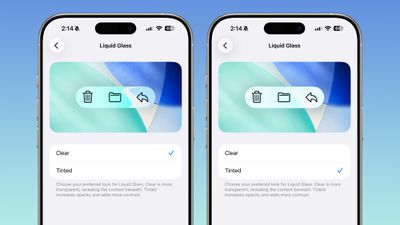
There is a new setting for customizing the look of Liquid Glass. You can now opt for a more tinted look that adds opacity.
ios 26 1 liquid glass opaque
Under Settings > Display and Brightness, there's a new option to switch between Clear or Tinted settings. Clear is more transparent and is the standard version of Liquid Glass that displays the background underneath buttons, menu bars, and other interface elements, while Tinted increases the opacity of Liquid Glass to improve contrast.

You'll see the most noticeable difference in apps and with Lock Screen notifications when Tinted mode is enabled.

Lock Screen Camera Swipe

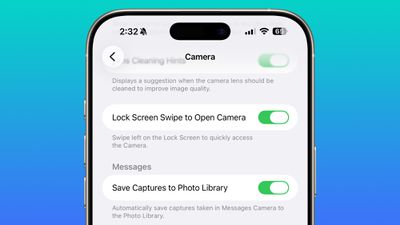
Apple finally added a way to turn off the Lock Screen gesture that opens the Camera app, which means no more accidentally turning on the camera when your iPhone is in your pocket.
lock screen swipe disable camera
In the Camera section of the Settings app, there's a Lock Screen Swipe to Open Camera setting, and turning it off disables the left swipe that opens the Camera app.

There was previously no way to turn off Lock Screen camera activation without disabling the camera app entirely.

Phone Haptics

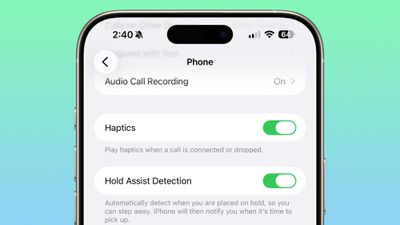
The Phone app includes a toggle to turn off haptic feedback when a call is connected or dropped, so if you find that little buzz irritating, you can now disable it.
ios 26 1 phone haptics

Alarms and Timers

Apple updated the interface of alarms and timers in iOS 26.1. There's now a Slide to Stop bar on the Lock Screen instead of a tap to stop button.

ios 26 1 slide to stop

You can still snooze an alarm with a tap on the oversized button, but to turn it off entirely, you need to use a slide gesture that requires more dexterity.

If you've accidentally dismissed an alarm while trying to tap the snooze button and then overslept, this will be a welcome change. Unfortunately, there is no option to choose to stick with the tap to stop button.

New Apple Intelligence Languages

Apple Intelligence is now available in Danish, Dutch, Norwegian, Portuguese (Portugal), Swedish, Turkish, Chinese (Traditional), and Vietnamese.

The new languages join English, French, German, Italian, Portuguese (Brazil), Spanish, Chinese (Simplified), Japanese, and Korean, opening up ‌Apple Intelligence‌ to more people.

AirPods Live Translation Languages

AirPods Live Translation works with additional languages in iOS 26.1, including Japanese, Korean, Italian, and Chinese (both Mandarin Traditional and Simplified).

At launch, Live Translation was limited to English (US, UK), French (France), German, Portuguese (Brazil), and Spanish (Spain).

You can translate to and from all of the above languages with the AirPods Pro 2, AirPods Pro 3, or AirPods 4 with ANC.

Apple Music

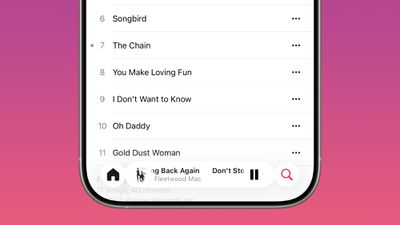
There's a hidden Apple Music gesture in iOS 26.1. You can swipe on the music player in the ‌Apple Music‌ app to switch songs. Just slide a finger over where the song title is listed, and it'll go to the next song or back to the previous song.
ios 26 1 apple music swipe

AirPlay

‌Apple Music‌ AutoMix now works over AirPlay, so you'll hear AutoMix transitions when playing music over ‌AirPlay‌ 2-compatible speakers.

Apple TV App

The Apple TV app has a new, more colorful icon that adopts the Liquid Glass aesthetic. The redesign coincides with Apple's decision to drop the "Plus" from its ‌Apple TV‌ streaming service. ‌Apple TV‌+ is now called ‌Apple TV‌ in the ‌Apple TV‌ app.

apple tv rebrand icon

Fitness App

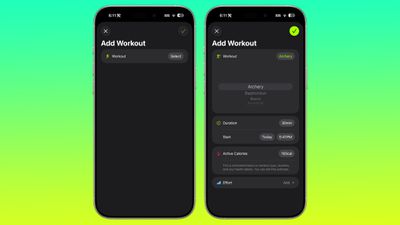
You can now create fully custom workouts in the Fitness app on ‌iPhone‌. There are options for selecting workout type, estimated Active Calories, effort, duration, and start time.
ios 26 1 custom workout

There were workout creation options before, but they were more structured than the open, custom creation options that are in iOS 26.1.

Settings App

Apple changed the alignment of icons and text in the Settings app. All settings with headers that feature text now have that text aligned to the left instead of center aligned. It's a small change that makes a big visual difference.
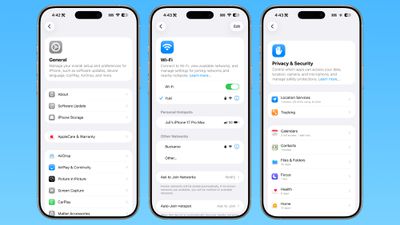
ios 26 1 left aligned settings
This includes General, Bluetooth, Wi-Fi, Cellular, Personal Hotspot, Accessibility, ‌Apple Intelligence‌, and more.

Home Screen Folders

When you tap into a folder on the Home Screen, the name of the folder at the top is left aligned instead of center aligned, matching the changes made in the Settings app.
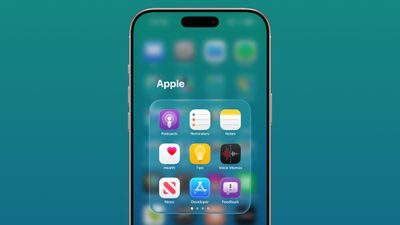
ios 26 1 folder alignment

Phone

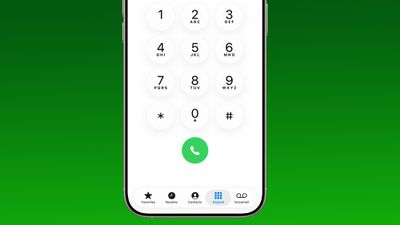
The Phone keypad now uses Liquid Glass for the numbers, fixing a visual issue present in ‌iOS 26‌.

ios 26 1 phone app keypad

Photos

The slider for scrubbing through videos in the Photos app has a new look.
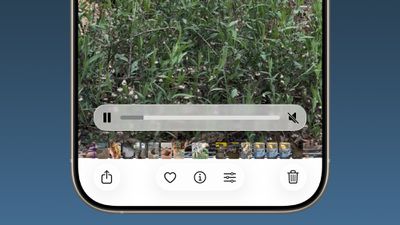
ios 26 1 photos app video

The ‌Photos‌ app navigation bar has a slightly more frosted look that makes it easier to see on light backgrounds.
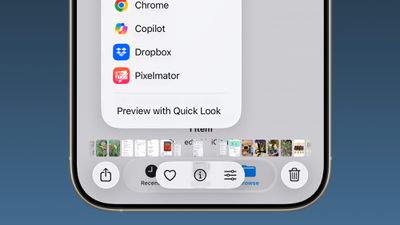
ios 26
The interface for managing multiple photos that you've selected has been tweaked slightly. Play as Slideshow, Favorite, and Hide have been relocated to the top of the menu.
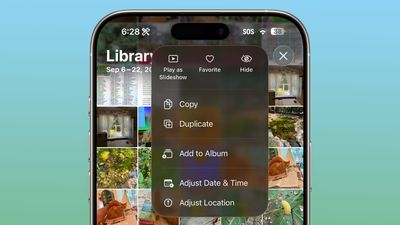
ios 26 1 photos app

Safari

The Tab Bar (Bottom) in Safari is wider with less padding around the edges, so there's less wasted space. In Reduce Transparency mode, there's more padding, so it no longer looks odd.
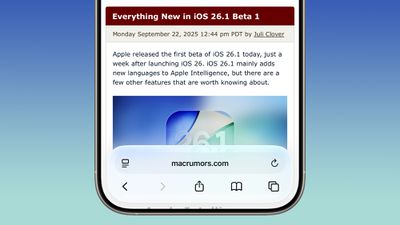
ios 26 1 safari bar

Background Security Improvements

The Privacy and Security section of the Settings app has a toggle to automatically download and install security improvements. It's a revamp of the prior Rapid Security Responses feature that allows Apple to provide security updates without having to offer a full new version of iOS.
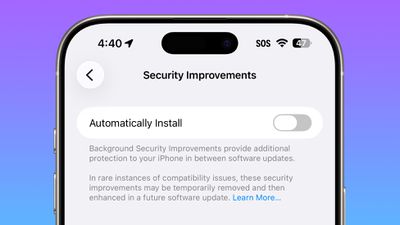
ios 26 1 security improvements

Display Settings

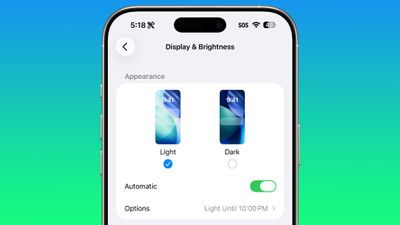
The Display section of the Settings app now has iOS 26-themed wallpaper instead of iOS 18 wallpaper, fixing an ‌iOS 26‌ oversight.

display brightness setting ios 26 1

Liquid Glass

The light refraction effect around apps is now more subtle with darker icon colors and background colors. It's a subtle change that most might not notice.

Wallpaper

When setting a wallpaper on the Lock Screen, instructions like Pinch to Crop show up momentarily and then disappear rather than being shown all the time, which gives a better view of your wallpaper when you're choosing how you want it to appear.
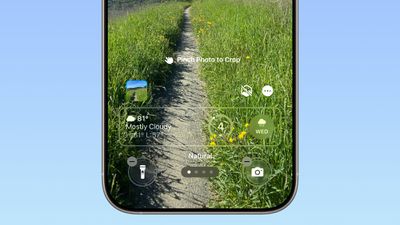
ios 26 1 wallpaper crop

Display Accessibility

Under the Display and Text Size section in the Accessibility settings, there is a "Display Borders" toggle. It adds a border to all buttons, and replaces the prior "Button Shapes" setting.

Local Capture Settings

There's an option to set a location in the Files app for audio and video recordings from calls. It's available by going to Settings > General > Local Capture.

External Microphones

There's an option to adjust input gain when using an external microphone with local capture.

FaceTime

FaceTime now supports improved audio quality in low-bandwidth conditions.

Communication Safety

Communication Safety and Web content filters that limit access to adult websites are not enabled by default for existing child accounts for ages 13-17.

iPadOS 26.1 - Slide Over

Many of the changes above are in iPadOS 26.1 too, and iPadOS 26.1 also includes major changes to multitasking. With iPadOS 26.1, Apple reintroduced Slide Over. Slide Over works alongside the window-based iPadOS 26 multitasking functionality, so you can have multiple windows open and still swipe over to quickly access a Slide Over app.

ipados 26 1 slide over
You can only have one Slide Over app at a time in iPadOS 26.1, and you can use the feature by tapping on the green window resizing button and toggling on Enter Slide Over.

The iPadOS 26.1 update also brings a Vision Pro app to the iPad.

Download iOS 26.1

You can get the update by opening up the Settings app, choosing the General section, and tapping on Software Update.

Compatibility

iOS 26.1 is available on all devices that are able to run ‌iOS 26‌, which includes the ‌iPhone‌ 11 and later along with the ‌iPhone‌ SE 2.

iPadOS 26.1 is available on all iPads able to run ‌iPadOS 26‌.

Related Roundups: iOS 26, iPadOS 26
Related Forum: iOS 26

Popular Stories

iOS 26

15 New Things Your iPhone Can Do in iOS 26.2

Friday December 5, 2025 9:40 am PST by
Apple is about to release iOS 26.2, the second major point update for iPhones since iOS 26 was rolled out in September, and there are at least 15 notable changes and improvements worth checking out. We've rounded them up below. Apple is expected to roll out iOS 26.2 to compatible devices sometime between December 8 and December 16. When the update drops, you can check Apple's servers for the ...
Intel Inside iPhone Feature

Apple's Return to Intel Rumored to Extend to iPhone

Friday December 5, 2025 10:08 am PST by
Intel is expected to begin supplying some Mac and iPad chips in a few years, and the latest rumor claims the partnership might extend to the iPhone. In a research note with investment firm GF Securities this week, obtained by MacRumors, analyst Jeff Pu said he and his colleagues "now expect" Intel to reach a supply deal with Apple for at least some non-pro iPhone chips starting in 2028....
ios 18 to ios 26 upgrade

Apple Pushes iPhone Users Still on iOS 18 to Upgrade to iOS 26

Tuesday December 2, 2025 11:09 am PST by
Apple is encouraging iPhone users who are still running iOS 18 to upgrade to iOS 26 by making the iOS 26 software upgrade option more prominent. Since iOS 26 launched in September, it has been displayed as an optional upgrade at the bottom of the Software Update interface in the Settings app. iOS 18 has been the default operating system option, and users running iOS 18 have seen iOS 18...
iOS 26

Apple Seeds iOS 26.2 and iPadOS 26.2 Release Candidates to Developers and Public Beta Testers

Wednesday December 3, 2025 10:33 am PST by
Apple today seeded the release candidate versions of upcoming iOS 26.2 and iPadOS 26.2 updates to developers and public beta testers, with the software coming two weeks after Apple seeded the third betas. The release candidates represent the final versions of iOS 26.2 and iPadOS 26.2 that will be provided to the public if no further bugs are found during this final week of testing....
Photos App Icon Liquid Glass

John Gruber Shares Scathing Commentary About Apple's Departing Software Design Chief

Thursday December 4, 2025 9:30 am PST by
In a statement shared with Bloomberg on Wednesday, Apple confirmed that its software design chief Alan Dye will be leaving. Apple said Dye will be succeeded by Stephen Lemay, who has been a software designer at the company since 1999. Meta CEO Mark Zuckerberg announced that Dye will lead a new creative studio within the company's AR/VR division Reality Labs. On his blog Daring Fireball,...
iOS 26

When Will Apple Release iOS 26.2?

Monday December 1, 2025 4:37 pm PST by
We're getting closer to the launch of the final major iOS update of the year, with Apple set to release iOS 26.2 in December. We've had three betas so far and are expecting a fourth beta or a release candidate this week, so a launch could follow as soon as next week. Past Launch Dates Apple's past iOS x.2 updates from the last few years have all happened right around the middle of the...
maxresdefault

iPhone Fold: Launch, Pricing, and What to Expect From Apple's Foldable

Monday December 1, 2025 3:00 am PST by
Apple is expected to launch a new foldable iPhone next year, based on multiple rumors and credible sources. The long-awaited device has been rumored for years now, but signs increasingly suggest that 2026 could indeed be the year that Apple releases its first foldable device. Subscribe to the MacRumors YouTube channel for more videos. Below, we've collated an updated set of key details that ...
ive and altman

Jony Ive's OpenAI Device Barred From Using 'io' Name

Friday December 5, 2025 6:22 am PST by
A U.S. appeals court has upheld a temporary restraining order that prevents OpenAI and Jony Ive's new hardware venture from using the name "io" for products similar to those planned by AI audio startup iyO, Bloomberg Law reports. iyO sued OpenAI earlier this year after the latter announced its partnership with Ive's new firm, arguing that OpenAI's planned "io" branding was too close to its...
iphone air camera

iPhone Air's Resale Value Has Dropped Dramatically, Data Shows

Thursday December 4, 2025 5:27 am PST by
The iPhone Air has recorded the steepest early resale value drop of any iPhone model in years, with new data showing that several configurations have lost almost 50% of their value within ten weeks of launch. According to a ten-week analysis published by SellCell, Apple's latest lineup is showing a pronounced split in resale performance between the iPhone 17 models and the iPhone Air....
iPhone 17 Pro Cosmic Orange

iPhone 17 Pro Lost a Camera Feature Pro Models Have Had Since 2020

Thursday December 4, 2025 5:18 am PST by
iPhone 17 Pro models, it turns out, can't take photos in Night mode when Portrait mode is selected in the Camera app – a capability that's been available on Apple's Pro devices since the iPhone 12 Pro in 2020. If you're an iPhone 17 Pro or iPhone 17 Pro Max owner, try it for yourself: Open the Camera app with Photo selected in the carousel, then cover the rear lenses with your hand to...

Top Rated Comments

sniffies Avatar
5 weeks ago
Nice changes, but I desperately need an option to make it super hard to trigger Home Screen edit wiggle mode.

Every time I handle my iPhone, it's somehow in the wiggle mode. Lost count of how many times I've accidentally rearranged or nearly deleted apps.

?

P.S. Lock Screen, too.
Score: 25 Votes (Like | Disagree)

bmark Avatar
5 weeks ago

This may shock you but implementing AI across 5 product lines and 2 dozen or so devices may be a process that takes a few years.

What people don't seem to understand is that Apple HAS shipped a ton of work on Apple Intelligence. The problem is almost none of it is user facing, and the stuff that is directly usable by end users is pretty lame. Now over the next few years they will build on that foundation and hopefully come up with something that's pretty good.
This may not shock you but Apple has failed for decades regarding Siri implementation across all their product lines. No once cares for their excuses. They are a 4 trillion dollar company for goodness sakes!
Score: 17 Votes (Like | Disagree)
bmark Avatar
5 weeks ago
iOS 26.1 is a cluster**** like usual! Apple should be embarrassed how bad their software development team has become.
Score: 12 Votes (Like | Disagree)
honus Avatar
5 weeks ago

If you've accidentally dismissed an alarm while trying to tap the snooze button and then overslept, this will be a welcome change. Unfortunately, there is no option to choose to stick with the tap to stop button.

Take a look at Settings -> Accessibility -> Touch -> Prefer Single-Touch Actions
Score: 11 Votes (Like | Disagree)
Dredd67 Avatar
5 weeks ago
This screen shows you everything that is currently wrong with the glass design. It's a visual mess.

Who thought this was a good interface? Even when approached objectively, it’s hard to read, difficult to understand, and a real pain to use.

Icons overlap, text is truncated, documents appear as nanoscopic miniatures, and the branding is obscure and unnecessary. What the hell is Quick Look, and why do I need to know about it? Wouldn’t “preview” suffice?

Trying to solve the problem of limited screen space by layering multiple UI levels on top of each other makes no sense on a 2D display. It might work in a VR device like the Vision Pro, but even then the random apps, commands, and icons create pointless clutter.

It’s time Apple looks beyond its bubble and acknowledges the growing disconnect between its products and users.

Attachment Image
Score: 11 Votes (Like | Disagree)
Zman5225 Avatar
5 weeks ago
Got super excited for a minute when I saw Liquid Glass toggle. I was hoping it was a toggle to turn it off completely.
Score: 9 Votes (Like | Disagree)