iPhone Duo: Open Two Apps Side by Side and Lock Them As an App Pair - MacRumors
Skip to Content

iPhone Duo: Open Two Apps Side by Side and Lock Them As an App Pair

by

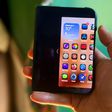
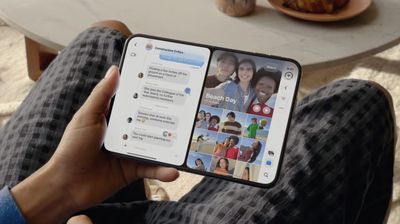
iPhone Duo is the first iPhone that can run two apps on the screen at the same time. Unfold the phone in landscape orientation, and Split View puts two apps side by side on the 7.6-inch inner display. It's especially handy for things like keeping Messages open next to Maps, or Safari next to Notes. Indeed, if there's an app combination that you use often, you can lock two together as an app pair, and they will always launch together. Here's how to do both.
iphone duo split screen scaled e1789143118947

Open Two Apps in Split View

The way it currently works, Split View can be invoked on the iPhone Duo's inner display in landscape orientation. Here are the two ways to start it.

From an App You're Already Using:

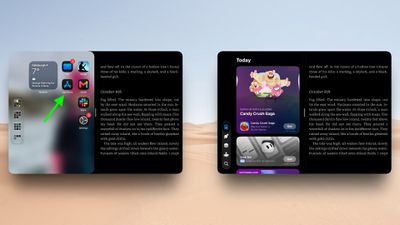
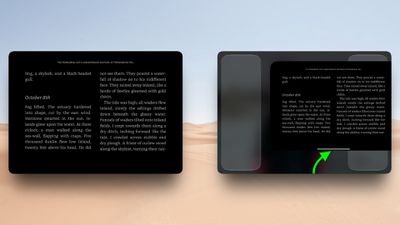
  1. Swipe up from the bottom of the screen, pause in the center, then keep dragging the app toward the left or right edge. The app will settle into that half of the screen, and the Home Screen will appear on the other half.
    kindle

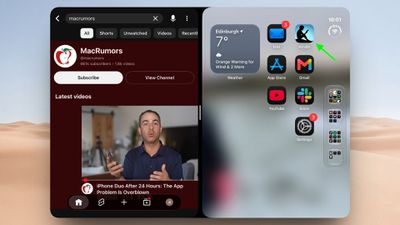
  2. Now select the second app you want to open. You can tap its icon from the Home Screen, swipe down to search for it, or swipe leftwards to find it in the App Library.
  3. Tap the second app, and it will appear alongside the first.
    app store

From the Home Screen or App Library:

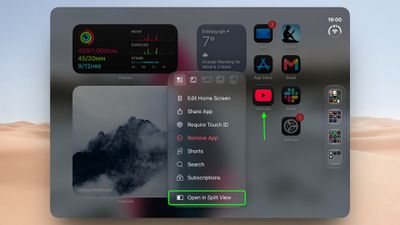
  1. Touch and hold an app icon, then tap Open in Split View.
    split view

  2. Tap the second app you want to open alongside it from the Home Screen, or using swipe-down search or the App Library.
    split view

We've found that in certain cases, two windows of the same app also work. Apps that support multiple windows include Safari, Mail, Notes and Files. Simply open the app in Split View, tap its icon again on the Home Screen or in App Library, and a second window opens beside the first. This way, you can have two webpages open at once, or your inbox next to a draft. It's pretty neat.

To swap the two apps around, just swipe up from the bottom of either app, pause in the center, then drag it to the opposite side.

Lock Two Apps as an App Pair

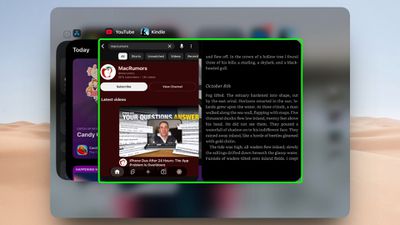
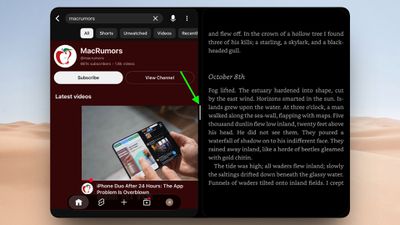
  1. With both apps open in Split View, tap the divider between them.
    lock pair

  2. There isn't really a second step – that's essentially it. The apps are now paired, and the next time you open either one, the other one will open with it automatically.
    locked pair

To unpair them at any time, just drag the divider in the center, all the way to the left or right edge of the screen. The app you push off will close, while the other will return to full screen.

Worth Knowing

Unlike in iPadOS, the app split on iPhone Duo is fixed at 50/50. So if you're used to Split View on iPad, remember that you can't drag the divider to give one app more room. Also, only one app can play audio at a time, so it's not like you can scroll two video feeds side by side and expect to get sound from both.
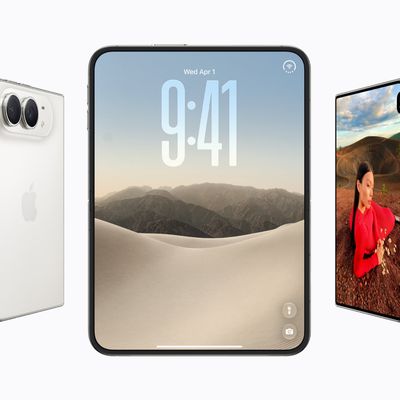
Related Roundup: iPhone Duo
Buyer's Guide: iPhone Duo (Buy Now)
Related Forum: iPhone

Top Rated Comments

BC2009 Avatar
3 weeks ago

I can’t deny that the iPhone Duo can be a handy and practical device, but definitely not $2k worth for me.

By the way, now that I’m seeing the video, I can tell that iPad OS 26 and its new multi-window interface was the foundation for the multi-tasking interface of the Duo.
Gruber calls the iPhone Duo's multitasking the best tablet multitasking by far -- saying it puts ALL iterations of the iPad multitasking to shame. I will be honest, I find iPad multitasking cumbersome and annoying and 99% of the time and leave it turned off. Very rarely when using the iPad Air with the Smart Keyboard (usually on vacation) I will turn on the multi-window multitasking and use my iPad kinda like a macBook. The only other iPad multitasking I ever found useful was the Split View with one app using like 1/3 of the screen and the other app taking 2/3 of the screen.
Score: 7 Votes (Like | Disagree)
sigmasirrus Avatar
3 weeks ago

Gruber calls the iPhone Duo's multitasking the best tablet multitasking by far -- saying it puts ALL iterations of the iPad multitasking to shame. I will be honest, I find iPad multitasking cumbersome and annoying and 99% of the time and leave it turned off. Very rarely when using the iPad Air with the Smart Keyboard (usually on vacation) I will turn on the multi-window multitasking and use my iPad kinda like a macBook. The only other iPad multitasking I ever found useful was the Split View with one app using like 1/3 of the screen and the other app taking 2/3 of the screen.
I wish they would bring back Split View. The new multitasking is so hard to use and a big step back.
Score: 5 Votes (Like | Disagree)
3 weeks ago

what happens to your pinned apps when you rotate to portrait? does it pick one to show? what if you rotate back to landscape? are they restored?
It will show the active app when you rotate to portrait. When flipped back to horizontal it will then show the two apps Side by side.
Score: 4 Votes (Like | Disagree)
code-m Avatar
3 weeks ago
AndroidOS, welcome to the multi-tasking iOS! Better late than never. 😅
Score: 3 Votes (Like | Disagree)
3 weeks ago

Gruber calls the iPhone Duo's multitasking the best tablet multitasking by far -- saying it puts ALL iterations of the iPad multitasking to shame. I will be honest, I find iPad multitasking cumbersome and annoying and 99% of the time and leave it turned off. Very rarely when using the iPad Air with the Smart Keyboard (usually on vacation) I will turn on the multi-window multitasking and use my iPad kinda like a macBook. The only other iPad multitasking I ever found useful was the Split View with one app using like 1/3 of the screen and the other app taking 2/3 of the screen.
The traffic lights are too small.
There’s gotta be a better way.
Score: 2 Votes (Like | Disagree)
code-m Avatar
3 weeks ago

I just want to see it fit in some pockets!
More surprised there is no body strap accessory. 😅
Score: 2 Votes (Like | Disagree)

Popular Stories

iphone duo standby

Apple Retail Staff Told to Warn Against iPhone Duo Walk-In Purchases

Saturday October 17, 2026 2:30 pm PDT by
Some Apple retail employees have been told to warn customers against visiting to purchase an iPhone Duo without a pre-order on Friday, October 23. Apple Store employees told MacRumors that they have been advised that there will likely be no iPhone Duo stock available for walk-in purchases on launch day. Staff have been instructed to discourage customers without pre-orders from coming in...
iPhone Duo Trio

Here's What Apple's Apps Look Like on the iPhone Duo

Tuesday October 20, 2026 11:12 am PDT by
With just three days to go until the iPhone Duo is released, Apple is getting ready for the launch. Behind the scenes, the App Store now has screenshots of Apple's built-in apps running on the Duo. We've seen some apps in marketing materials, but images of the ones we haven't seen give us an idea of what it will be like using the iPhone Duo day to day. Many apps are shown in landscape...
iphone duo screen crack in store

Crackgate? iPhone Duo Owners Report Screens Breaking Along the Hinge

Friday October 23, 2026 11:05 am PDT by
Some iPhone Duos are already experiencing hinge issues that cause display cracks, based on photos shared on Reddit and the MacRumors forums. Almost all of the display faults are right along the hinge, and most result in a line of bright pixels across one side of the screen. An iPhone Duo owner in Australia said his device cracked after being opened fewer than 20 times, and there was no...
Latest Stories
Disable Touch on MacBook Pro PROLED XDR and When Using Sidecar
12 minutes ago
Anker's Early Black Friday Sale Surprises With Mystery Boxes and Big Discounts
23 minutes ago
Apple Arcade Adding These Four Games in December
35 minutes ago
Amazon Begins Early Black Friday Sale, Featuring Sitewide Discounts on Tech and Decor
1 hour ago
OLED iPad Air Rumored to Launch in Two Sizes in Early 2027
3 hours ago
The Original iPod Went on Sale 25 Years Ago Today
3 hours ago
Apple Maps Could Factor Parking Into Your Arrival Time
4 hours ago
Waze Now Alerts Drivers to Nearby Cyclists Using Garmin LiveTrack
4 hours ago
iPhone 20 Pro: Ten Big Changes That Could Redefine Apple's Flagship
5 hours ago
Here's What Apple Fixed in iOS 27.2.1 and macOS 27.2.1
17 hours ago
Webex Gets iPhone Duo Support
18 hours ago
Meta's Muse AI Agent Comes to Apple Watch
18 hours ago
Anker Launches Eufy Security Cam With Auto-Tracking Light
19 hours ago
macOS 27.2.1 Fixes eMudhra Certificate Flaw in Command-Line Tools
20 hours ago
Anthropic Launches Claude Fable 5.2 and Mythos 5.2
21 hours ago
Apple Releases macOS Golden Gate 27.2.1
22 hours ago
Apple Releases iOS 27.2.1 With Bug Fixes
22 hours ago
Apple Releases watchOS 27.2.1 and visionOS 27.2.1 With Security Fixes
22 hours ago
Apple Watch Ultra 4 Gets $99 Amazon Discounts, Starting at $699.99
22 hours ago
Apple Pay Ad Features Martial Arts Convenience Store Food Fight
22 hours ago
Apple Continues to Say Some AI Features Will Have Fees for Extra Usage
23 hours ago
Apple Announces Türkiye Expansion Plans as Tim Cook Visits
1 day ago
Singapore Saved Apple $2.7 Billion in Taxes This Year
1 day ago
Apple Music's 2026 Artist of the Year is Olivia Dean
1 day ago
This Could Be Your Last Chance to Pre-Order the HomeView at a Discount
1 day ago
Some HomePod Mini 2 Buyers Returning Units Over Mac Speaker Issues
1 day ago
MacBook Pro With PROLED XDR Display: Details You Might Have Missed
1 day ago
Satechi Offers MacRumors Readers 30% Off Select Accessories in Early Black Friday Sale
1 day ago
Leaker Envisions a Shorter iPhone With a New iOS Layout
1 day ago
Apple to Give You More Control Over When Your Mac Passwords Lock
1 day ago