iOS 16.5 Features: Everything New in iOS 16.5

Apple today released iOS 16.5, the fifth major update to the iOS 16 operating system. iOS 16.5 is not as notable as some of the prior updates that we have seen, but there are some important bug fixes and feature additions.
iOS 16
This guide highlights all of the new features in the iOS 16.5 update.

Sports Tab in Apple News

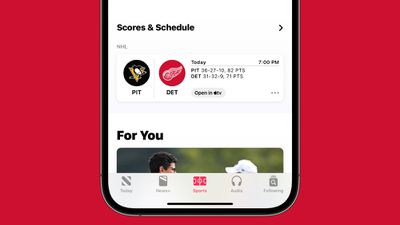
Apple added a dedicated Sports tab in Apple News, providing sports fans with quick access to stories, scores, standings, and other information. ‌Apple News‌ users can select their favorite teams and leagues to get personalized news.
apple news sports tab
Tapping on sports score and schedule cards in ‌Apple News‌ now goes directly to game pages populated with additional information about specific games.

Pride Collection Wallpaper

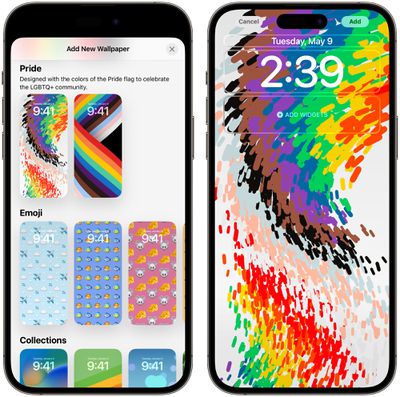
To go along with the new 2023 Pride Apple Watch Band and watch face, Apple has designed a Pride Celebration Lock Screen that is available in the iOS 16.5 update.
pride wallpaper ios 16 5

Bug Fixes

There are a number of bug fixes in the iOS 16.5 update, including fixes for Spotlight, Screen Time, and Podcasts.

  • Fixes an issue where Spotlight may become unresponsive
  • Addresses an issue where Podcasts in CarPlay may not load content
  • Fixes an issue where Screen Time settings may reset or not sync across all devices

Security Fixes

According to Apple's security support documents for iOS, the iOS 16.5 and iPadOS 16.5 updates fix a long list of vulnerabilities, including three security flaws that were known to be actively exploited. Two of these issues were addressed in the prior iOS 16.4.1 and iPadOS 16.4.1 Rapid Security Response updates and are not an issue if you were running iOS 16.4.1 (a), but a third vulnerability is still active until you install the new software.

The WebKit security flaw could allow an attacker to break out of the Web Content sandbox, an issue that Apple fixed with improved bounds checks. Apple says that it is aware of a report that this issue may have been actively exploited. The other two WebKit vulnerabilities were related to processing maliciously crafted web content that could allow for the disclosure of sensitive information or arbitrary code execution.

Other Features

Know of an iOS 16.5 feature that we left out of this guide? Let us know in the comments below.

Related Forum: iOS 16

Popular Stories

iPhone Top Left Hole Punch Face ID Feature Purple

iPhone 18 Pro Launching Later This Year With These 12 New Features

Thursday January 15, 2026 10:56 am PST by
While the iPhone 18 Pro and iPhone 18 Pro Max are not expected to launch for another eight months, there are already plenty of rumors about the devices. Below, we have recapped 12 features rumored for the iPhone 18 Pro models, as of January 2026: The same overall design is expected, with 6.3-inch and 6.9-inch display sizes, and a "plateau" housing three rear cameras Under-screen Face ID...
Apple MacBook Pro M4 hero

These 5 Apple Products Will Reportedly Be Upgraded With OLED Displays

Friday January 16, 2026 7:07 pm PST by
Apple plans to upgrade the iPad mini, MacBook Pro, iPad Air, iMac, and MacBook Air with OLED displays between 2026 and 2028, according to DigiTimes. Bloomberg's Mark Gurman previously reported that the iPad mini and MacBook Pro will receive an OLED display as early as this year, but he does not expect the MacBook Air to adopt the technology until 2028 at the earliest. A new iPad Air is...
Apple Wallet ID Illinois

Apple Plans to Expand iPhone Driver's Licenses to These 7 U.S. States

Friday January 16, 2026 12:12 pm PST by
In select U.S. states, residents can add their driver's license or state ID to the Apple Wallet app on the iPhone and Apple Watch, and then use it to display proof of identity or age at select airports and businesses, and in select apps. The feature is currently available in 13 U.S. states and Puerto Rico, and it is expected to launch in at least seven more in the future. To set up the...
iOS 27 Mock Quick

iOS 27 Will Add These 8 New Features to Your iPhone

Sunday January 18, 2026 3:51 pm PST by
iOS 27 is still many months away, but there are already plenty of rumors about new features that will be included in the software update. The first beta of iOS 27 will be released during WWDC 2026 in June, and the update should be released to all users with a compatible iPhone in September. Bloomberg's Mark Gurman said that iOS 27 will be similar to Mac OS X Snow Leopard, in the sense...
14 inch MacBook Pro Keyboard

MacBook Pro Buyers Now Facing Up to a Two-Month Wait Ahead of New Models

Sunday January 18, 2026 6:50 pm PST by
MacBook Pro availability is tightening on Apple's online store, with select configurations facing up to a two-month delivery timeframe in the United States. A few 14-inch and 16-inch MacBook Pro configurations with an M4 Pro chip are not facing any shipping delay, but estimated delivery dates for many configurations with an M4 Max chip range from February 6 to February 24 or even later. At...

Top Rated Comments

Rocko99991 Avatar
35 months ago
Those wallpapers are hideous.
Score: 39 Votes (Like | Disagree)

JonBOY26 Avatar
35 months ago
Users: "Apple, please stop adding new features and focus on fixing bugs!"

Apple: "here's some pride wallpapers"
Score: 30 Votes (Like | Disagree)
Baritone_Guy Avatar
35 months ago
Obligatory, why do we need an OS update for a Sports Tab and some wallpapers. I get it for the security stuff, but relying on an OS update to update apps is so old school.

Come on Apple.
Score: 25 Votes (Like | Disagree)
TheYayAreaLiving ?️ Avatar
35 months ago
The Weather Widget is still not fixed.

* The widget is reporting: Thunderstorm ⛈️
* When you open the weather app, it’s reporting: Mostly Sunny. ?️

Which one is correct? Frustrating and unreliable! At least iOS 16.5 got the temperature right. ??‍♀️

See below: ?


Attachment Image

Attachment Image
Score: 17 Votes (Like | Disagree)
mnsportsgeek Avatar
35 months ago
So ridiculous that in the year 2023 a software update is needed to push new wallpapers.
Score: 14 Votes (Like | Disagree)
sjsharksfan12 Avatar
35 months ago
I still don't think I understand how to use the Wallpapers on IOS. I want to change the wallpaper and it gives me an entirely new home screen where I have to place the widgets again. I'm kinda getting frustrated by it.
Score: 12 Votes (Like | Disagree)