iOS 15.1 Features: Everything New in iOS 15.1

Apple today released iOS 15.1, the first major update to the iOS 15 operating system that was released in September. iOS 15.1 introduces new features that were delayed from iOS 15 plus it adds camera improvements for iPhone 13 Pro users.
iOS 15
This guide highlights everything that's been added in the iOS 15.1 update.

SharePlay

Integrated into the FaceTime app, SharePlay is a feature that's designed to allow people to do more together virtually using ‌FaceTime‌. There are built-in options for listening to music with others with playlist sharing and watching TV and movies with syncing.

FaaceTime SharePlay iPhone Green Feature
There's also a SharePlay screensharing component for sharing what's on your ‌iPhone‌, iPad, or Mac with someone else, a feature great for group planning or assisting someone with device troubleshooting.

SharePlay was meant to be introduced as part of the initial iOS 15 update, but Apple had to delay it because it was buggy and not ready for release.

ProRes Video Capture (iPhone 13 Pro)

When the ‌iPhone‌ 13 Pro models launched, Apple promised that a high-quality ProRes video option would be coming in an update, and it has arrived in iOS 15.1.
settings
ProRes is a professional video recording format used by TV show, commercial, and movie creators, and the format offers higher color fidelity and less compression. ProRes support allows ‌iPhone‌ 13 Pro and Pro Max owners to capture, edit, and share professional-quality videos from their devices.

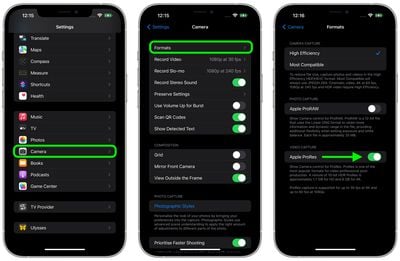
You can enable ProRes by going to the Camera section of the Settings app and tapping on "Formats." From there, toggle on "Apple ProRes."

ProRes video capture is limited to 30fps at 1080p on devices with only 128GB of storage, but higher capacity devices can record in 4K. Apple says that a one-minute 10-bit HDR ProRes video takes up 1.7GB of space when recorded in HD mode, or 6GB in 4K mode.

Auto Macro Toggle (iPhone 13 Pro)

For macro shots, the ‌iPhone‌ 13 Pro models switch over to the Ultra Wide lens when the ‌iPhone‌'s camera gets close to an object, which some people are not a fan of because it can be difficult to get a shot with the camera lenses swapping back and forth.
settings
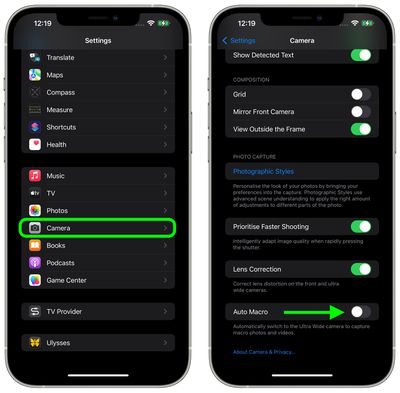
The iOS 15.1 update adds a new toggle to turn off Auto Macro, and when disabled, the Camera app will not automatically switch over to the Ultra Wide camera for macro photos and videos.

Auto Macro can be turned off in the Camera section of the Settings app by scrolling down and toggling off the "Auto Macro" option.

Lossless Audio and Dolby Atmos With Spatial Audio for HomePod

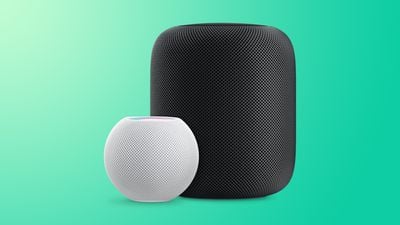
Paired with the HomePod 15.1 software, iOS 15.1 brings Lossless quality and Dolby Atmos Spatial Audio to the ‌HomePod‌ and the HomePod mini.

HomePodandMini feature green
Lossless audio and Dolby Atmos can be enabled through the Home app. Open up Home Settings, tap on your profile, and then under Media, tap on Apple Music. From there, toggle on Lossless Audio and Dolby Atmos.

Vaccine Cards in the Wallet App

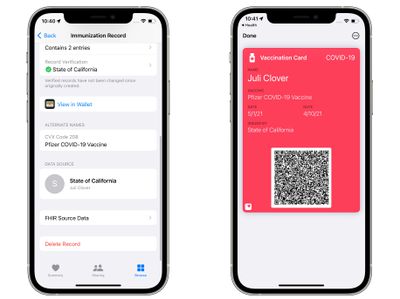
‌iPhone‌ users who have added their COVID-19 vaccination records to the Health app on the ‌iPhone‌ can now use those records to generate a vaccination card in the Wallet app. The Apple Wallet vaccination card can be shown to businesses, venues, restaurants, and more that are requiring vaccines for entry.
vaccine card ios 15 1
Any vaccination record available through the SMART Health Cards specification can be added to the Health app and transferred to Wallet.

California, Louisiana, New York, Virginia, Hawaii, and some Maryland counties support Smart Health Cards, as do Walmart, Sam's Club, and CVS Health. So those in the specific supported states should be able to look up their information in state databases, but those who were vaccinated through companies like Walmart and CVS can also add their information to the Health and Wallet apps because it's the same system.

Home App

There are new automations triggers that can be created based on HomeKit-enabled sensors that detect humidity, air quality, or light level.

Shortcuts

Shortcuts includes new actions for overlaying text on images or GIFs, and there are new Siri games.

iPhone 12 Battery Algorithms

For ‌iPhone‌ 12 models, there are updated battery algorithms that will offer better estimates of battery capacity over time.

iPad Live Text

On the ‌iPad‌, the update adds the above listed features and support for Live Text in the Camera app. With Live Text, the Camera can detect text, phone numbers, addresses, and more, with the feature available on iPads that have an A12 Bionic chip or later. Live Text was already available on the ‌iPhone‌.

Bug Fixes

The update includes several bug fixes for issues with Photos storage, the Weather app, the Wallet app, Wi-Fi, and more.

- ‌Photos‌ app may incorrectly report storage is full when importing photos and videos
- Weather app may not show current temperature for My Location, and may display colors of animated backgrounds incorrectly
- Audio playing from an app may pause when locking the screen
- Wallet may unexpectedly quit when using VoiceOver with multiple passes
- Available Wi-Fi networks may not be detected

Guide Feedback

Know of an iOS 15.1 feature we left out or want to offer feedback on this guide? Send us an email here.


Related Forum: iOS 15

Popular Stories

Low Cost MacBook Feature A18 Pro

Apple Is Expected to Launch These Four MacBooks in 2026

Friday January 9, 2026 8:17 am PST by
2026 could be a bumper year for Apple's Mac lineup, with the company expected to announce as many as four separate MacBook launches. Rumors suggest Apple will court both ends of the consumer spectrum, with more affordable options for students and feature-rich premium lines for users that seek the highest specifications from a laptop. Subscribe to the MacRumors YouTube channel for more videos. ...
iPhone Top Left Hole Punch Face ID Feature Purple

10 Reasons to Wait for This Year's iPhone 18 Pro

Thursday January 8, 2026 2:56 am PST by
Apple's iPhone development roadmap runs several years into the future and the company is continually working with suppliers on several successive iPhone models at the same time, which is why we often get rumored features months ahead of launch. The iPhone 18 series is no different, and we already have a good idea of what to expect for the iPhone 18 Pro and iPhone 18 Pro Max. One thing worth...
iOS 18 Siri Personal Context

Apple Confirms Google Gemini Will Power Next-Generation Siri This Year

Monday January 12, 2026 7:38 am PST by
In a statement shared with CNBC today, Apple confirmed that Google Gemini will power the next-generation version of Siri that is slated to launch later this year. "After careful evaluation, we determined that Google's technology provides the most capable foundation for Apple Foundation Models and we're excited about the innovative new experiences it will unlock for our users," the statement...
iOS 18 Siri Personal Context

Elon Musk Reacts to Apple and Google Teaming on Gemini-Powered Siri

Monday January 12, 2026 11:38 am PST by
Elon Musk today expressed concern about Apple and Google partnering on a more personalized version of Siri powered by Google's generative AI platform Gemini. "This seems like an unreasonable concentration of power for Google, given that [they] also have Android and Chrome," wrote Musk, in a post on X. Musk serves as CEO of xAI, the company behind Gemini competitor Grok. It is unlikely...
iOS 26

Here's What's New in iOS 26.3 So Far

Monday January 12, 2026 1:15 pm PST by
Apple today seeded the second beta of iOS 26.3, nearly a month after the first beta. So far, the update includes a couple of new features for iPhones. iOS 15.3 through iOS 18.3 were all released in late January over the years, so it is thereby likely that iOS 26.3 will be released towards the end of this month as well. The update is compatible with the iPhone 11 series and newer. Below,...
proposed unicode emoji 18%402x

Squinting Face, Pickle, and Lighthouse Among New Emoji Coming to iOS

Friday January 9, 2026 4:24 am PST by
The Unicode Consortium has published a draft list of emoji that could come to smartphones and other devices in the future. The list shared by Emojipedia outlines 19 emoji candidates under consideration for Emoji 18.0, which is expected to be finalized in September 2026. Among the proposed additions are a squinting face emoji, left- and right-pointing thumb gestures, a pickle, a lighthouse, a ...
Apple Intelligence iPhone 16

Google Gemini Partnership With Apple Will Go Beyond Siri Revamp

Monday January 12, 2026 8:48 am PST by
Apple and Google today announced that Google Gemini will help power not only a more personalized version of Siri, but a range of future Apple Intelligence features. "Apple and Google have entered into a multi-year collaboration under which the next generation of Apple Foundation Models will be based on Google's Gemini models and cloud technology," the companies said, in a statement. "These...
apple homekit ios 18 5

Apple Reminding Users of Pending Home App Upgrade Requirement

Friday January 9, 2026 10:08 am PST by
Back in late 2022 and early 2023, Apple rolled out a new architecture for its Apple Home platform to deliver improved performance and compatibility, although the rollout came with some hiccups that forced Apple to pull and later re-release the upgrade. Three years later, Apple is now on the verge of ending support for the old version of the Home architecture, which may result in access to...

Top Rated Comments

Turnpike Avatar
55 months ago
I keep watching for the battery % up in the top corner of the home screen now that the notch is smaller. I really hope it's coming in one of the next few updates.....
Score: 10 Votes (Like | Disagree)
southerndoc Avatar
55 months ago
How do you add vaccination status to the wallet app? I don't see an option (only apply for an Apple Card, add debit/credit card, and add a transit card).
Score: 6 Votes (Like | Disagree)
BWhaler Avatar
55 months ago
Nice update. Hope it stomps out a ton of bugs.

We need to start talking about how settings and options have gotten completely out of control. It’s MS in the 90’s territory.
Score: 6 Votes (Like | Disagree)
nattK Avatar
55 months ago

As far as Vaccine Cards in the Wallet App goes, it is hardly a feature when it is available in only a few states. The vast majority of people won’t have this.
Not necessarily. While only a handful of states use SMART health cards for their registry, you can still add your vaccinations to your wallet app as long as your doctor’s office or pharmacy uses them. I don’t live in a participating state that uses SMART health cards but since my doctor’s office uses Epic MyChart for EHR, I was able to add my vaccination records to my Wallet app.
Score: 6 Votes (Like | Disagree)
w5jck Avatar
55 months ago
As far as Vaccine Cards in the Wallet App goes, it is hardly a feature when it is available in only a few states. The vast majority of people won’t have this.
Score: 5 Votes (Like | Disagree)
cudi Avatar
55 months ago

I suspect it’s easier (especially with recovery mode and whatnot) to just reimage the whole firmware when doing it via USB instead of trying to support delta updates. Apple also seems to prefer pushing updates directly to phones instead of requiring tethering to update (look at how betas are delivered these days, vs back in iOS 8 or 9).
They push it directly to phones because that’s what every average iPhone user is gonna do. You’d be surprised but not a lot of people plug their phone into their computer. Better yet a lot of people don’t even use a laptop or desktop. For someone like me, I will ALWAYS update through a cord/computer. Always.
Score: 5 Votes (Like | Disagree)