Apple's MLS Season Pass: Everything You Need to Know

Apple in February 2023 launched its very first MLS Season Pass. Keep reading to learn what's included in the pass, how much it costs, and how to sign up.

apple tv mls season pass

What is Apple's MLS Season Pass?

Apple's MLS Season Pass is a new subscription service available to Major League Soccer fans in more than 100 countries and regions.

How Much Does the MLS Season Pass Cost?

You don't need an Apple TV+ subscription to purchase the MLS Season Pass, but it's cheaper if you have one. Non-TV+ subscribers can pay $14.99 per month or $99 per season, whereas TV+ subscribers pay $12.99 per month or $79 per season.

Through Family Sharing, up to six family members can share the subscription using their own Apple ID and password, and fans can ask Siri a wide variety of questions related to MLS, including schedules, scores, standings, club rosters, and player stats.

Note that MLS season ticket holders automatically get access to the MLS Season Pass on ‌‌Apple TV‌‌.

What's Included in the MLS Pass?

The Season Pass includes every live MLS regular-season match, the playoffs, and the Leagues Cup, with no blackouts. There is also a free selection of pre-season on-demand content to get fans hyped up for the new season, which begins on February 25.
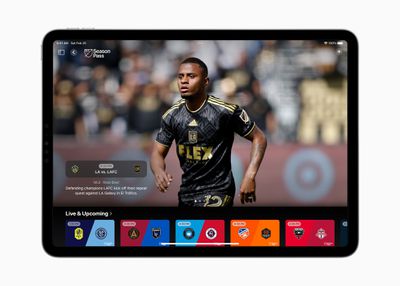
Apple MLS Season Pass Apple TV My Sports league page
In total, you get:

  • Every live MLS regular-season match
  • MLS Cup Playoffs
  • MLS All-Star Game
  • Leagues Cup
  • Campeones Cup
  • Hundreds of MLS NEXT Pro and MLS NEXT matches

Note that the Leagues Cup and Campeones Cup are not available in Mexico.

How Do I Subscribe?

  1. Open the ‌Apple TV‌ app.
  2. Go to Watch Now.
  3. Scroll down to Channels.
  4. Find MLS Season Pass, then open it.
  5. Choose the Subscribe button.
  6. Sign in with the ‌Apple ID‌ and password that you use to make purchases.

How Do I Access MLS Pass Content?

MLS Season Pass content can be accessed via the ‌Apple TV‌ app, which is on iPhone, iPad, Mac, ‌Apple TV‌, as well as Smart TVs, game consoles, and set-top boxes. You can also watch MLS Season Pass on the web at tv.apple.com on Android, Windows PC, and Chrome OS devices.
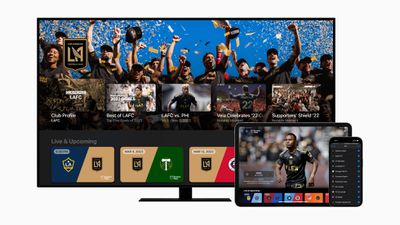
Apple MLS Season Pass hero
To watch a match, follow these steps:

  1. Open the ‌Apple TV‌ app or go to tv.apple.com.
  2. If prompted, sign in with your ‌Apple ID‌ and password.
  3. Go to Watch Now and scroll down to Channels, or go to Search.
  4. Choose MLS Season Pass.
  5. Choose a game, then choose Watch.

What Else Should I Know?

A selection of MLS and Leagues Cup matches, including some of the biggest playoff matchups, will also be available at no additional cost to ‌Apple TV‌+ subscribers. A limited number of games will be available for free in the ‌Apple TV‌ app when you sign in with your ‌Apple ID‌. If you miss a game, you can watch a replay or download the game to watch offline.

When the season kicks off, fans can also visit Apple Maps to explore dedicated Match Day Guides created by MLS clubs, including Atlanta United, Nashville SC, and Toronto FC, and find recommendations for local bars and restaurants to catch a game, detailed information about their stadiums, and more.
Apple MLS partnership June 2022
‌‌Apple Maps‌‌ is also launching several new custom-designed three-dimensional landmarks of MLS Stadiums in time for the season openers, including Red Bull Arena in Harrison, New Jersey; Lumen Field in Seattle; and Audi Field in Washington, D.C.

Why Can't I Find MLS Season Pass?

If you can't find MLS Season Pass in the ‌Apple TV‌ app, it may not be available in your country or region. You can find out what's available in your country or region on Apple's website. Also, make sure that your Apple devices are up-to-date with the latest software.


Popular Stories

top stories 2025 12 20

Top Stories: iOS 26.3 Beta, Major Apple Leaks, and More

Saturday December 20, 2025 6:00 am PST by
You'd think things would be slowing down heading into the holidays, but this week saw a whirlwind of Apple leaks and rumors while Apple started its next cycle of betas following last week's release of iOS 26.2 and related updates. This week also saw the release of a new Apple Music integration with ChatGPT, so read on below for all the details on this week's biggest stories! Top Stories i...
iPhone Top Left Hole Punch Face ID Feature Purple

iPhone 18 Pro Features Leaked in New Report, Including Under-Screen Face ID

Tuesday December 16, 2025 8:44 am PST by
Next year's iPhone 18 Pro and iPhone 18 Pro Max will be equipped with under-screen Face ID, and the front camera will be moved to the top-left corner of the screen, according to a new report from The Information's Wayne Ma and Qianer Liu. As a result of these changes, the report said the iPhone 18 Pro models will not have a pill-shaped Dynamic Island cutout at the top of the screen....
ios 18 security update

Don't Want to Upgrade to iOS 26? Here's How to Stay on iOS 18 [Update: Now Unavailable]

Friday December 19, 2025 10:37 am PST by
Since the beginning of December, Apple has been pushing iPhone users who opted to stay on iOS 18 to install iOS 26 instead. Apple started by making the iOS 18 upgrades less visible, and has now transitioned to making new iOS 18 updates unavailable on any device capable of running iOS 26. If you have an iPhone 11 or later, Apple is no longer offering new versions of iOS 18, even though there...
airpods pro 3 new blue

AirPods Pro 3's Static and Noise Issues Haven't Been Resolved

Thursday December 18, 2025 3:44 pm PST by
Since the AirPods Pro 3 launched, there have been complaints from users who have noticed a static-like sound or a crackling issue when using the earbuds, particularly when Active Noise Cancellation is on but no media is playing. Users have also run into strange high-pitched whistling sounds that happen intermittently. We shared the issues back in late October, and despite two subsequent...
apple music chatgpt

ChatGPT's Apple Music Integration Is Now Live

Wednesday December 17, 2025 3:50 pm PST by
There's now a dedicated Apple Music app for ChatGPT, which allows ChatGPT to make music recommendations and build playlists. Apple Music can be added to ChatGPT through the Settings section in the Mac app, website, or iOS app. Apple Music is listed under the apps option, and connecting to it requires signing in with your Apple Account for authorization purposes. ChatGPT can be used to...
apple beta 26 lineup

Apple's 2026 and 2027 Product Roadmap: Foldable iPhone, iPhone 18 Pro, M5 Macs, and More

Tuesday December 16, 2025 4:42 pm PST by
There has been a whirlwind of rumors over the last few days, sourced from leaked internal software designed for the iPhone and the Mac, and news sites like The Information. Below, we have a quick recap of everything we've heard this week, which serves as a guide to Apple's product plans in 2026 and beyond. We've organized the info by likely release date, though there are some products that...
samsung exynos 2600 2nm%402x

Samsung Announces World's First 2nm Mobile Chip Ahead of Apple

Friday December 19, 2025 3:59 am PST by
Samsung has officially unveiled the Exynos 2600, the world's first 2 nanometer mobile system-on-a-chip (SoC), built on the company's Gate-All-Around (GAA) process. The 10-core ARM-based design aims to deliver improved performance and efficiency for flagship devices like the upcoming Galaxy S26 series. The chip uses Arm's latest cores and supports new instructions for improved CPU speed and...

iOS 26 Maps Glass

Apple Quietly Discontinued Flyover City Tours in Apple Maps

Thursday December 18, 2025 1:31 pm PST by
Apple Maps no longer offers a Flyover feature that provides users with automated tours of notable landmarks in major cities. The Flyover option appears to have been nixed around when iOS 26 launched, but its removal went largely unnoticed. Flyover city tours were introduced in 2014 with iOS 8 and OS X Yosemite, using Flyover imagery to generate an aerial tour. Most cities with Flyover...

Top Rated Comments

vegetassj4 Avatar
37 months ago
Since it’s football for most of the world, shouldn’t it be called MLF?
Score: 7 Votes (Like | Disagree)
RemedyRabbit Avatar
37 months ago
I dream of the day when there's a Premier league season pass in the UK, with every game live including the 3pm kick offs all through a single service. I know there are 'options' for that, but I would gladly pay for high quality reliable non-dodgy official streams.
Score: 6 Votes (Like | Disagree)
gleepskip Avatar
37 months ago

BUT it's more expensive than the previous ESPN+ coverage, and Apple essentially fired ALL the local broadcast teams in the league in favor of a national squad of broadcasters and pundits. Some broadcasters had been with teams for quite a few years and were part of the club culture. There is now no local coverage.
This is what I dislike about Apple sport coverage. They don't care about continuity or culture.

The ATV+ UI also needs improvement and would have already been fixed if they understood sport fans: There is no means to hide the final score! I went looking for the Orlando City match from yesterday.


I covered the final score, just as Apple should.

Attachment Image
Score: 4 Votes (Like | Disagree)
jandekjandek Avatar
37 months ago
Hmm. Here in Australia I can (and do) get the Premier League for less than that.

Sporting rights are worth different amounts in different markets. As well as the quality of the competition, things like match times matter a lot. Putting Apple’s interests aside, if MLS wants to reach global audiences they ought to want their broadcasts priced competitively. In this country, that is an awful lot of money relative to what we pay for other things. It’s a prime time price, but not a prime time product.
Score: 3 Votes (Like | Disagree)
mike090910 Avatar
37 months ago
Looks like no 4k support
Score: 3 Votes (Like | Disagree)
gleepskip Avatar
37 months ago
I signed up for MLS Season Pass with the T-mobile freebie. I complained earlier that Apple spoil the final score in the app. I further discovered if I want to watch a previous match, I can only watch a recap!

Apple clearly aren't sport enthusiasts.
Score: 2 Votes (Like | Disagree)