App Switcher Returns in watchOS 27.2 Beta With New Launch Gesture - MacRumors
Skip to Content

App Switcher Returns in watchOS 27.2 Beta With New Launch Gesture

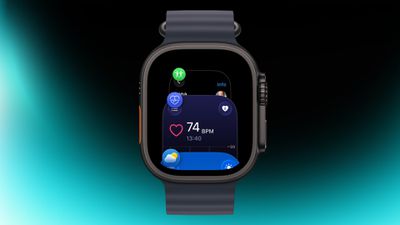
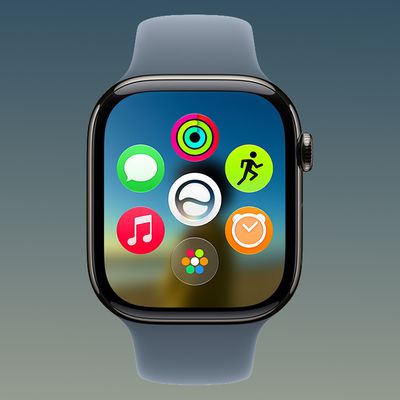
Apple has apparently listened to user feedback and brought back the App Switcher screen in the latest watchOS 27.2 beta, but accessing it is a little different than before.
watch
In watchOS 26 and earlier versions, a double press of the Digital Crown would bring up the App Switcher, where you could easily switch to the last-used app and view and open other recently used apps. You could also swipe left on a misbehaving app to force close it.

In watchOS 27, the Digital Crown double-press gesture is now reserved for Apple's upcoming new Live Rewind AI feature, so it no longer brings up the App Switcher screen. There were concerns that this meant the App Switcher would be gone for good, but Apple has reinstated it in the second watchOS 27.2 beta, released yesterday.

The gesture for opening it has changed, though.

As shown in the video below, you now access the App Switcher by pressing and holding the bottom of the screen while you're in an app.


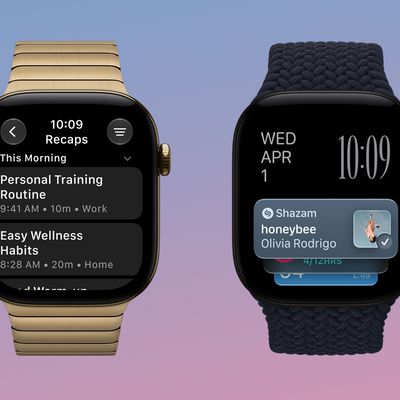
Apple says Live Rewind, which which offers a transcript of what was said in the last 15 seconds, will be available later this year on Apple Watch Series 12 and Apple Watch Ultra 4.
Related Roundups: watchOS 26, watchOS 27
Related Forum: Apple Watch

Popular Stories

watchos 27

Apple Releases watchOS 27.2 With Siri AI Enhancements

Monday October 26, 2026 10:47 am PDT by
Apple today released watchOS 27.2, the first major update to the watchOS 27 operating system. watchOS 27.2 can be downloaded through the Settings app on the watch or the Apple Watch app on a connected iPhone. Software can only be installed when the Apple Watch is on the charger and has over 50 percent battery. According to Apple's release notes, watchOS 27.2 introduces new Siri AI...

watchos 27

Apple Seeds Updated watchOS 27.2 Release Candidate

Friday October 23, 2026 12:28 pm PDT by
Apple today seeded an updated version of the watchOS 27.2 release candidate, four days after the first RC became available. Registered developers and public beta testers can download software through the Apple Watch Settings app or using the Apple Watch app on iPhone. watchOS 27.2 adds new Siri AI features and extends Siri AI to more languages. This update provides enhancements to Siri...
siri recap live rewind

watchOS 27.3 Brings Live Rewind and Siri Recap to Apple Watch

Tuesday November 3, 2026 10:35 am PST by
With the first beta of watchOS 27.3, Apple is introducing new Audio Intelligence features it previewed for the Apple Watch Series 12 and Ultra 4 earlier this year. Powered by the S11 chip, Audio Intelligence includes Live Rewind, Siri Recap, Sound Recognition, and Shazam Music Recognition. Sound Recognition and Shazam are already on the watch, but Live Rewind and Siri Recap are now available ...

Top Rated Comments

CharlesShaw Avatar
6 weeks ago
It's presumptuous of Apple to believe enough wearers will actually use Live Rewind on their eligible watches, so the function of the crown double-click should be customizable so those who developed muscle memory with app switcher can continue to do so, and others, like me, could perhaps choose another function for that input.
Score: 32 Votes (Like | Disagree)
insomniac86 Avatar
6 weeks ago

It's presumptuous of Apple to believe enough wearers will actually use Live Rewind on their eligible watches, so the function of the crown double-click should be customizable so those who developed muscle memory with app switcher can continue to do so, and others, like me, could perhaps choose another function for that input.
How dare you speak such obvious common sense!

Really though, it seems unreasonable for Apple to impose this change on every existing Apple Watch user to accommodate a new feature that none of the existing models support.

It would make sense if older models also acquired the rewind feature, then Apple would simply be remapping the function.

So, as you said, they should allow us to control the behaviour of what the double press does.

Also, the new implementation doesn’t allow for quick app switching between 2 apps like the previous implementation did.
Score: 15 Votes (Like | Disagree)
HazeAndHahmahneez Avatar
6 weeks ago
It’s too early for this! Lmao

What do you guys mean you never use app switch? What do you just launch an app from main screen whenever you need? But with new modes now Home Screen is an extra click away (also another terrible design change)

Alright, tho yeah let’s bring app switcher back, but hey, let’s make it a swipe gesture instead even with ya know, rain and swimming pools and exercise sweat and washed hands with no towel nearby…great

It should be a user choice, crown presses, fingers swipes, pinch gestures etc
Score: 13 Votes (Like | Disagree)
Happy_John Avatar
6 weeks ago

It’s too early for this! Lmao

What do you guys mean you never use app switch? What do you just launch an app from main screen whenever you need? But with new modes now Home Screen is an extra click away (also another terrible design change)

Alright, tho yeah let’s bring app switcher back, but hey, let’s make it a swipe gesture instead even with ya know, rain and swimming pools and exercise sweat and washed hands with no towel nearby…great

It should be a user choice, crown presses, fingers swipes, pinch gestures etc
Just let the user be able to assign certain gestures to their chosen use, like the "action button" on iPhone.
Score: 11 Votes (Like | Disagree)
6 weeks ago
Ok, better than nothing but why can they just not give us the option to use the double crown click for it instead?
Score: 10 Votes (Like | Disagree)
maszaikasza Avatar
6 weeks ago

How many times have you needed to access the app switcher on Apple Watch in a rainstorm, pool, or while washing dishes? I don’t understand you people who use it all all, let alone in these fictional scenario you’re making up to get mad about.
Apple Watch Ultra was advertised as a sports watch for divers, endurance athletes, climbers etc. and I can easily imagine scenarios when one rely on physical buttons more than a touchscreen. I wrote a comment about it earlier - running with sweaty hands and trying to toggle between workout and music app without the App Switcher was a painstaking task. Glad Apple brought back an alternative for App Switcher. Maybe not a perfect solution, but still better than nothing.
Score: 9 Votes (Like | Disagree)
Latest Stories
Apple Surveys iPhone Duo Buyers About Crease and Camera
2 hours ago
Apple's First Touchscreen Mac is Now Arriving to Customers
3 hours ago
Claude Gets Personal Finance Feature With Bank Account Linking
3 hours ago
Apple Arcade Adds Crossy Road Rush and NBA 2K27
4 hours ago
Apple's New HomeView Smart Home Hub: Here's How Much RAM It Has
4 hours ago
iPad Mini vs. iPad Air Buyer's Guide: Now Just $50 Apart
6 hours ago
First iOS 27.3 and macOS Golden Gate 27.3 Public Betas Now Available
7 hours ago
Apple Announces a New Mac Sales Record
8 hours ago
Paid $200 for Logic Pro? Apple Says You Won't Get This New Feature
8 hours ago
Instagram's Edits Video Editor is Now Available on Mac
9 hours ago
Prevent Siri and Search From Accessing Specific iPhone Apps
9 hours ago
Best Early Black Friday Deals on iPhone 18 Pro and iPhone Duo
10 hours ago
MacBook Pro PROLED XDR Reviews Are In: Is the Touchscreen Worth It?
11 hours ago
Early Black Friday Accessory Deals at Amazon Include TVs, Headphones, and Charging Devices
11 hours ago
Apple Creator Studio App Updates Rolling Out, Starting With Logic Pro
11 hours ago
Siri AI Waitlist Now Limited to Times of 'High Demand,' Says Apple
13 hours ago
See Apple's Touchscreen MacBook Pro in Action
14 hours ago
MacBook Neo Shipments Expected to Double in 2027
14 hours ago
HomeView Code Suggests Future Support for AI Chatbot Apps, Anti-Spoofing Protection
15 hours ago
Got an iPhone Duo on Launch Day? Tomorrow Could Be Your Last Chance to Return It
16 hours ago
Apple Launching Five New Products Tomorrow
17 hours ago
Apple Releases Safari Technology Preview 256 With Bug Fixes and Performance Improvements
1 day ago
Apps Can Now Try to Stop You From Canceling Subscriptions
1 day ago
'Super Mario Odyssey' Can Now Run on Apple TV Thanks to AI
1 day ago
How 'Resident Evil' Director Zach Cregger Uses His iPhone to Make Movies
1 day ago
HomePod Mini 2's Amount of RAM Confirmed
1 day ago
Apple TV's '12 Days of Snoopy' Special Arrives November 13
1 day ago
Apple is Putting Employees on an AI Budget
1 day ago
Apple Releases Xcode 27.3 Beta With Three New Features
1 day ago
Apple Will Check Public iCloud Links for Harmful Content Starting in iOS 27.3
1 day ago