iOS 27 Adds a Useful New Copy-and-Paste Feature to Your iPhone - MacRumors
Skip to Content

iOS 27 Adds a Useful New Copy-and-Paste Feature to Your iPhone

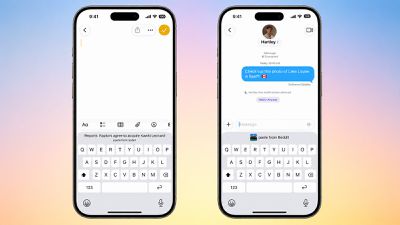
iOS 27 adds a new copy-and-paste feature to the iPhone's keyboard, enabling convenient one-tap pasting for text, photos, links, and more.
iOS 27 Paste From
For example, if you copy a link in Safari and move to the Notes app, a "paste from Safari" option with the link will automatically appear above the keyboard. Tapping on the shortcut adds the link to the note. Or if you copy a photo in the Reddit app and open the Messages app, a "paste from Reddit" option will appear above the keyboard.

Given this feature is built into the keyboard, it works across many combinations of apps, making pasting more convenient across iOS 27.

The keyboard has already surfaced one-time verification codes since iOS 12.

iOS 27 is currently available in developer beta, with a public beta to follow in July. The update is expected to be released to all users with an iPhone 11 or newer in September, and this small yet useful feature will likely be popular.

Related Roundups: iOS 27, iPadOS 27

Popular Stories

Everything New Your iPhone Can Do on iOS 27 Feature 1

20 New Things Your iPhone Can Do in iOS 27

Monday July 20, 2026 7:03 am PDT by
Apple will release iOS 27 in September, and despite the company's focus this year on refining its flagship operating system and nixing bugs, there are still many additional features on the way, not least of which is Apple's new context-aware Siri, re-tooled for the generative AI era. This year's major iPhone software update isn't all about AI, though, as the following feature list...
iCloud iPhone 17 Pro

iPhone Users Who Pay for iCloud Storage Get Two New Perks on iOS 27

Thursday July 2, 2026 6:10 am PDT by
If you pay for certain iCloud+ storage plans beyond the 5GB that Apple offers for free, you will receive two more perks on iOS 27 at no additional cost. A summary of the two new iCloud+ perks on iOS 27:Increased daily usage limits for some new Apple Intelligence features, including image generation in the revamped Image Playground app. HomeKit Secure Video cameras receive generated video...
ios 27

iOS 27 Brings These Five New Features to Your iPhone Lock Screen

Thursday July 23, 2026 4:05 am PDT by
Apple unveiled iOS 27 at WWDC this week, and while the headline-grabbing Siri overhaul has received the most attention, the Lock Screen has picked up several refinements that you may have missed. Some are brand-new additions, while others are tweaks to features Apple introduced in iOS 26, but together they give you more control over how your Lock Screen looks and behaves. Here are five...

Top Rated Comments

3 weeks ago
that is cool but I wish for clipboard history as I switched from android. I missed that feature.
Score: 13 Votes (Like | Disagree)
3 weeks ago
Just add a copy-paste button within the entire grey space at the bottom... Don’t make it too sensitive, to avoid accidental clicks when swiping up, but do utilize this whole empty space for those who wants it, it’s not that complicated...
Score: 11 Votes (Like | Disagree)
slippery-pete Avatar
3 weeks ago
Never fear, complaints are here!!!!
Score: 7 Votes (Like | Disagree)
TheMacDaddy1 Avatar
3 weeks ago
How about a whole new keyboard that works as well as Gboard on Android??

I have a Pixel 10 Pro XL at work for testing. The keyboard is SOOOO much better than an iPhone keyboard. Slightly bigger keys, number row, awesome tactile feedback, a down carrot to pull down the keyboard at anytime, dragging across they spacebar to move the cursor in ANY app.

It makes the the iPhone keyboard looks so bad.
Score: 6 Votes (Like | Disagree)
3 weeks ago
Yet they still don't support paste without formatting.
Score: 4 Votes (Like | Disagree)
eveluvsrainbows Avatar
3 weeks ago

How about a whole new keyboard that works as well as Gboard on Android??

I have a Pixel 10 Pro XL at work for testing. The keyboard is SOOOO much better than an iPhone keyboard. Slightly bigger keys, number row, awesome tactile feedback, a down carrot to pull down the keyboard at anytime, dragging across they spacebar to move the cursor in ANY app.

It makes the the iPhone keyboard looks so bad.
the iOS keyboard already has both tactile feedback and the ability to hold down on the space bar to move the cursor to another position, and this works in all apps too. the keys being slightly bigger doesn’t make gboard a better keyboard. and there is already a way to dismiss the keyboard in nearly every iOS app as well. the only thing the iOS keyboard doesn’t have is a number row, but the vast majority of users don’t need that, not to mention making the keyboard taller will leave less room for your actual content.

therefore, i don’t really agree that gboard makes the iOS keyboard look bad at all nor do i share the opinion that gboard is that much better than the iOS keyboard. the iOS keyboard has served me well for the past six years and every time i have used an android keyboard it made me want to go back to the iOS keyboard for its simplicity. so honestly gboard is not better than the ios keyboard in my opinion.
Score: 4 Votes (Like | Disagree)