How to See Which Mac Apps Will Stop Working After macOS Golden Gate - MacRumors
Skip to Content

How to See Which Mac Apps Will Stop Working After macOS Golden Gate

Apple is phasing out support for Rosetta 2, which is a feature that allows Intel-based apps to run on Apple silicon Macs. Rosetta is going to stop working for most apps in macOS 28, and when that happens, apps that use it will stop working.
macos 27 rosetta apps support
Apple began warning customers and companies about the upcoming sunsetting of Rosetta with macOS Tahoe, and the warnings go even further in macOS Golden Gate.

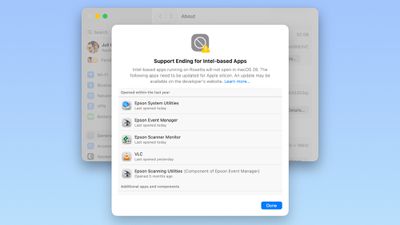
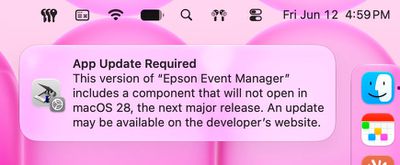
If you have apps that still use Rosetta, you'll get a warning every time you restart your Mac or open an Intel app. ‌macOS Golden Gate‌ also adds a new list where you can check which apps are going to stop working in the future.

You can get to the list by going to Settings > General > About > Intel-Based apps and clicking on the "Details" option.

The interface lists all of the apps that are going to stop working, giving Mac users plenty of time to contact app developers or find alternative apps.
macos 27 rosetta warning
‌macOS Golden Gate‌ does not install Rosetta automatically, so if you still have these outdated Intel apps, there will be a short installation when you try to open one for the first time after upgrading to Golden Gate. Authentication plugins and other pre-login utilities that require Rosetta fail to load in ‌macOS Golden Gate‌ because of the limitation.

Apple designed Rosetta to help users and developers transition from Intel to Apple silicon, but Apple phased out the last Intel-based Mac years ago. Apple only sells Apple silicon Macs, and it is slowly ending support for Intel-based models.

‌macOS Tahoe‌ was the final version of macOS available for Intel Macs, and ‌macOS Golden Gate‌ requires a Mac with an Apple silicon chip.

Related Roundup: macOS Golden Gate

Popular Stories

Apple Logo Top Half

Have One of These 16 Apple Devices? Software Support Ends This Fall

Saturday June 13, 2026 8:00 am PDT by
Apple will end software support for 16 devices this fall across four product lines, with the Apple Watch seeing the most sweeping cull in the product's history. The full extent of this year's software drops became clear with the announcements of macOS 27 Golden Gate, iPadOS 27, tvOS 27, and watchOS 27 at WWDC this week. The one bright spot is that iOS 27 features identical device support to...
macOS 27 next to MacBook Pro Running macOS 27

macOS Golden Gate Beta 2 Now available for Developers

Monday June 22, 2026 10:09 am PDT by
Apple today provided developers with the second beta of macOS Golden Gate, with the update coming two weeks after Apple seeded the first beta. Developers can download macOS Golden Gate by going to System Settings > General > Software Update. Beta Updates will need to be enabled, and a free developer account is required. macOS Golden Gate includes multiple design improvements. Liquid Glass ...
Photos App Icon Liquid Glass

iOS 27 Revamps App Icons With Sharper Liquid Glass Layers

Tuesday June 16, 2026 9:18 am PDT by
Apple has redesigned its first-party app icons for the second year running, with iOS 27 addressing blurriness complaints about iOS 26 by integrating additional layers of Liquid Glass directly into the icon artwork itself. When Apple introduced Liquid Glass with iOS 26 last year, it redesigned its entire lineup of first-party app icons to give them a layered glass look with subtle depth. The...

Top Rated Comments

4 weeks ago
that's it, I'm switching to windows
Score: 26 Votes (Like | Disagree)
4 weeks ago

So this is where Apple forces me to buy a Windoze machine because I can't carry on using the Mac version of Garmin Basecamp.

You can carry on without updating the OS for quite some time, or you can keep an older mac around to run software that hasn't had an update in over a half a decade.

Score: 13 Votes (Like | Disagree)
Yamcha Avatar
4 weeks ago
End of Crossover unless they create an ARM native app.
Score: 10 Votes (Like | Disagree)
4 weeks ago
Install a Mac VM of MacOS 26/27 with UTM and leave the apps in it.
Score: 9 Votes (Like | Disagree)
turbineseaplane Avatar
4 weeks ago
Well, the good news here is that ...

wait a minute..

There IS no good news here.

This is going to suck for a lot of people.
Score: 9 Votes (Like | Disagree)
chars1ub0w Avatar
4 weeks ago
Don't like Apple's strategy. They have the resources to maintain Rosetta 2. In some cases, useful programs never get updated and we don't have the source code around. Maybe the developer passed away or went out of business. And there is nobody else supplying the same functionality. Then I have to dedicate an un-updated Mac to the task.
Score: 7 Votes (Like | Disagree)