

Roku Unveils Redesigned Home Screen - MacRumors
Skip to Content

Roku Unveils Redesigned Home Screen

Roku today announced that its home screen is receiving its biggest redesign in more than a decade. The new home screen will begin rolling out to Roku TVs and streaming devices across the U.S. starting today, with more countries to follow later. The changes will appear automatically, with no software update required.
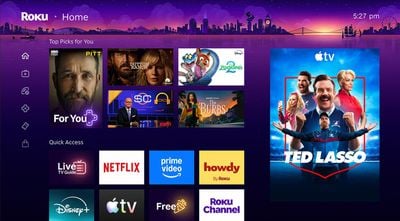
Roku 2026 Home Screen
At the top of the home screen, a new "Top Picks for You" section provides recommendations based on your watch history and what is trending on Roku.

A new AI-powered "Quick Access" section surfaces the apps you use most, such as the Apple TV app. There is still a separate page containing a complete list of apps that you have installed on your Roku device if you need it.
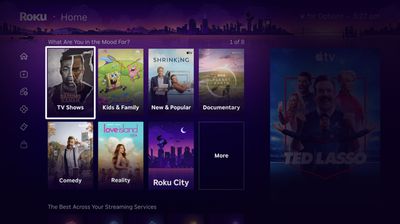
Roku 2026 Home Screen 2
New curated hubs called "Destinations" offer content organized by genres and moods, such as comedy, reality, movies, sports, documentaries, and more.

The menu on the Roku home screen now has a collapsed design with icons, rather than expanded text labels. Roku says this change provides a cleaner canvas for discovering content, but it also results in a large ad being shown persistently on the right side of the screen. Previously, the ad would only appear in certain views.


A new "Shortcuts" section provides quick access to features like Continue Watching, Sleep Timer, Save List, and more, all in one place.

If you are a fan of the Roku City screen saver, there is now an on-screen tile that you can select to view it at any time. You can explore the screen saver's iconic cityscape, plus access Daily Trivia and other mini-games.

Popular Stories

Apple TV Remote Icon

iOS 27 Lets You Add Apple TV Remote to Your iPhone's Home Screen

Thursday June 11, 2026 11:51 am PDT by
Starting with iOS 27, the virtual Apple TV remote can be added to the iPhone's Home Screen again, rather than being limited to Control Center. To do so, swipe down on the Home Screen and search for "remote." Next, tap and hold on the Remote app and drag it to your Home Screen. Alternatively, you can find it in the App Library. Apple used to offer an Apple TV Remote app in the App Store, but...
iCloud iPhone 17 Pro

iPhone Users Who Pay for iCloud Storage Get Two New Perks on iOS 27

Tuesday June 9, 2026 11:29 am PDT by
If you pay for extra iCloud storage on your iPhone, beyond the 5GB included for free, you might receive two more perks on iOS 27 at no additional cost. First, Apple said there will be daily usage limits for some of the new and enhanced Apple Intelligence features on iOS 27, including image generation. However, the company noted that "increased access" is available with "most" iCloud+ storage ...
CarPlay Siri AI

Apple Announces New CarPlay Features on iOS 27, Including Video Apps

Monday June 8, 2026 4:17 pm PDT by
Back at WWDC 2025, Apple revealed that it was planning to allow CarPlay users to watch video via AirPlay in their vehicles while they are not driving, but we did not hear many specific details about this functionality until now. In a WWDC 2026 video aimed at developers, Apple said the CarPlay video feature is available in new vehicles that support it. When playing a video in an iPhone app...

Top Rated Comments

carniesandrubes Avatar
2 weeks ago
Yet another company that thinks they know what you want to watch better than you do.

Glad I ditched Roku years ago.
Score: 24 Votes (Like | Disagree)
jhfenton Avatar
2 weeks ago
I'm glad I cut off my Roku TV from the Internet after they pushed the Moana 2 popup video to our home screens. I bought an Apple TV 4K and set it to control the TV's power. I rarely see the home screen, but I wouldn't want this garbage.
Score: 8 Votes (Like | Disagree)
2 weeks ago
When people ask why I spent $130 on an Apple TV instead of $30 on a Roku - this right here is why.
Score: 6 Votes (Like | Disagree)
Justin Cymbal Avatar
2 weeks ago
Looking forward to what’s in store for Apple’s punch back 🤛

Where/when is this ATV coming out?!? 🙃

last one came out in October, 2022!
Score: 5 Votes (Like | Disagree)
ikramerica Avatar
2 weeks ago

This was the “update” that made me immediately drive to the Apple Store and buy an Apple TV. The Home Screen is now visually 80%+ ads and runs more slowly. Nope, not having it.

I unplugged the TV’s Ethernet connection which caused the front LED to start flashing due to no internet. I think that’s most easily solved with a piece of electrical tape.
You can reset the TV and never join a network or sign in with Roku and then your TV becomes dumb and your Apple TV takes over. And no more flashing LED.
Score: 4 Votes (Like | Disagree)
2 weeks ago
I have begun to loathe my Roku tvs I purchased years ago. I will not be buying them again and have slowly started to replace them with Apple TVs when they bite the dust.
Score: 4 Votes (Like | Disagree)













