

Anker's $70 Nano Power Strip Clamps to Your Desk for Easy Access to 10 Ports - MacRumors
Skip to Content

Anker's $70 Nano Power Strip Clamps to Your Desk for Easy Access to 10 Ports

Anker this week launched a useful new accessory for your desk, debuting the 10-in-1 Nano Power Strip. Priced at $70, the Nano Power Strip has a unique clamp design that puts multiple ports on your desktop while eliminating cable clutter.
anker nano power strip 1
I was able to test out the Nano Power Strip ahead of when it launched, and found it to be a useful alternative to standard under-desk power strips. The power strip comes in black or white and it's made of plastic, but the matte finish adds aesthetic appeal, as does a silver front plate for some of the ports.

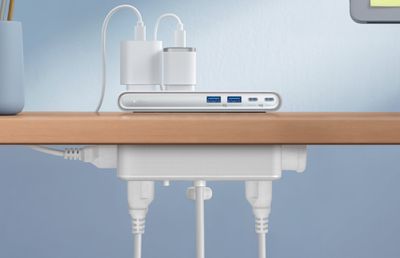
The clamp is adjustable with an included knob and it fits desktops from 0.6 inches to 1.8 inches. Unfortunately, I have a Parsons-style desk that's too thick to use the power strip as intended, so it's worth measuring. With my thicker desk, I can still attach it to a leg or the back of the desk, but it doesn't put all of the outlets in the ideal position. There are silicone pads at both sides of the clamp to keep furniture from being scratched.
anker nano power strip 2
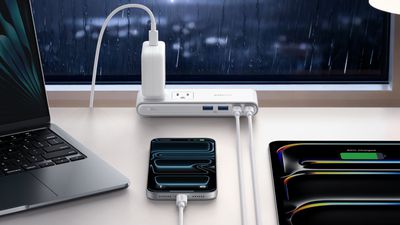
There are two outlets at the top, two outlets at the bottom, and two outlets at the sides, for a total of six outlets. There are two USB-C ports with 70W max charging (split between 45W and 25W when charging two devices), and two 12W USB-A ports. 70W isn't going to charge a MacBook Pro at its maximum speed, but it's enough for day-to-day use, and it'll fast charge most other Apple devices. I do wish there was more USB-C power and one less USB-A port, but it's easy enough to use one of the top outlets to plug in one of Anker's small multi-port power adapters.

With the power strip positioned at the edge of a desk, the two outlets on the top of the device are accessible from the desktop. The four other outlets are accessible from the bottom of the desk, so cables can be hidden away. The USB-A and USB-C ports are also meant to be used from the desktop, and the above-desk portion is slim, coming in at under an inch.

Because the Nano Power Strip attaches to a desk, it stays secure when plugging things in to the ports or the top outlets, which is convenient. I don't need to hold it down to unplug something, and it doesn't move around on a tabletop. If you've ever had a power strip with a bunch of heavy cables plugged in, you probably know what a hassle it can be trying to keep it upright.

The Nano Power Strip is a surge protector, and Anker says that it has overload, short-circuit, and temperature control.

Anker's Nano Power Strip can be purchased from the Anker website or from Amazon for $70.

Tag: Anker

Popular Stories

Four iPhone 18 Pro Colors Mock Feature

iPhone 18 Pro Launching Later This Year With These 10 New Features

Tuesday May 26, 2026 6:32 am PDT by
While the iPhone 18 Pro and iPhone 18 Pro Max are not launching until September, there are already plenty of rumors about the devices. It was initially reported that the iPhone 18 Pro models would have fully under-screen Face ID, with only a front camera visible in the top-left corner of the screen. However, the latest rumors indicate that only one Face ID component will be moved under the...

Apple Watch Blood Glucose Monitoring Feature 2

Apple Watch for Diabetes: The Latest on Apple's Plans for Non-Invasive Blood Sugar Monitoring

Tuesday May 26, 2026 9:30 am PDT by
For many years now, it has been rumored that the Apple Watch will eventually gain non-invasive blood sugar monitoring capabilities, which would enable millions of people with diabetes to track their blood glucose levels without needing to prick their skin with a needle or wear a dedicated continuous glucose monitor. According to Bloomberg's Mark Gurman, Apple recently shifted oversight of...
apple wallet drivers license feature iPhone 15 pro

Apple Just Expanded iPhone Driver's License Feature to Arkansas

Wednesday May 27, 2026 9:41 am PDT by
In select U.S. states, residents can add their driver's license or state ID to the Apple Wallet app on the iPhone and Apple Watch, and then use it to display proof of identity or age at select airports and businesses, and in select apps. Starting today, the feature is available in Arkansas, which is the 14th state to offer it. However, it may take some time to roll out to all users. To...

Top Rated Comments

8 weeks ago
Dreaming of the day companies stop putting USB-A ports in new hardware
Score: 13 Votes (Like | Disagree)
Mrkevinfinnerty Avatar
8 weeks ago

give it a few weeks and it will be on sale ...
Give it a few weeks it will be on fire.
Score: 3 Votes (Like | Disagree)
tgwaste Avatar
8 weeks ago
I cant believe there is no USB input on the bottom of this. That's so dumb.
Score: 3 Votes (Like | Disagree)
8 weeks ago

Note that it supports Anker's proprietary IQ charging, not the open USB PD standard.
This is not true. All these ports support USB PD.
Score: 2 Votes (Like | Disagree)
Tim Cook's Pool Boy Avatar
8 weeks ago


Cool product and I would consider it but I have all my wires coming from under the desk without a need to plug in on my desk. But what is with this weird photo on their page? She is using an iMac without a keyboard or mouse.
I do this often. She might be using the Universal Control feature through her MacBook? My iMac's magic keyboard and magic trackpad were both dead the other day. Used my Neo to do work on my iMac. Worked great.
Score: 2 Votes (Like | Disagree)
J InTech82 Avatar
8 weeks ago


Cool product and I would consider it but I have all my wires coming from under the desk without a need to plug in on my desk. But what is with this weird photo on their page? She is using an iMac without a keyboard or mouse.
You don't see the keyboard that's attached to the monitor-the laptop? Or the mouse she is holding right near the laptop? I mean I do agree tho, very weird photo!
Score: 2 Votes (Like | Disagree)










































