

Apple Releases tvOS 26.4 With Genius Browse - MacRumors
Skip to Content

Apple Releases tvOS 26.4 With Genius Browse

Apple today released tvOS 26.4, the fourth update to the tvOS operating system that came out last fall. tvOS 26.4 is available for the Apple TV 4K and the ‌Apple TV‌ HD, and it comes over a month after Apple released tvOS 26.3.
tvOS 26 Feature
tvOS 26.4 can be downloaded using the Settings app on the ‌‌‌Apple TV‌‌‌. Open up Settings and go to System > Software Update to get the new software. ‌‌‌Apple TV‌‌‌ owners who have automatic software updates activated will be upgraded to tvOS 26.4 automatically.

Apple added a new Genius Browse section to the ‌Apple TV‌ app in tvOS 26.4. Genius Browse is a content discovery feature that provides recommendations for TV shows and movies across multiple suggested categories. Suggestions vary based on content preferences, and the options are updated regularly.
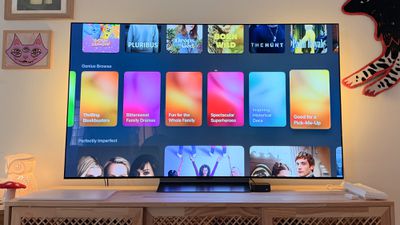
tvos 26 genius browse overview

The update removes the dedicated iTunes Movies and iTunes TV Shows apps that Apple started phasing out in 2023, which means wishlists will no longer be available. Apple sent emails to affected customers with instructions on how to transfer wishlist content to the ‌Apple TV‌ app watchlist.

tvOS 26.4 also adds more easily accessible customization options for subtitles, and it improves ‌Apple TV‌ Audio Format settings with an option for Continuous Audio Connection for HDMI output.

Full release notes for tvOS 26.4 are available through Apple's tvOS support document.

Related Roundup: Apple TV
Buyer's Guide: Apple TV (Don't Buy)

Popular Stories

Where is the New Apple TV Feature

Next Apple TV's Chip Revealed in Latest Leak

Tuesday September 8, 2026 10:19 am PDT by
The next Apple TV 4K will be equipped with an A19 or A19 Pro chip, according to evidence in Apple's code uncovered by MacRumors contributor Aaron Perris. In particular, the device's model identifier points towards the A19 generation of chips. Accordingly, the next Apple TV would have 8GB or 12GB of RAM, up from 4GB in the current 2022 model with the A15 Bionic chip. Other rumored upgrades for...
iOS 27 Feature Cool

Apple Releases New iOS 27, iPadOS 27, macOS 27, and tvOS 27 Public Betas

Monday August 31, 2026 2:13 pm PDT by
Apple today released the sixth public betas of iOS 27, iPadOS 27, tvOS 27, and macOS Golden Gate, allowing anyone with a compatible device to download and test the new software. The sixth betas come a week after Apple seeded the fifth betas and a few hours after the eighth developer betas. You can get started by signing up on Apple's beta website and then opting in to the public beta by...
Apple TV Remote Icon

iOS 27 to Upgrade Apple TV Remote App in Two Ways

Thursday September 10, 2026 2:33 am PDT by
Apple has updated the design of the virtual Apple TV Remote for the iOS 27 Release Candidate, which was released yesterday, and there are two new features that have been added to the iPhone app's interface. First up, Apple has added a new button to the top-right corner of the Remote UI with a glyph showing four squares. Pressing the button pops out an app menu similar to the Apple TV home...

Top Rated Comments

gate5blues Avatar
25 weeks ago
Honestly the Apple TV is a mess. I wish they'd revisit their interface completely. especially around edge cases like thumbnails not loading and not having ANY context about the thing you are clicking on. no ability to sort movies or see the years easily.. not to mention the cumbersome switching between purchased content. Also easier removal of autoplay settings for when you just want to browse quietly. ..

Is it just me?
Score: 7 Votes (Like | Disagree)
DeftwillP Avatar
25 weeks ago
My apple tv has been running soooooo terribly lately with extreme input lag from the remote . I read that unpairing the remote and repairing it should help but I can't help but wonder if there's been some underlying OS issues. I keep up to date with fresh updates on that and the homepods that are paired as stereo speakers. Sometimes, I only get audio from one side too. Real magical experience from apple.
Score: 4 Votes (Like | Disagree)
dg1974 Avatar
25 weeks ago

Why is it an option? Is there any disadvantage to enabling it?
Apple TV 4K 2021 connected to a Denon AVR-X2800H.
With this new setting enabled, when watching a video with a stereo track, the Denon now report a “Multi Channel input” (as it was a 5.1 track) but audio come out only from left/right speakers. With this setting disabled, the Denon report correctly as Stereo and then I can choose any “decoder” (like DTS Neu:X) I want.

So I’ll keep this disabled.
Score: 2 Votes (Like | Disagree)
turbineseaplane Avatar
25 weeks ago

My apple tv has been running soooooo terribly lately with extreme input lag from the remote . I read that unpairing the remote and repairing it should help but I can't help but wonder if there's been some underlying OS issues. I keep up to date with fresh updates on that and the homepods that are paired as stereo speakers. Sometimes, I only get audio from one side too. Real magical experience from apple.
A relative of mine has this remote issue on theirs. It's really awful.
Score: 2 Votes (Like | Disagree)
Reason077 Avatar
25 weeks ago
I wish they’d fix YouTube streaming to Apple TV over AirPlay. If a YouTube video has multiple soundtracks (which is getting very common now days with AI-generated dubs), the video will play in some random foreign language with no way to change it to the native audio. UNLESS you set the quality to 360p (only!), but that looks awful.
Score: 2 Votes (Like | Disagree)
bowens Avatar
25 weeks ago

and it improves Apple TV Audio Format settings with an option for Continuous Audio Connection for HDMI output.

Can a kind soul please dumb that down for me and will it do anything noticeable for my Sonoc Arc?
I saw a video the other day about it. What I think it means is, at least on mine, sometimes I start a show or movie and the sound cuts in a couple seconds later. You get almost a click noise. It should fix that.

Score: 2 Votes (Like | Disagree)









































