macOS Tahoe 26.4 Adds Slow Charger Indicator for MacBooks - MacRumors
Skip to Content

macOS Tahoe 26.4 Adds Slow Charger Indicator for MacBooks

macOS Tahoe 26.4 includes a new slow charger indicator that tells MacBook users when their charging setup isn't delivering full power.
macos slow charger warning%402x
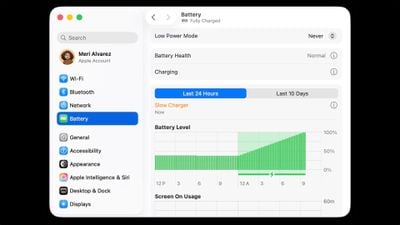
As described in an updated Apple support document, a "Slow Charger" label now appears in orange text in the battery status menu and above the Battery Level graph in Battery settings. The indicator is accompanied by an info button for more details.

Apple says that to charge more quickly, users should use a power adapter and cable that deliver at least the minimum wattage recommended for their MacBook model.

The feature is similar to one Apple added to iPhone with iOS 18, where periods of slow charging appear as an orange bar in the Battery section of the Settings app.

The slow charger indicator is one of two battery-related changes in macOS 26.4. The update also adds a Charge Limit feature that lets MacBook users set a maximum charge level anywhere from 80 to 100 percent, with the aim of preserving long-term battery health.

macOS Tahoe 26.4 is available now via System Settings ➝ General ➝ Software Update.

Related Roundup: macOS Tahoe
Related Forum: macOS Tahoe

Popular Stories

macOS Tahoe 26 Thumb 2

Second macOS Tahoe 26.5 Beta Now Available for Developers

Monday April 13, 2026 10:07 am PDT by
Apple today provided the second beta of an upcoming macOS Tahoe 26.5 update to developers for testing purposes, with the update coming two weeks after the first beta. Developers can download the macOS Tahoe 26.5 update by opening up the System Settings app, selecting the General category, and then choosing Software Update. Beta Updates will need to be enabled, and a free developer account is ...
macOS Tahoe 26 Thumb

Apple Releases macOS Tahoe 26.4.1 With MacBook Air and MacBook Pro Wi-Fi Fix

Thursday April 9, 2026 10:18 am PDT by
Apple today released macOS Tahoe 26.4.1, a minor update to the macOS Tahoe operating system that came out last September. macOS Tahoe 26.4.1 comes two weeks after Apple launched macOS Tahoe 26.4. Mac users can download the new software by opening up the System Settings app and navigating to the Software Update section. According to Apple, macOS Tahoe 26.4.1 addresses an issue that could...
iOS 26

Apple Releases Second iOS 26.5, iPadOS 26.5, tvOS 26.5 and watchOS 26.5 Public Betas

Tuesday April 14, 2026 10:06 am PDT by
Apple today provided public beta testers with the second releases of upcoming iOS 26.5, iPadOS 26.5, watchOS 26.5, and tvOS 26.5 updates for testing purposes. The public betas come a day after Apple provided the betas to developers. After signing up for beta testing on Apple's beta site, public beta testers can download the updates using the Software Update section of the Settings app on...

Top Rated Comments

M4irmidnight Avatar
6 weeks ago

macOS Tahoe 26.4 includes a new slow charger indicator that tells MacBook users when their charging setup isn't delivering full power.


As described in an updated Apple support document ('https://support.apple.com/en-us/102397'), a "Slow Charger" label now appears in orange text in the battery status menu and above the Battery Level graph in Battery settings. The indicator is accompanied by an info button for more details.

Apple says that to charge more quickly, users should use a power adapter and cable that deliver at least the minimum wattage recommended for their MacBook model ('https://support.apple.com/en-us/109509').

The feature is similar to one Apple added to iPhone with iOS 18 ('https://www.macrumors.com/2024/06/11/ios-18-slow-charger-battery-settings/'), where periods of slow charging appear as an orange bar in the Battery section of the Settings app.

The slow charger indicator is one of two battery-related changes in macOS 26.4. The update also adds a Charge Limit feature ('https://www.macrumors.com/2026/02/16/mac-charge-limit-macos-tahoe-26-4/') that lets MacBook users set a maximum charge level anywhere from 80 to 100 percent, with the aim of preserving long-term battery health.

macOS Tahoe 26.4 is available now via System Settings ➝ General ➝ Software Update.

Article Link: macOS Tahoe 26.4 Adds Slow Charger Indicator for MacBooks ('https://www.macrumors.com/2026/03/25/macos-tahoe-26-4-slow-charger-macbooks/')
I wish MagSafe would turn green once it’s hit the desired charge limit, rather than staying orange.
Score: 11 Votes (Like | Disagree)
needsomecoffee Avatar
6 weeks ago
Why did Apple hide setting the charge level action behind the information button ?? Also, setting mine to 80% was my first encounter with the "glass" slider control. Do not care so to criticize too much about Liquid Glass or 26 overall (run with transparency down and contrast up). However, the way the slider control turns to this transparent, barely visible, glass object really threw me at first. Very, very unintuitive. Hiding the battery level charger set-level action in an information dialog, though, is the worst UI decision I can recall. The slider button... sort of the cherry on top of the cake. Is this Craig's cake?? Who owns these decisions?? HTH, NSC
Score: 10 Votes (Like | Disagree)
Apple_Robert Avatar
6 weeks ago
Nice feature. I just wish Apple did a better job of not burying features behind menus and make it more intuitive where things are.
Score: 8 Votes (Like | Disagree)
Agent007 Avatar
6 weeks ago

the worst UI decision I can recall
IMO not as bad as the ENTIRE settings panel being a narrow, iOSified joke. Many UI sacrifices made for no apparent gains other than "it feels new cause it's different".
Score: 7 Votes (Like | Disagree)
turbineseaplane Avatar
6 weeks ago
Ironically, it also has a “garbage interface” indicator…

Known as liquid glass
Score: 5 Votes (Like | Disagree)
6 weeks ago

*UPDATE*

I have Optimized Battery Charging - enabled. I have put charge limit to 80% (Option available thanks to the MacOS Tahoe 26.4 update)

So I shutdown my MacBook Pro and charge it. Its battery level was at 65%

After I'd say 45 minutes of charging, I boot up MacBook Pro and it's now at 100%

So it didn't respect my charge limit. UNLESS...

I suspect that Apple rather wants us to use the sleep mode function than shutdown so the charge limit can work?
I believe macOS has to be running to know to limit the charging to 80%. I noticed when I updated my iPhone last night, it was charged to 85%. I'm assuming while it was updating, iOS wasn't running to limit the charging so it just charged up.

Now I'm curious about what happens when it hits 80%. Does the macOS go into bypass mode and just power from the charger, leaving the battery to sit there? Is that better for battery life/cycle count? It will still drain but slightly.
Score: 3 Votes (Like | Disagree)