

The 5 Most Important Apple Software Features Introduced This Year

2025 was a significant year of advancement for Apple's software, with a noticeable focus on visual design, productivity, and communication.
iOS 26 Glass Feature
While Apple introduced and continued to iterate on a wide range of features throughout the year, several additions stood out for their scope and practical impact across multiple devices. As the year comes to an end, these five new features provide a useful lens for weighing up what the company focused on this year and how far its platforms evolved in 2025.

Liquid Glass

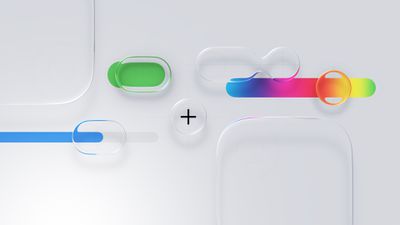
This year's most immediately visible change is the introduction of Liquid Glass, a new system-wide visual design language applied across Apple's operating systems. Liquid Glass replaces many of the flat, opaque UI elements introduced over the past decade with layered translucency, subtle refraction, and motion-responsive surfaces that react to underlying content.
Liquid Glass General Feature
Navigation bars, sidebars, control panels, and system overlays now appear as semi-transparent sheets that blend into their surroundings rather than sitting on top of them. Apple framed this as a unifying material across platforms rather than a purely aesthetic refresh, with the same visual logic appearing on iPhone, iPad, Mac, Apple Watch, and Apple TV.

In practice, it is one of Apple's biggest visual redesigns since the original iOS 7 shift away from skeuomorphism, and it signals a renewed focus on making the interface feel fresh, spatial, playful, and responsive rather than static.

Revamped iPad Multitasking

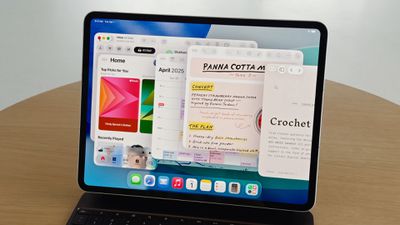
On the ‌iPad‌, the most consequential change is the introduction of an all-new multitasking system with windows and a macOS-style Menu Bar and cursor in iPadOS 26.
iPadOS 26 App Windowing
Apps can now run in freely resizable windows rather than being constrained to fixed split-screen layouts, allowing multiple overlapping windows to coexist on screen. Alongside this, a Menu Bar appears at the top of the display when invoked, exposing app commands in a structured, searchable format similar to macOS.

Instead of asking users to adapt desktop workflows to a touch-first model, Apple has now explicitly imported desktop interaction styles into iPadOS, addressing a significant number of user complaints about the software limitations of the ‌iPad‌. For users who want to use the ‌iPad‌ with true multitasking and desktop-style workflows, this is one of the most substantive capability upgrades the platform has ever received.

More Powerful Mac Spotlight

On the Mac, Spotlight received its most extensive overhaul to date, transforming it from a passive search tool into an actions-first command interface, similar to third-party apps like Alfred or Raycast.
tahoe spotlight
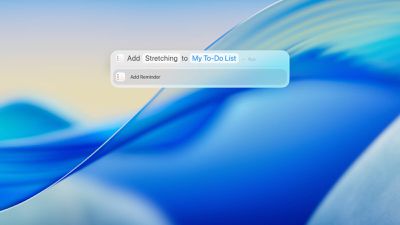
Spotlight in macOS Tahoe can now execute hundreds of actions directly from the search field. Users can create and edit notes, send emails and messages, start timers, run Shortcuts, adjust system settings, and perform app-specific commands, without opening the corresponding app.

Apple also redesigned Spotlight's results presentation with richer, more structured browsing views. Instead of returning a flat list of matches, Spotlight now surfaces grouped results for files, applications, actions, and suggestions, allowing users to scan and refine results more quickly.

Spotlight now includes a built-in clipboard history, allowing users to view and reuse previously copied text or images directly from the Spotlight interface. Apple also integrated an app library-style view, providing a centralized, searchable overview of all installed applications.

Live Translation

Another major addition is Live Translation. Real-time translation now operates inside Messages, FaceTime, and the Phone app, translating both text and spoken audio during conversations.
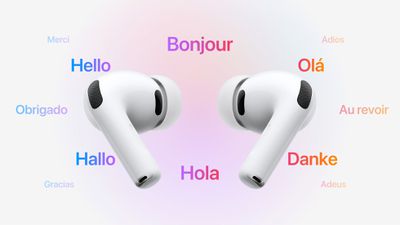
AirPods Live Translation

In Messages, incoming and outgoing text can be translated inline. In ‌FaceTime‌, Live Translation provides real-time translated captions during video calls, allowing participants to speak naturally while reading translations as the conversation unfolds. In phone calls, spoken dialogue can be translated in near real time, with translated audio and on-screen text presented during the call.

Apple also extended Live Translation to AirPods, enabling real-time spoken translation directly through the earbuds during in-person conversations. When Live Translation is active, speech from another language can be translated on the paired ‌iPhone‌ and played back in the user's AirPods, while the user's responses can be translated and spoken aloud by the ‌iPhone‌ for the other participant.

Communication Screening and Hold Assist

Call Screening allows the ‌iPhone‌ to automatically answer calls from unknown numbers on the user's behalf. The system asks the caller to identify themselves and explain the reason for the call, then presents the user with a live transcript of the response before the call is connected.

With Hold Assist, when a user is placed on hold during a phone call, the ‌iPhone‌ can remain in the queue on their behalf and monitor the call until a live agent becomes available. Once the system detects that the call has resumed, it notifies the user to return to the conversation.

In Messages, Apple introduced more aggressive screening for unknown senders. Messages from numbers that are not in the user's contacts are automatically routed into a separate area, keeping potential spam and scam attempts out of the main conversation list.


Popular Stories

Touchscreen MacBook Feature

Apple Is Expected to Launch These Four MacBooks in 2026

Friday January 9, 2026 8:17 am PST by
2026 could be a bumper year for Apple's Mac lineup, with the company expected to announce as many as four separate MacBook launches. Rumors suggest Apple will court both ends of the consumer spectrum, with more affordable options for students and feature-rich premium lines for users that seek the highest specifications from a laptop. Below is a breakdown of what we're expecting over the next ...
iPhone Top Left Hole Punch Face ID Feature Purple

10 Reasons to Wait for This Year's iPhone 18 Pro

Thursday January 8, 2026 2:56 am PST by
Apple's iPhone development roadmap runs several years into the future and the company is continually working with suppliers on several successive iPhone models at the same time, which is why we often get rumored features months ahead of launch. The iPhone 18 series is no different, and we already have a good idea of what to expect for the iPhone 18 Pro and iPhone 18 Pro Max. One thing worth...
proposed unicode emoji 18%402x

Squinting Face, Pickle, and Lighthouse Among New Emoji Coming to iOS

Friday January 9, 2026 4:24 am PST by
The Unicode Consortium has published a draft list of emoji that could come to smartphones and other devices in the future. The list shared by Emojipedia outlines 19 emoji candidates under consideration for Emoji 18.0, which is expected to be finalized in September 2026. Among the proposed additions are a squinting face emoji, left- and right-pointing thumb gestures, a pickle, a lighthouse, a ...
apple homekit ios 18 5

Apple Reminding Users of Pending Home App Upgrade Requirement

Friday January 9, 2026 10:08 am PST by
Back in late 2022 and early 2023, Apple rolled out a new architecture for its Apple Home platform to deliver improved performance and compatibility, although the rollout came with some hiccups that forced Apple to pull and later re-release the upgrade. Three years later, Apple is now on the verge of ending support for the old version of the Home architecture, which may result in access to...
grok logo purple gradient

U.S. Senators Ask Apple and Google to Remove X and Grok Apps Over Sexualized Image Generation

Friday January 9, 2026 9:43 am PST by
In a letter to Apple CEO Tim Cook and Google CEO Sundar Pichai, U.S. Senators Ron Wyden, Ben Ray Lujan, and Edward Markey have requested that Apple and Google remove X Corp's X and Grok apps from their app stores over recent incidents of "mass generation of nonconsensual sexualized images of women and children." X has come under fire over the past week amid reports of Grok's AI image...
iOS 26 Glass Feature

iOS 26 Shows Unusually Slow Adoption Months After Release

Thursday January 8, 2026 3:44 pm PST by
iOS 26 is showing unusually slow adoption among iPhone users months after release, according to third-party analytics. Usage data published by StatCounter (via Cult of Mac) for January 2026 indicates that only around 15 to 16% of active iPhones worldwide are running any version of iOS 26. The breakdown shows iOS 26.1 accounting for approximately 10.6% of devices, iOS 26.2 for about 4.6%, and ...

iphone fold text

iPhone Fold to Pave Way for Thinner, Brighter Display on iPhone Air 2

Friday January 9, 2026 3:37 am PST by
The iPhone Fold will be the first Apple device to adopt a Samsung-made OLED technology called CoE (Color Filter on Encapsulation), which could make the display brighter and thinner than previous panels, reports The Elec. In a traditional OLED panel, a polarizing film sits above the display to cut reflections and improve contrast. The drawback is that this film also absorbs some of the OLED's ...

Top Rated Comments

yellowbunny Avatar
2 weeks ago
This year is the first time in like 25 years of owning Apple products where the jankiness is the main new feature…
Score: 47 Votes (Like | Disagree)
-BigMac- Avatar
2 weeks ago

('https://www.macrumors.com/2025/12/30/5-most-important-software-features-introduced-this-year/')

2025 was a significant year of advancement for Apple's software, with a noticeable focus on visual design, productivity, and communication.


While Apple introduced and continued to iterate on a wide range of features throughout the year, several additions stood out for their scope and practical impact across multiple devices. As the year comes to an end, these five new features provide a useful lens for weighing up what the company focused on this year and how far its platforms evolved in 2025.

Liquid Glass

This year's most immediately visible change is the introduction of Liquid Glass, a new system-wide visual design language applied across Apple's operating systems. Liquid Glass replaces many of the flat, opaque UI elements introduced over the past decade with layered translucency, subtle refraction, and motion-responsive surfaces that react to underlying content.


Navigation bars, sidebars, control panels, and system overlays now appear as semi-transparent sheets that blend into their surroundings rather than sitting on top of them. Apple framed this as a unifying material across platforms rather than a purely aesthetic refresh, with the same visual logic appearing on iPhone, iPad, Mac, Apple Watch, and Apple TV.

In practice, it is one of Apple's biggest visual redesigns since the original iOS 7 shift away from skeuomorphism, and it signals a renewed focus on making the interface feel fresh, spatial, playful, and responsive rather than static.
So, the "most important Apple Software feature introduced this year", is a skin. A skin which is extremely divisive, and subjectively less practical. It is such an important feature; that even prior public release, Apple backtracked on the design, and had to introduce a less glassy, less contrasty version - due to the backlash of users not being able to read content. It's been a good year?

Thank you for such an important feature Apple ❤️

Just took this so we can all admire:


Attachment Image
Score: 40 Votes (Like | Disagree)
throAU Avatar
2 weeks ago
pfft

memory integrity enforcement doesn’t get a mention… what sort of coverage is this?

https://security.apple.com/blog/memory-integrity-enforcement/

TLDR: This culmination of this half-decade plus of work, involving both the hardware and software/OS teams at Apple will make malware MUCH more difficult to develop for macOS and iOS due to a combination of software and hardware features built into the A19 and M5 and later.

Essentially, OS 26+ when running on A19/M5 and onward, the OS and CPU will stop about 90-95% of memory exploit bugs (read: malware) in their tracks, even if the software is buggy and exploitable.

WAY more relevant than liquid (gl)ass.
Score: 38 Votes (Like | Disagree)
Wieslawo Avatar
2 weeks ago
Liquid Glass is a skin. An ugly skin, nothing more. There's nothing new; all the magnifiers, zooms, and highlights have been given a glass skin. The settings menu is identical to before. Everything is exactly the same. iOS 7 brought much more in this regard. To call it something great is a misconception. Its greatness manifests itself solely in dissatisfaction, not in fear of change. I was the first to test the beta, and as quickly as I saw it, I got rid of the crap.
Score: 38 Votes (Like | Disagree)
Dr McKay Avatar
2 weeks ago

So, the "most important Apple Software feature introduced this year", is a skin. A skin which is extremely divisive, and subjectively less practical. It is such an important feature; that even prior public release, Apple backtracked on the design, and had to introduce a less glassy, less contrasty version - due to the backlash of users not being able to read content. It's been a good year?

Thank you for such an important feature Apple ❤️

Just took this so we can all admire:


Attachment Image
Score: 38 Votes (Like | Disagree)
hagar Avatar
2 weeks ago
“Liquid Glass: In practice, it is one of Apple's biggest visual redesigns”

Why do you guys keep saying this? Except for some annoying bubbles around the menu items and oversized toggles, nothing changed.
Score: 31 Votes (Like | Disagree)









































