

Everything New in iOS 26.2 Beta 3 - MacRumors
Skip to Content

Everything New in iOS 26.2 Beta 3

Apple provided developers with the third beta of an upcoming iOS 26.2 update, and there are still new features that are being added with each beta that we get. We've rounded up all of the changes that Apple made in beta 3.
iOS 26

AirDrop

Apple added new AirDrop functionality, providing a way for two people to share files temporarily without having to add one another as contacts.
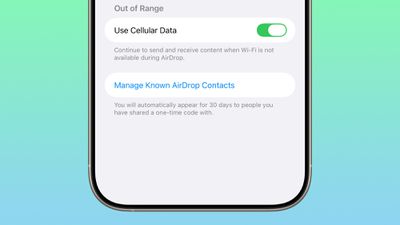
ios 26 2 airdrop
iOS 26.2 includes an option to generate a one-time AirDrop code, which can then be shared with someone who is not in your contacts list. The code allows file exchanges over AirDrop for a 30-day period.

People you have shared a one-time code with can be managed by opening up the Settings app, selecting the General section, choosing AirDrop, and tapping on "Manage Known AirDrop Contacts."

Hypertension Notifications

According to Apple's developer notes, Hypertension Notifications are now available for reading with a new API. Apps can request authorization to read notifications resulting from the Hypertension Notification feature on Apple Watch.
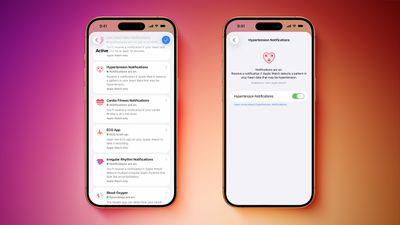
Hypertension Notifications Feature
This suggests a third-party app can read data from the Health app, so your medical app could be alerted if you receive a hypertension alert.

Privacy

When you access your Apple Account for the first time after installing iOS 26.2, you'll see an alert letting you know that Apple's privacy information for Apple Accounts has been updated to better explain how personal information is collected and used by Apple.
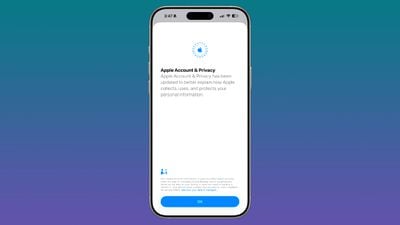
ios 26 2 b3 apple account

Side Button

Apple is laying the groundwork for a new option that will let iPhone users in Japan choose a different default voice assistant. A press and hold gesture on the Side Button only activates ‌Siri‌ in the current version of iOS 26, but there are multiple references to new Side Button behavior in the beta.

The wording indicates that Japanese users will be able to select a new app to activate with the Side Button, potentially allowing alternative assistants like Gemini or Alexa to be used on the iPhone. Developer documentation confirms that it will only be available for Japanese Apple Accounts owned by people living in Japan.

Liquid Glass Settings

When using the new Liquid Glass "Tinted" option that reduces transparency, there's a warning that the Tinted option cannot be used in tandem with the Reduce Transparency and Increase Contrast Accessibility settings.
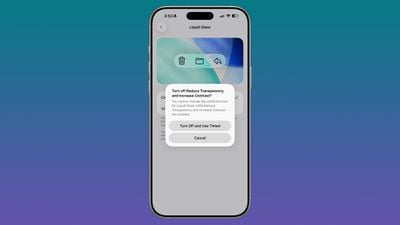
ios 26 2 b3 tinted mode
Turning on Tinted mode is able to turn off Reduce Transparency and Increase Contrast automatically. In the prior betas, there was no option to turn on Tinted mode without turning off these features manually.

Games App

There is a new splash screen that confirms features coming to the Games app in iOS 26.2, including options to filter the games library, better support for navigating the Games app with a controller, and real-time updates challenge scores during gameplay.
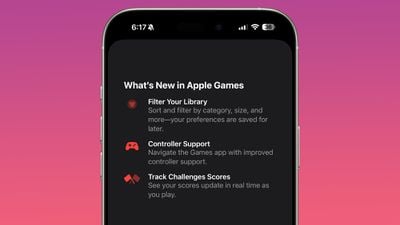
ios 26 2 b3 games app

Alarms in Reminders

There's now a small reminder about the option to mark a reminder as urgent to get an alarm, functionality that is new in iOS 26.2. The reminder shows up when you go to add a new entry in a list for the first time.
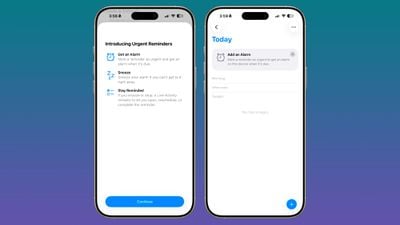
ios 26 2 b3 reminders
There's also a splash screen that lets users know about the new feature.

iPadOS 26.2 Multitasking

In the third iPadOS 26.2 beta, Apple added an option to drag and drop apps from the App Library, Dock, and Spotlight into Slide Over and tiled views, restoring some functionality that was removed in the iPadOS 18 to iPadOS 26 transition.
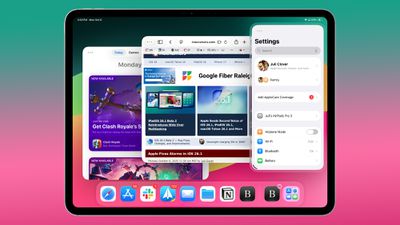
ipados 26 1 slide over

More Features

Know of a new feature in iOS 26.2 beta 3 that we left out? Let us know in the comments.

Popular Stories

Four iPhone 18 Pro Colors Mock Feature

iPhone 18 Pro: Pre-Orders and Release Date

Sunday August 16, 2026 8:24 pm PDT by
Apple has yet to reveal when the iPhone 18 Pro and iPhone Ultra will be announced and released, but the dates usually follow a familiar pattern. As usual, the event is expected to take place in the first half of September. Labor Day falls on September 7 this year. The last time the holiday was on that day was in 2020, but the iPhone event that year was delayed until October due to the...
iPhone 17 One Year Later Thumb 1

Should You Buy an iPhone 17 Now or Wait for iPhone 18?

Friday August 14, 2026 12:15 pm PDT by
For the first time since Apple started selling standard and "Pro" iPhones, we're not going to get an entry-level iPhone model this fall. Apple doesn't plan to release an iPhone 18 in September, and will only launch the iPhone 18 Pro, iPhone 18 Pro Max, and foldable iPhone Ultra. The lower-cost iPhone 18 won't come out until spring 2027. Subscribe to the MacRumors YouTube channel for more ...
iPhone 18 Pro Dark Cherry Feature

iPhone 18 Pro and iPhone Ultra: New Details Leak as Apple Event Nears

Monday August 17, 2026 11:09 am PDT by
"iPhone Ultra" supply will be very limited when the foldable device is first released later this year, according to Fixed Focus Digital, a known leaker on the Chinese social media platform Weibo. The account also claimed that the iPhone 18 Pro's A20 Pro chip will be up to 18% faster and up to 30% more power efficient compared to the iPhone 17 Pro's A19 Pro chip. The A20 Pro chip will be the...

Top Rated Comments

swrobel Avatar
10 months ago
These regional-only features are so annoying. I guess many would blame the local regulations, but I think options like letting you set your own voice assistant are common sense and should be just rolled out to everyone when Apple implements them, so I blame them for complying with the letter of the law, rather than the spirit.
Score: 19 Votes (Like | Disagree)
10 months ago

I bet they will roll back the air drop feature. Ppl are saying its not even working properly. Someone said her husband in her contacts and shes in his and it still made them generate a code for 30 days. Clearly thats gotta be a bug. No one likes this feature anyways. They will roll it back


Beta
Score: 7 Votes (Like | Disagree)
10 months ago

These regional-only features are so annoying. I guess many would blame the local regulations, but I think options like letting you set your own voice assistant are common sense and should be just rolled out to everyone when Apple implements them, so I blame them for complying with the letter of the law, rather than the spirit.
Agree entirely. I don’t think there is any reason to not allow users outside of Japan to use a different voice assistant. Most people I know just have Siri off because how bad it is.
And just to appease the “well I have no issues using Siri” crowd….fantastic! If Siri works for you, amazing. We’re talking about those with different use cases.
Score: 7 Votes (Like | Disagree)
10 months ago

The reason is because Apple wants to control everything you do. If they could, they’d implement stricter control. Luckily, some standards were set in the past

Apple doesn’t care about user experience, they care about money and use control to extract more money from us
I think when the original iPhone came out, having a vision of how the device should be used made sense. You were dealing with a population where majority of users didn’t know “anything”. But now, twenty years later, we’ve got a generation of people who are significantly tech savvy and have use cases, many of which, don’t require Apple gatekeeping. I’m confident this is linked to not allowing users the option to leverage solutions outside the Apple walled garden to keep you locked in. I can’t see any other reason why things are so locked down.
Score: 5 Votes (Like | Disagree)
maxoakland Avatar
10 months ago
The way tinted liquid glass conflicts with reduce transparency is inelegant and overly complicated. I don’t think this was handled well
Score: 5 Votes (Like | Disagree)
PurpleRainMan Avatar
10 months ago
Is that it? I mean where are the useful features? Perhaps now that Apple are giving up privacy now that they are in bed with Google we'll get Pixel drops. Each update removes another layer from the Apple privacy layer.
Score: 3 Votes (Like | Disagree)









































