Spotify Launches Redesigned Apple TV App With Music Videos, Podcasts
Spotify has launched a redesigned Apple TV app that the company says has been "rebuilt from the ground up for a faster, smarter, more visual experience."
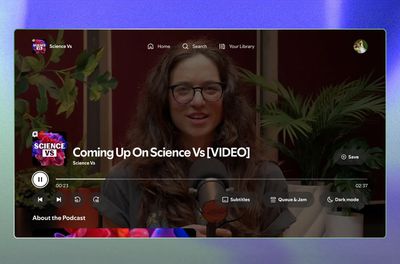
The new features include a brand new, refreshed design for tvOS 26, as well as two formats previously exclusive to the mobile version of the app – video podcasts and music videos.
The ability to watch music videos is still rolling out in the U.S. and Canada, but it has already expanded to 97 countries around the world, so everyone should have it soon.
Users should see a "switch to video" prompt that appears when a song being listened to also has an associated music video. Video versions of podcasts work similarly, with the added option to change playback speed.
The updated app also offers remote control via Connect, lyrics, Spotify DJ recommendations, seamless playback, and queue management.
Note that if you wait for the new version of the app via automatic updates, you won't see it until mid-November, so you'll want to download it yourself via the App Store.
Popular Stories
In a move that should be welcomed by parents and guardians of young children, Spotify has announced a new feature that lets you keep kids' and family music played on the service out of your taste profile.
Starting today, Spotify is rolling out a new toggle in the app's settings that prevents kids' music from affecting your personalized recommendations. This includes, for example, songs you...
Just two days before Apple's "Welcome home" experience in New York, Bloomberg's Mark Gurman has leaked several details about the new products set to be unveiled, including an all-new smart home hub, a HomePod mini 2, and a new Apple TV 4K.
Here is an all-in-one summary of the details shared by Gurman:Apple's home hub with a touch-enabled display will be named HomeView, seemingly confirming a ...
Apple today announced an upcoming product launch that will take place on Tuesday, October 13. We are expecting Apple's announcement to focus on new smart home products, including the long-rumored smart home hub, a new Apple TV 4K, and a refreshed HomePod mini.
Subscribe to the MacRumors YouTube channel for more videos.
The home hub is an all-new device that's like a cross between an iPad and...